

Up to $13.50 back on every lot of gold, in your HFM wallet the next day.
Checked on 9 October 2026
A rebate is cash that comes back to you on every trade you close. When you open your HFM trading account through ForexFanClub, HFM pays the rebate into your MyWallet, with nothing to apply for.
The $13.50 rebate on gold comes from a current HFM campaign on the Premium, Top Up and Copy Trade accounts. HFM has not announced an end date, and when the campaign ends, the gold rebate can go back to $10.80 a lot.
HFM Top Up account · 1 lot
Gold (XAU/USD)$13.50
EUR/USD$9.00
Bitcoin (#BTCUSD)$18.00
HFM Pro account · 1 lot
Gold (XAU/USD)$6.30
EUR/USD$3.60
Bitcoin (#BTCUSDr)$7.20
The amount depends on both the instrument and the account. Choose your account and lot size in the table below to see the rebate on your instrument. For a month of your own trading, our forex rebate calculator adds up the rebate for you.

How Much Does the HFM Rebate Save You?
When you trade gold, the HFM Unlimited account is the cheapest after the rebate.
The panel below shows the spread, the rebate and the net cost, which is your trading cost minus the rebate.
- XAUUSDGold / US Dollar▼Net cost after rebate$21.52Total cost: $35.02Rebate: −$13.50Estimated in USD · 1.00 lot
- EURUSDEuro / US Dollar▼Net cost after rebate$10.37Total cost: $18.47Rebate: −$8.10Estimated in USD · 1.00 lot
- USDJPYUS Dollar / Japanese Yen▼Net cost after rebate$8.57Total cost: $16.67Rebate: −$8.10Estimated in USD · 1.00 lot
- GBPUSDBritish Pound / US Dollar▼Net cost after rebate$16.84Total cost: $24.94Rebate: −$8.10Estimated in USD · 1.00 lot
- USA30Wall Street 30▼Net cost after rebate$3.55Total cost: $4.67Rebate: −$1.13Estimated in USD · 1.00 lot
- USA100US Tech 100▼Net cost after rebate$1.12Total cost: $1.61Rebate: −$0.50Estimated in USD · 1.00 lot
- USA500US 500▼Net cost after rebate$0.51Total cost: $0.69Rebate: −$0.18Estimated in USD · 1.00 lot
- BTCUSDBitcoin / US Dollar▼Net cost after rebate$22.19Total cost: $40.19Rebate: −$18.00Estimated in USD · 1.00 lot
- ETHUSDEthereum / US Dollar▼Net cost after rebate$2.55Total cost: $4.35Rebate: −$1.80Estimated in USD · 1.00 lot
- USOIL.SUS Crude Oil (WTI)▼Net cost after rebate$5.17Total cost: $6.07Rebate: −$0.90Estimated in USD · 1.00 lot
- XAGUSDSilver / US Dollar▼Net cost after rebate$39.59Total cost: $50.39Rebate: −$10.80Estimated in USD · 1.00 lot
- JPN225Japan 225▼Net cost after rebate$0.06Total cost: $0.09Rebate: −$0.03Estimated in USD · 1.00 lot
- GER40Germany 40▼Net cost after rebate$1.84Total cost: $2.34Rebate: −$0.50Estimated in USD · 1.00 lotMarket closed · showing figures from before the close
- EURJPYEuro / Japanese Yen▼Net cost after rebate$10.16Total cost: $18.26Rebate: −$8.10Estimated in USD · 1.00 lot
- AUDUSDAustralian Dollar / US Dollar▼Net cost after rebate$11.05Total cost: $19.15Rebate: −$8.10Estimated in USD · 1.00 lot
- USDCADUS Dollar / Canadian Dollar▼Net cost after rebate$9.55Total cost: $17.65Rebate: −$8.10Estimated in USD · 1.00 lot
- USDCHFUS Dollar / Swiss Franc▼Net cost after rebate$19.70Total cost: $27.80Rebate: −$8.10Estimated in USD · 1.00 lot
- Accounts Tap an account to see what a trade costs there.
- Lots Set your trade size and every amount follows.
- Net cost Spread and commission, minus your rebate.
- Stocks No rebate, so the net cost is the total cost.
Where the figures come from, and how we work them out:
Data sources and how the figures are worked out
Where the rebate figures come from
HFM pays a set amount per lot on each instrument, and the amount depends on the partner level. ForexFanClub holds Platinum, HFM’s top level, so HFM pays its top rate on every lot you trade. We read those rates in HFM’s partner area, and you keep 90% of what HFM pays. That 90% is the Rebate line in the panel.
Each account type has its own rate on the same instrument, so switching account changes the rebate as well as the cost. The panel covers Premium, Pro, Zero and Unlimited. The rebate table near the top of this page has the amounts for Top Up, Copy Trade, Crypto and Cent.
How the net cost is worked out
Total cost is the 24-hour average spread in US dollars plus the round-turn commission for the account you pick. Net cost is that total with your rebate taken off. Every amount follows the lot size you set.
Tap a row to see the spread cost, commission, total, rebate and net cost. The 24-hour average, lowest, highest and latest spread appear underneath.
Where the spread and the commission come from
We read symbol information from live MT5 accounts in US dollars with HF Markets (SV) Ltd, one per account type, and save samples at regular intervals. Each spread becomes a dollar amount through the value of one price step on that instrument. The same 24-hour averages appear on our HFM spread page.
Spreads are shown in points (pts) for indices, crypto and stocks, and in pips for the other instruments. For gold (XAUUSD), 1 pip is $0.10 per troy ounce on 100 ounces per lot, counted the same way in our spread tools for other brokers, so you can compare brokers directly.
Outside an instrument’s regular trading hours, the row reads Market closed · showing figures from before the close, with an Earlier average spread. Earlier figures also appear when a recent price is missing during trading hours.
When a line reads Unconfirmed
A cost appears once the spread converts to US dollars and the commission is confirmed. While either one is pending, that line reads Unconfirmed in place of a figure that could mislead you. Open the row to see which part is pending.
The rebate reads Unconfirmed when HFM lists no rate for that instrument on that account. Tell us which instrument you trade and we will check the rate with HFM. On shares HFM pays no partner commission, so the panel shows None and the net cost equals the total cost.
What the figures cover
These figures cover the spread, the round-turn commission and the rebate for one round-turn trade. Swap on a position held overnight is separate, and the HFM swap calculator has it. All times are UTC, and Data received at the top of the panel shows when the latest data arrived.
HFM partner-area rebate rates checked on 9 October 2026 (UTC). This date is separate from the tool’s data update times.
On 1 lot of gold, a Premium account gets back $13.50, but its spread costs about $35. An Unlimited account (InfinityX in India, KATANA in Japan) gets back only $2.70, and its spread costs about $10. So the spread decides which account is cheaper, not the size of the rebate.
After the rebate, 1 lot of gold costs you about $8 in spread on an Unlimited account. On a Premium account, the same trade costs about $22.
Unlimited pays a smaller rebate per lot than Premium, and HFM offers Unlimited only in some countries. Where Unlimited is not offered, the Pro account is the next cheapest.
Unlimited leverage also covers your trades only up to a set number of lots. Our high leverage page shows that limit and when the normal leverage comes back.
Why Is the HFM Rebate This High?
ForexFanClub is at Platinum, HFM’s top partner level, and passes on 90% of what HFM pays.
HFM sorts its partners into five levels, Amber, Red, Silver, Gold and Platinum, and pays more per lot at each level. So the rebate you can get through a partner depends on that partner’s level, as well as the share the partner passes on.
1 lot of AUD/CAD on a Premium account
| Partner level | HFM pays the partner | Your rebate at 90% |
|---|---|---|
| Amber | $4.00 | $3.60 |
| Red | $6.00 | $5.40 |
| Silver | $7.00 | $6.30 |
| Gold | $8.00 | $7.20 |
| Platinum (ForexFanClub) | $9.00 | $8.10 |
At Amber, HFM pays the partner $4.00 on this trade. That is less than the $8.10 you receive through ForexFanClub, so a partner at that level could not match this rebate even if it passed its whole commission to you. Every instrument works the same way.
How Do You Get the HFM Rebate?
Every HFM trading account that you open through ForexFanClub earns the rebate, from the first trade that you close.
First time with HFM
The link in the button tells HFM that ForexFanClub is your partner, so start from the button and not from the HFM website.
Open the HFM registration form with the button below. Choose your country of residence and enter your email address and a password.
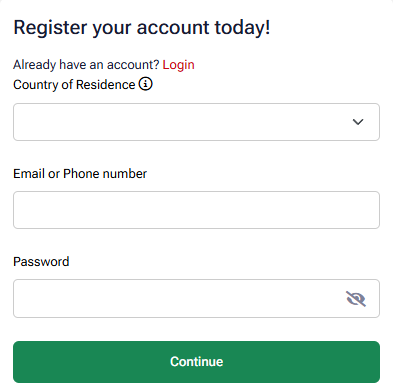
The form that our button opens has no partner code row. If your form shows a Partner Code or Campaign ID row under the password, paste 314605 there with the Copy button below.
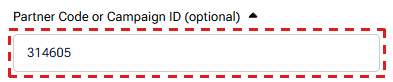
314605
Press Continue and finish the registration. Then open your first trading account, for example Premium, which has no minimum deposit. The HFM minimum deposit page shows how far the gold price can move against a small deposit before HFM closes the trade.
Trade as usual. Your trading account earns the rebate from the first trade that you close.
Already have an HFM account
If you opened your HFM trading account through a ForexFanClub link or button, that trading account already earns the rebate. Any trading account that you add later needs Campaign ID 314605 too, as in step 3.
If your trading account has another partner, or no partner, keep your HFM Client Area login and add one more trading account in it. HFM keeps each existing trading account with the partner it was opened under, so only the new trading account earns the rebate.
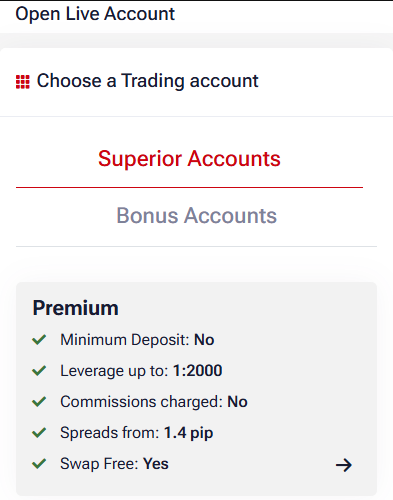
Log in to the HFM Client Area or the HFM app. On My Trading Accounts, tap Open Live Account.

Choose the type of trading account, for example Premium. Our HFM account types guide shows which type costs the least for your trading.
In the Campaign ID box, paste 314605 with the Copy button below, then tap Add before you continue. The form does not stop you if you skip Add, and without Add the new trading account has no partner.
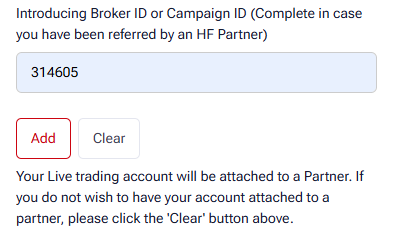
314605
Fund the new trading account with an internal transfer or a deposit. The rebate starts from the first trade that you close on the new trading account.
If you open the trading account through the button below instead, HFM records ForexFanClub as its partner from the link. If your browser blocks cookies, enter Campaign ID 314605 as in step 3.
Then add the trading account to ForexFanClub
HFM pays the rebate whether you add the trading account to ForexFanClub or not. On ForexFanClub, you see every payment in one place and get the member rewards.
- Register at the ForexFanClub member area (opens in a new tab) with your email address.
- Open Dashboard, choose HFM and enter the number of the trading account you have just opened.
- Approval takes 15 minutes at most. Your rebate history then appears under Auto Rebate History.
Only trading accounts opened through a ForexFanClub link can be added, so add the new trading account straight after you open it.
When Is the HFM Rebate Paid?
HFM pays the rebate into MyWallet the day after you trade, with nothing to claim.
HFM adds up your rebate at midnight server time, so the trades you close today are paid tomorrow. Monday’s payment covers Friday to Sunday, because the markets are shut at the weekend.
HFM makes a payment once your total reaches $1, and a smaller total is carried over to the next day, so nothing is lost. That $1 comes quickly. A single 0.1-lot gold trade on a Premium account brings back $1.35.
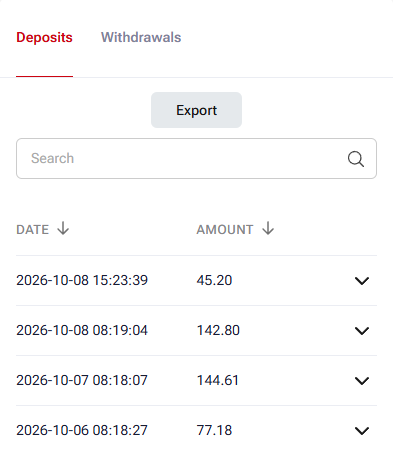
To see your payments, open MyWallet › Wallet Actions › Wallet Finances in the HFM Client Area. Each one is listed as Rebates from 314605.
Small differences from the table come from currency conversion. From MyWallet, you can move the money to a trading account or withdraw it in the usual way. Our guide to withdrawing money from HFM shows how long each payment method takes.
Which HFM Trades Earn the Rebate?
An HFM trade earns the rebate once you hold it for 2 minutes or longer, and two more rules cover bonus margin and a buy and a sell on the same instrument.
Earns the full rebate
- Every trading instrument in the rebate table
- Any trading account that you open through ForexFanClub
- Trades held for 2 minutes or longer
- Margin funded from your own deposit
Sits outside the rebate
- Trades held for less than 2 minutes
- Margin that comes from bonus credit
- The smaller position when you hold a buy and a sell on the same instrument
A trade closed within 2 minutes earns no rebate, because HFM pays no partner commission on it. Hold the trade for 2 minutes or longer and the full rebate comes back.
Bonus credit lowers the rebate by its share of the margin. For example, if bonus credit covers half the margin on 1 lot of gold on a Top Up account, you receive $6.75 instead of $13.50. The margin from your own deposit earns the full rebate. Our HFM bonus guide shows which bonus you can get in your country and how it changes your rebate.
If you hold a buy and a sell on the same instrument, HFM pays the rebate on the larger position only. So if the buy and the sell are the same size, only one of them earns the rebate. These rules come from HFM’s partner agreement, and ForexFanClub adds none of its own.
HFM Rebate FAQ
Other questions readers ask about the HFM rebate.
- Is a rebate the same as forex cashback?
-
“Forex cashback” and “forex rebate” describe the same thing, part of your trading cost paid back on every trade. The HFM version is automatic, so the money arrives on its own.
- Can I take an HFM bonus and the rebate at the same time?
-
Yes. You can trade with an HFM bonus and still receive the rebate, but the part of a trade’s margin that the bonus covers earns no rebate. So the larger the bonus is against your own deposit, the smaller your rebate is.
Our HFM bonus guide shows which bonus HFM offers in your country. HFM’s promotions page (opens in a new tab) lists the offers that are running now.
- Which partner code gives the ForexFanClub rebate at HFM?
-
The ForexFanClub partner code at HFM is 314605, which HFM also calls the Campaign ID.
When you register through a ForexFanClub button, the link passes 314605 to HFM for you. If your form shows a Partner Code or Campaign ID field, enter 314605 there.
When you open another trading account later, type 314605 in the Campaign ID box and tap Add.
- Do I pay tax on the rebate?
-
In most countries, a rebate counts as income and may be taxable. The rules differ by country and change, so check your own position with a qualified tax adviser.
Which HFM Page Do You Need Next?
Read the HFM spread page next to see what a trade costs before the rebate.
Once the HFM trading account is open, add it to Forex FanClub. The member area lists every rebate payment day by day, across every broker you use. Registration is free and takes an email address.

Produced and operated by Forex FanClub
Person responsible: Hiroki Sakaida, founder of Forex FanClub
Hiroki Sakaida decides what our content and services cover and which features they offer. He also checks content and functionality and decides on revisions and publication. Our Content and Service Policy explains how we produce and check our content and services, including our use of AI.
Risk warning: Forex and CFD trading involve leverage, and you could lose all the money you invest. This article and tool provide information, not investment advice. The amounts shown are calculated from the collected data and do not guarantee the amounts that will apply to your own trades, or any future profit.
Affiliate disclosure: This article contains HFM referral links. Forex FanClub receives referral commission based on registrations and trading through these links.