

A margin call usually comes at a 40% to 60% margin level, and the stop out at 20% at XM, HFM and XS and at 0% at Exness.
Levels checked on 16 October 2026
A margin call is a warning that your trading account is running out of money for the trades you hold, and a stop out is the point where the broker closes those trades for you. Both come at a margin level that each broker sets.
You can watch your margin level move on a demo account before you trade real money. At XM, registration opens your first demo account automatically.
Contents
When Does a Margin Call or Stop Out Happen?
At XM, you get a margin call when your margin level falls to 50%, and the stop out closes your trades when it falls to 20%. HFM, XS and Exness use their own levels, and some of them change the levels with the type of trading account.
Your margin level compares the money left in your trading account with the margin that your open trades use. When a trade loses money, the money left shrinks, and your margin level falls with it.
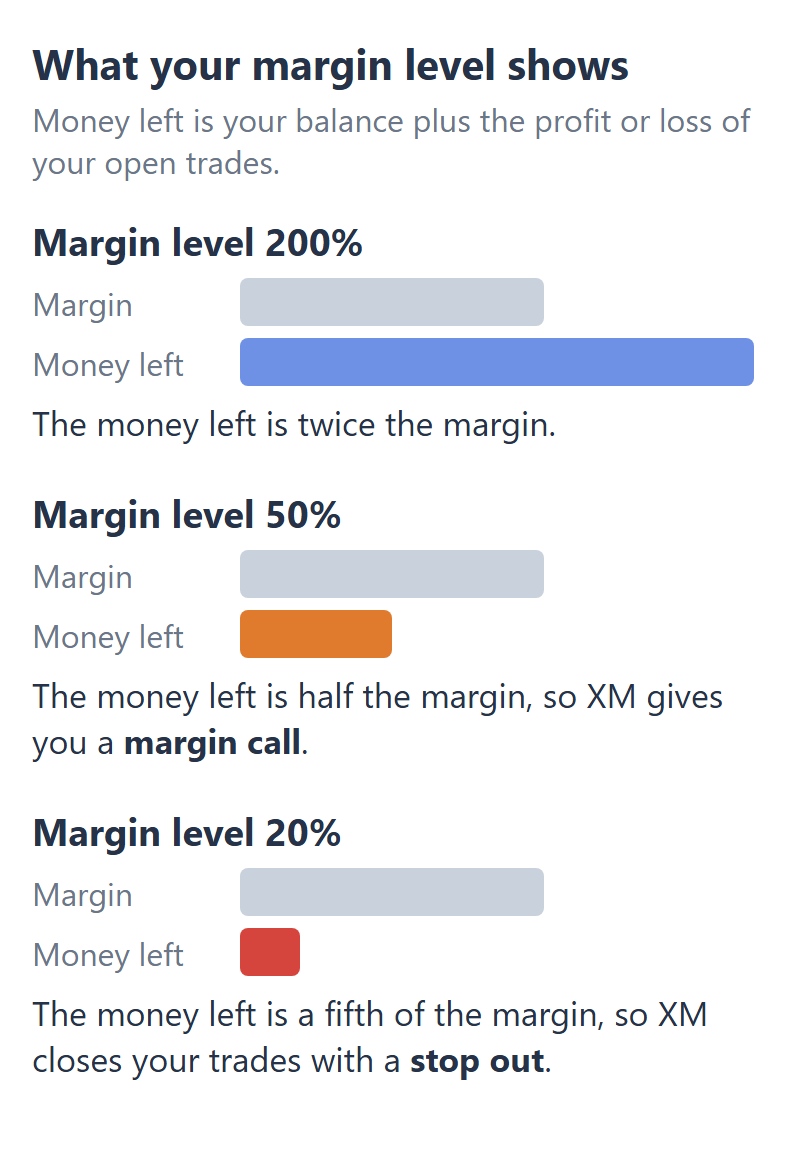
The table below shows the levels for each trading account.
| Margin call | Stop out | |
|---|---|---|
| XM, all accounts | 50% | 20% |
| HFM Premium, Pro, Zero, Cent | 50% | 20% |
| HFM Unlimited | 20% | 0% |
| XS Standard, Pro, Elite | 40% | 20% |
| XS Cent, Micro | 40% | 10% |
| Exness Standard, Standard Cent | 60% | 0% |
| Exness Pro, Raw, Zero | 30% | 0% |
Exness Standard warns you earliest. Every Exness account and HFM Unlimited close your trades only when your equity reaches zero, and XS Cent and Micro close them later than the other XS accounts.
So the levels that matter to you are the ones for your own trading account. Our XM, HFM, XS and Exness margin pages explain each broker’s rules for leverage and margin in more detail.
How Much Can You Lose Before a Stop Out?
With a $100 deposit and 0.01 lot of gold at 1:1000, you can lose $99.16 before the XM stop out closes the trade. Because 0.01 lot of gold is 1 ounce, every $1 that gold moves against you takes $1 from your trading account.
0.01 lot of gold on $100 at XM, 1:1000
Margin, gold at $4,179$4.18
Equity at the 50% margin call$2.09
Equity at the 20% stop out$0.84
Gold’s move to the stop out$99.16
The stop out level is a percentage of your margin, not of your deposit. At 1:1000, this trade uses only a few dollars of margin, so the stop out comes when less than a dollar is left. By then, almost your whole deposit is gone.
Changing the broker does not change this much, because the margin on this trade is just as small at every broker. The table below shows the same trade at XM, HFM, XS and Exness.
$100 deposit, 0.01 lot of gold, 1:1000
| Move to margin call | Move to stop out | |
|---|---|---|
| XM | $97.91 | $99.16 |
| HFM | $97.91 | $99.16 |
| XS | $98.33 | $99.16 |
| Exness Standard | $97.49 | $100.00 |
At Exness, the trade stays open until your equity reaches zero, but on this trade that gives gold only $0.84 more room than at the other three brokers. So on a small trade, the leverage you choose changes the warning much more than the broker does.
Does Lower Leverage Give You an Earlier Warning?
Yes, lower leverage gives you an earlier margin call, because the same trade then uses more margin. On the $100 gold trade at XM, the margin call comes after a $79.10 move at 1:100, instead of $97.91 at 1:1000.
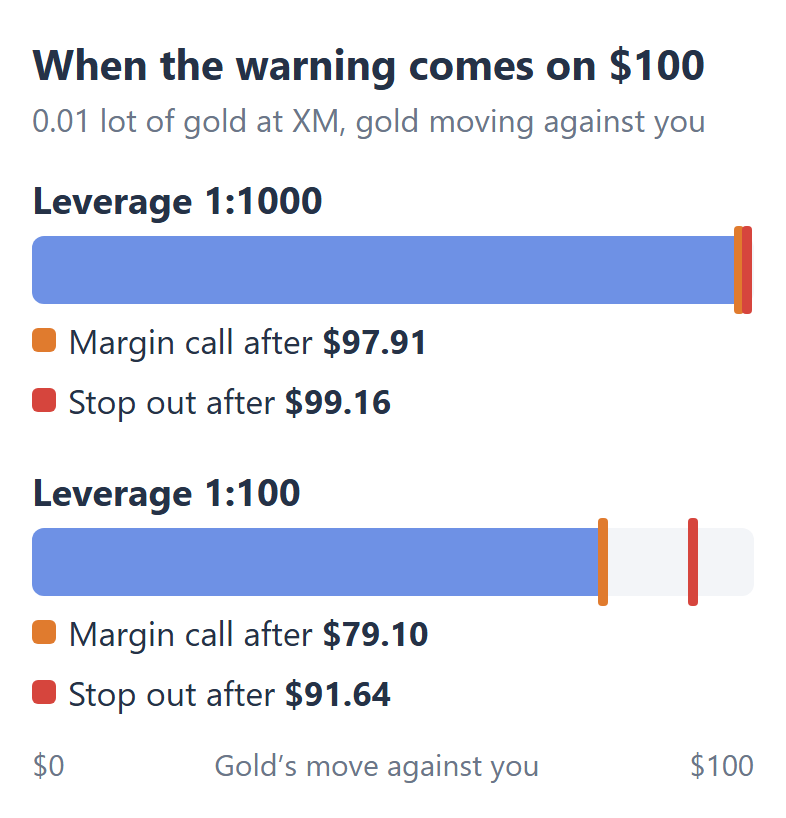
Leverage does not change how much the trade loses when gold moves. It changes only the size of the margin, so at 1:100 the margin call comes while $20.90 is still in your trading account. That leaves you time to close the trade or add money.
However, the leverage that you choose is not always the leverage you trade at. During major news and around the weekend, all four brokers can lower the leverage for some trades.
A trade that you open in those hours needs more margin, so it starts with a lower margin level. Our high leverage guide shows when each broker does this and which trades it affects.
How Can You Avoid a Stop Out?
A stop-loss keeps you away from a stop out, because it closes a losing trade at a price you choose. At high leverage, the margin call comes so late that it is only a last alert, so the stop-loss is what protects your deposit.
The size of the trade matters too, because a smaller trade lets the price move further before a stop out. Our lot size calculator shows the lot size that fits your balance and stop-loss, and how far the price can move before a stop out at your broker.
Adding money or closing a trade also raises your margin level. So if you hold trades over the weekend, look at your margin level on Friday, while you can still close a trade, because the price can jump when the market opens again.
Can You Lose More Than Your Deposit?
No, XM, HFM, XS and Exness all bring a negative balance back to zero, so you cannot lose more than your deposit. Your balance can go negative when the price jumps over the weekend and the stop out closes your trades at a worse price.
HFM and Exness each add one condition. At HFM, the protection covers retail clients, and HFM can remove it from a client who abuses it.
At Exness, the balance goes back to zero only after the stop out has closed all your trades. Until then, a deposit goes to cover the loss, so if your Exness balance is negative, wait for the reset before you deposit.
Questions People Ask About Margin Calls
- Does a margin call close your trades?
-
No, a margin call only warns you, and your trades stay open until the stop out level.
At XM, you also cannot open new trades while your margin level is under 50%. When the stop out comes, XM closes the trade with the largest loss first.
- Is a lower stop out level better?
-
A lower stop out level keeps a losing trade open longer, which helps only if the price turns back. If the price keeps moving against you, the trade still closes, and less of your deposit is left.
- Can you withdraw money while trades are open?
-
Yes, you can withdraw part of your money while trades are open, but each broker limits how much.
At XM, a withdrawal goes through only if your margin level stays above 150% on weekdays and 400% at the weekend. HFM uses 150% on weekdays and 300% at weekends.
At XS and Exness, you can withdraw up to your free margin, which is your equity minus the margin that your open trades use.
Which Page Do You Need Next?
For your own balance and trade size, the lot size calculator shows how far the price can move before a stop out.
Sources of the margin call and stop out levels
The brokers’ own rules
- XM
- XM Client Agreement (opens in a new tab): margin call at 50% and stop out at 20% for all trading accounts, the trade with the largest loss closed first. The XM Help Centre: negative balance protection for all clients. The XM Members Area: withdrawals with open trades while the margin level stays over 150% on weekdays and 400% at the weekend.
- HFM
- HFM account comparison (opens in a new tab): margin call 50% and stop out 20% on Premium, Pro, Zero and Cent. The Unlimited account terms: 20% and 0%. The HFM Client Agreement: negative balance protection for retail clients, and withdrawals while the margin level stays over 150% on weekdays and 300% at weekends.
- XS
- XS account types (opens in a new tab): margin call 40% on every account, stop out 20%, and 10% on Cent and Micro. The XS Help Centre: negative balance protection, and withdrawals with open trades up to the free margin.
- Exness
- Exness Standard accounts (opens in a new tab) and Exness Professional accounts (opens in a new tab): stop out 0% on every account, margin call 60% on Standard and Standard Cent and 30% on Pro, Raw and Zero. The Exness Help Centre: negative balance protection after a stop out, and withdrawals up to the free margin.
Our calculation
- Gold’s move before a margin call
- 0.01 lot of gold is 1 ounce at every broker, so a $1 move in gold is $1 on the trade. The margin is the gold price divided by the leverage, with gold at $4,179 on our XM margin calculator on 16 October 2026. The move is $100 minus the equity left at the level. The spread is not counted, and the lot size calculator counts it.
All levels checked on 16 October 2026.
Once your rebate account is open, link it to Forex FanClub. The member area lists every rebate payment day by day, across every broker you use. Registration is free and takes an email address.

Produced and operated by Forex FanClub
Person responsible: Hiroki Sakaida, founder of Forex FanClub
Hiroki Sakaida decides what our content and services cover and which features they offer. He also checks content and functionality and decides on revisions and publication. Our Content and Service Policy explains how we produce and check our content and services, including our use of AI.
Risk warning: Forex and CFD trading involve leverage, and you could lose all the money you invest. This article provides information, not investment advice. The amounts shown are calculated from the collected data and do not guarantee the amounts that will apply to your own trades, or any future profit.
Affiliate disclosure: The broker pages linked from this page contain referral links. Forex FanClub receives referral commission based on registrations and trading through those links.