

A chat message and a short form change your Exness partner. The trading account you open next pays back up to 36% of the spread.
You can change your partner at Exness yourself, with a chat message and a short form. Your existing trading accounts stay with the partner that you opened them under, so the rebate starts on the trading account that you open after the change.
Contents
- How Do You Change Your IB at Exness?
- Where Do You Ask Exness for the Partner Change?
- What Goes in the Exness Partner Change Form?
- When Can You Open the New Trading Account?
- How Much Does the New Trading Account Pay Back?
- Do You Need to Add the Trading Account to ForexFanClub?
- What If You Are New to Exness?
- Exness Partner Change FAQ
- The rest of the Exness numbers
How Do You Change Your IB at Exness?
You ask the Exness Assistant for a partner change, send the form with our partner link, and open a new trading account once Exness approves the change. The whole change usually takes up to three business days.
- In your Exness Personal Area, type Change Partner in the Exness Assistant chat.
- Open the form link that the chat sends back. Choose Rebates as the reason, paste our partner link and add our website address.
- Submit the form and confirm it with the code that Exness sends you. Exness usually processes the request within three business days.
- After the change is approved, clear your browser cache and cookies, then open an additional trading account. That trading account earns the rebate from the first trade that you close.
Your existing trading accounts stay as they are, with the old partner, their history and any open positions. You keep the same Personal Area and the same login, and an internal transfer moves your balance to the new trading account with no withdrawal and no fee.
The switch is worth the few minutes it takes. On a Standard account, you get back 36% of the spread, about $8.83 on 1 lot of gold. If you trade 10 lots of gold a month, that comes to about $88 a month, paid into your trading account.
Where Do You Ask Exness for the Partner Change?
You ask in the Exness Assistant, the chat inside your Exness Personal Area. The chat replies with a link to a partner change form that is made for your Personal Area.
- Sign in to your Exness Personal Area and open the chat from the icon in the bottom-right corner.
- Send Change Partner. You can type it, or tap it when the chat offers it as a suggestion.
- The chat replies with four steps and a link to your own partner change form.
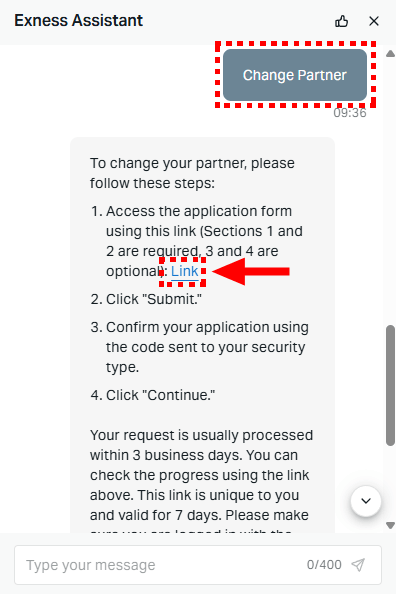
The form link is valid for seven days, and it only works while you are signed in to your own Exness Personal Area. Save the link, because you open the same link later to see how far your request has got.
This chat is in your own Personal Area. The Partner Personal Area is a separate sign-in for partners who refer traders, so you need no partner login to change your IB. Our guide to the Exness Personal Area login shows which password opens what.
What Goes in the Exness Partner Change Form?
The form is headed Partner change and has four fields. Exness requires the first two, and the second one is where our partner link goes. Fill in the third field as well, with our website address, because it shows Exness where you found your new partner.
What goes in each field
- Select reason for partner change
- Rebates
- New partner’s link or wallet account number
- Our partner link
- Where did you find your new partner?
- Our website address
- Leave a comment
- Leave it empty
https://one.exnessonelink.com/boarding/sign-up/a/fanclub_en
https://fxfan.club/en/
Paste the whole link, not a partner number. The fanclub_en at the end of the link is our partner code, and it puts your Personal Area on the 36% rebate. A partner number tells Exness who your partner is, but it carries no rebate rate, so a request without the code gets the default rate of 0%.
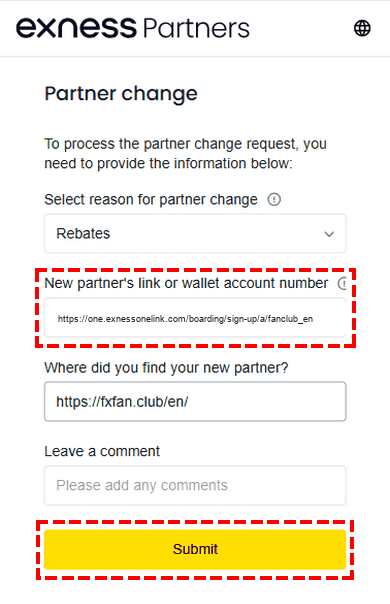
Click Submit, confirm with the code that Exness sends you, and then click Continue. Exness usually processes the request within three business days. Open the saved form link if you want to see the progress.
When Can You Open the New Trading Account?
Open the new trading account after Exness approves the change. A trading account that you open while the request is still in progress goes to your old partner, like your other trading accounts.
- Clear your browser cache and cookies. Exness asks for this before you open the trading account.
- Open a new real trading account in your Exness Personal Area.
- Choose the account type that you want: Standard, Standard Cent, Pro, Raw Spread or Zero.
- Move your balance with an internal transfer between your own trading accounts.
Your money stays inside Exness during the transfer, so you pay no withdrawal fee and wait for no payment provider. Keep the old trading account while it still has open positions, and move the rest of the money once those positions close.
Because you open a new trading account anyway, this is a good moment to choose the account type again. On gold, the Standard account pays the largest rebate, but the total cost of a gold trade is still highest on Standard after the rebate.
After the rebate, 1 lot of gold costs about $12.41 on Raw Spread or Zero and about $15.70 on Standard. Raw Spread and Zero need a larger first deposit and charge a commission per lot.
So choose Standard if you want no commission and a small first deposit, and choose Raw Spread or Zero if the lowest cost per lot matters more. The Exness rebate page compares all four accounts.
How Much Does the New Trading Account Pay Back?
On a Standard or Standard Cent account, you get back 36% of the spread. The other account types pay back a smaller share or a set amount per lot.
| Account type | Your rebate |
|---|---|
| Standard / Standard Cent | 36% of the spread |
| Pro | 22.5% of the spread |
| Raw Spread / Zero accounts | A set amount per lot |
ForexFanClub is at Brilliant, Exness’s top partner tier, so Exness pays us its top rate on every lot that you trade. We pass 90% of it back into the trading account that you traded on.
Our rebate setting at Exness pays you automatically once a day, so the rebate arrives the day after you close the trade.
Trades that you place on your own trading account earn the rebate, by hand or from an EA, whether you hold them for seconds or for weeks.
The Exness rebate page shows the rebate on each trading instrument and what a trade costs after the rebate.
Do You Need to Add the Trading Account to ForexFanClub?
No. Exness pays the rebate into your trading account either way. When you add the trading account to ForexFanClub, you see every payment in one place and get the member rewards.
- Register at the ForexFanClub member area (opens in a new tab) with your email address.
- Open Dashboard, choose Exness and enter the number of the trading account that you have just opened.
- Approval takes 15 minutes at most. Your rebate history then appears under Auto Rebate History.
Only trading accounts opened through a ForexFanClub link can be added, so add the new trading account straight after you open it.
Members also collect USDT from a daily login and from the quest board, and adding your first trading account is one of the quests. The member area shows the current rewards.
What If You Are New to Exness?
If you have no Exness account yet, you skip the partner change. Register with Exness through our link, and your trading accounts earn the rebate from the first trade that you close.
On the sign-up form, also type our partner code fanclub_en in Partner code (optional). Our Exness partner code guide shows where the field is.
Exness Partner Change FAQ
- Can I move my existing Exness trading account to a new partner?
-
No. Each Exness trading account stays with the partner that it was opened under.
Only the trading accounts that you open after the change earn the rebate. So open an additional trading account once Exness approves the change, and move your balance with an internal transfer.
- How long does an Exness partner change take?
-
Exness usually takes up to three business days. You do not need to keep the chat open, because the progress shows on the form link that the chat sent you.
The link stays valid for seven days, which is longer than the usual wait.
- What is the ForexFanClub partner code for Exness?
-
fanclub_en. The code is the end of our partner link, and it puts your Personal Area on the 36% rebate instead of the default rate of 0%. When you paste the whole link into the form, the code goes with it.
- How do I check which partner my trading account is under?
-
Ask in the Exness Assistant chat, and have your trading account number ready. Exness tells you the partner of your Personal Area.
If you only want to change the partner, type Change Partner, and the chat sends you the form straight away.
- Do I need a ForexFanClub account to get the rebate?
-
No. Exness pays the rebate into your trading account whether you register with ForexFanClub or not.
On ForexFanClub, you see the rebate history for every broker that you use, and you get member rewards such as a daily login bonus in USDT.
- Do I pay tax on the rebate?
-
In most countries, a rebate counts as income and may be taxable. The rules differ by country and change, so check your own position with a qualified tax adviser.
The rest of the Exness numbers
The rebate is one side of what a trade costs. Exness’s rebate, spread, swap and margin pages cover the other sides.
Once the new Exness trading account is open, add it to Forex FanClub. The member area lists every rebate payment day by day, across every broker you use. Registration is free and takes an email address.

Produced and operated by Forex FanClub
Person responsible: Hiroki Sakaida, founder of Forex FanClub
Hiroki Sakaida decides what our content and services cover and which features they offer. He also checks content and functionality and decides on revisions and publication. Our Content and Service Policy explains how we produce and check our content and services, including our use of AI.
Risk warning: Forex and CFD trading involve leverage, and you could lose all the money you invest. This article and tool provide information, not investment advice. The amounts shown are calculated from the collected data and do not guarantee the amounts that will apply to your own trades, or any future profit.
Affiliate disclosure: This article contains Exness referral links. Forex FanClub receives referral commission based on registrations and trading through these links.
- How Do You Change Your IB at Exness?
- Where Do You Ask Exness for the Partner Change?
- What Goes in the Exness Partner Change Form?
- When Can You Open the New Trading Account?
- How Much Does the New Trading Account Pay Back?
- Do You Need to Add the Trading Account to ForexFanClub?
- What If You Are New to Exness?
- Exness Partner Change FAQ
- The rest of the Exness numbers