

Forex demo accounts are free at XM, HFM, XS and Exness, and an unused demo account stays open the longest at XS, for 90 days.
Demo rules checked on 16 October 2026
A demo account lets you practise with virtual money on the same platform as a real trading account. It is free at every broker, but if you stop using it, the broker closes it, and how soon depends on the broker.
At XM, registration opens your first demo account automatically, so you can start practising on the same day.
Contents
Which Forex Demo Account Lasts the Longest?
Of XM, HFM, XS and Exness, XS keeps an unused demo account open the longest, for 90 days. HFM deletes an unused demo account after 29 days, which is the shortest limit.
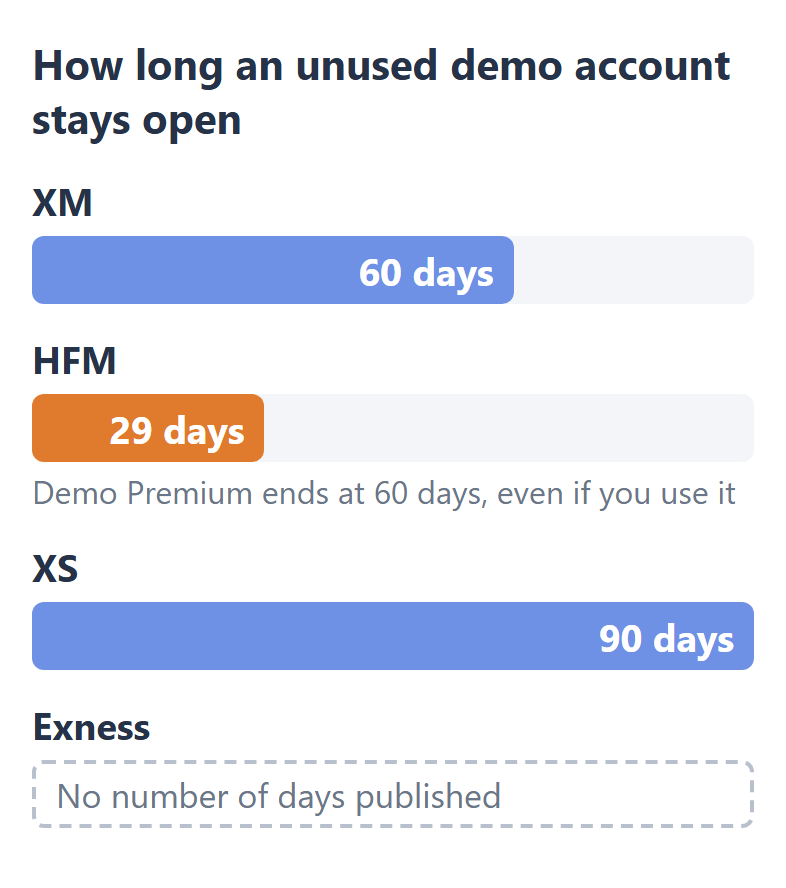
To keep a demo account open, trade on it at least once every four weeks. Each limit counts only the days without a trade, and HFM’s 29 days is the shortest of them, so one trade every four weeks keeps your demo accounts open at XM, HFM and XS.
Exness also deletes demo accounts that nobody uses, but it publishes no number of days. So at Exness, no rule tells you in advance how long an unused demo account lasts.
At HFM, the type of demo account matters too. A Demo Premium account ends after 60 days even when you trade on it, and Demo Zero shows no end date when you open it. So for practice that lasts longer than two months at HFM, open Demo Zero.
What Balance and How Many Demo Accounts Do You Get?
At XM and HFM, you choose the demo balance yourself when you open the account, and an Exness demo account starts with $10,000. At XS, you add virtual money after opening.
The table below shows the balance and how many demo accounts you can hold at each broker.
| Demo balance | Demo accounts | |
|---|---|---|
| XM | $1,000 to $5,000,000 | 5 accounts at a time |
| HFM | Up to $100,000 | Not published |
| XS | You can add more | 10 accounts per type |
| Exness | $10,000 to start | 100 accounts per type |
The balance changes what the demo teaches you. With $10,000 of virtual money, a loss that would hurt a small real deposit looks tiny. So a demo balance close to your planned deposit shows you what a loss really costs.
If you chose the wrong amount, you can change it later. XM and Exness both have a Set Balance button, HFM lets you raise the balance three times a day and lower it twice, and XS lets you add more with Add Demo Funds.
Is a Demo Account the Same as a Real Account?
No. A demo account earns no rebate, its spreads and swaps are confirmed to match only at XM and Exness, and its slippage cannot be checked. So a real trading account with a rebate costs less than the demo shows.
- Rebate
A real trading account opened through ForexFanClub gets part of the cost of every lot back as a rebate, and a demo account gets none. Our forex rebates page shows how much at each broker. - Spreads and swaps
At XM, both matched in our comparison of demo and real accounts. Exness says its demo has the same conditions as live accounts. HFM and XS do not say so, and we have not compared them. - Slippage
The price you get can differ from the price you asked for, and the gap changes with every order. So comparing it fairly would need a very large number of trades with real money.
So a demo account shows you whether your plan works, and only a real trading account shows you the full cost and the prices that you really get.
When Should You Move From a Demo to a Cent Account?
A cent account is the next step once your plan works on the demo account, because it lets you trade real money in sizes 1/100 of a standard account’s. One cent lot is 1/100 of a standard lot, so the profit, the loss and the cost are 1/100 too.
Gold moves $20 against your trade
| Loss | Part of $100 | |
|---|---|---|
| Standard account, 0.01 lot | $20 | 20% |
| Cent account, 0.01 lot | $0.20 | 0.2% |
On a $100 deposit, the same $20 move in gold takes 0.2% of your money on a cent account at 0.01 lot, and 20% on a standard account. So one bad trade on a cent account leaves almost all of your first deposit.
At XM, HFM and Exness, you cannot practise these small sizes on a demo account first. XM has no demo of its Micro account, HFM offers no Cent demo account, and Exness offers Standard Cent only as a real trading account.
So at these brokers, a cent account is where you first trade sizes smaller than 0.01 lot. Our cent account comparison shows which broker’s cent account has the lowest spread and how much money you need to open one.
How Do You Open a Demo Account?
At all four brokers, you open a demo account in the broker’s client area, and it needs no deposit.
- XM
At XM, registration opens your first demo account automatically, and you can add more from Home in the Members Area. The XM demo account guide shows each step and how to log in to MT5. - HFM
At HFM, register (opens in a new tab) for a myHF area first. Then open the demo account under Trading Accounts, Open Demo Account. - XS
At XS, you can use a demo account before you verify your profile. After you register at XS (opens in a new tab) and answer the questionnaire, open it under Accounts, Open Demo Account. - Exness
At Exness, registering (opens in a new tab) opens a Standard demo account on MT5 for you, with $10,000 of virtual money. Demo accounts of the other types are in your Personal Area.
Questions People Ask About Forex Demo Accounts
- Is a forex demo account free?
-
Yes, at all four brokers. A demo account needs no deposit, and all the money in it is virtual.
- Can you make real money on a demo account?
-
No, the profit on a demo account is virtual, and you cannot withdraw it.
The exception is a demo contest, where the prizes are real. HFM runs a monthly Demo Contest with prizes paid as credit on a real trading account.
XM also runs weekly demo competitions, which our XM demo competition guide explains.
- Can a demo account become a real trading account?
-
No, you open a real trading account separately, and the demo account stays as it is.
At all four brokers, you open the real trading account in the same client area as your demo accounts, so you do not register again.
Which Page Do You Need Next?
For trading real money in small sizes after the demo, start with the cent account comparison.
Sources of the demo account rules
The brokers’ own rules
- XM
- XM Help Centre (opens in a new tab): up to 5 demo accounts at a time, closed after 60 days without use, demo accounts for Standard and Ultra Low Standard only. The starting balance list and Set Balance are from the XM Members Area.
- HFM
- HFM Client Agreement (opens in a new tab): Demo Premium is valid for 60 days, and an unused demo account is deleted after 29 days. The demo types and their balances are from the Open Demo Account page in the HFM Client Area.
- XS
- XS Help Centre, demo accounts (opens in a new tab): no end date, archived after 90 days without use, up to 10 demo accounts of each account type on each platform, and Add Demo Funds.
- Exness
- Exness demo account page (opens in a new tab): “the same conditions as on live trading accounts”. The Exness Help Centre: a Standard demo account with $10,000 at registration, Set Balance, up to 100 demo accounts of each type, Standard Cent as a real account only, and unused demo accounts deleted without a stated number of days.
Our measurement
- Demo and real at XM
- On 30 September 2026, we read the settings of all 1,639 instruments of the XM Standard account on a demo account and on a real trading account, and the spread of 16 instruments on both every 30 seconds for an hour. They matched.
All rules checked on 16 October 2026.
Once your rebate account is open, link it to Forex FanClub. The member area lists every rebate payment day by day, across every broker you use. Registration is free and takes an email address.

Produced and operated by Forex FanClub
Person responsible: Hiroki Sakaida, founder of Forex FanClub
Hiroki Sakaida decides what our content and services cover and which features they offer. He also checks content and functionality and decides on revisions and publication. Our Content and Service Policy explains how we produce and check our content and services, including our use of AI.
Risk warning: Forex and CFD trading involve leverage, and you could lose all the money you invest. This article provides information, not investment advice. The amounts shown are calculated from the collected data and do not guarantee the amounts that will apply to your own trades, or any future profit.
Affiliate disclosure: The broker pages linked from this page contain referral links. Forex FanClub receives referral commission based on registrations and trading through those links.