
Compare XM’s five account types item by item, from the bonus to the lot size.
All details checked on 3 October 2026
StandardMicro
The bonus-side account: standard lot, spreads from 1.6 pips, no commission.Standard at a hundredth of the size: 1 lot = 1,000 units, from 5 USD.
Lot and trade size
Lot size100,000 units1,000 units
One lot is the trade size the platform counts in. On a Standard trading account 1 lot is 100,000 units of the base currency, so 3 lots of EURUSD are 300,000 EUR.
A 1-pip move on 1 lot of EURUSD is worth about 10 USD.
Source: XM account type screen
On a Micro trading account 1 lot is 1,000 units, a hundredth of the Standard lot: 3 Micro lots of EURUSD are 3,000 EUR.
A 1-pip move on 1 Micro lot of EURUSD is worth about 0.10 USD. Micro is the XM account for small sizes; the balance is kept in a normal currency such as USD, and XM has no cent account.
Source: XM account type screen
Minimum trade0.01 lot (1,000 units)0.1 lot (100 units)
The smallest order is 0.01 lot, which is 1,000 units of the base currency: 1,000 EUR on EURUSD. A 1-pip move on 0.01 lot of EURUSD is worth about 0.10 USD.
Source: XM account type screen
The smallest order is 0.1 Micro lot, which is 100 units of the base currency: 100 EUR on EURUSD. A 1-pip move on that size is worth about 0.01 USD, so a Micro trading account can be tried with a few dollars.
Source: XM account type screen
Largest order50 lots on GOLDPer instrument, in Symbol Information
XM sets the largest single order per instrument. Symbol Information for GOLD on a Standard trading account showed a maximum of 50 lots; other instruments have their own figure.
To read the figure for an instrument: in the XM app open Markets, pick the instrument, tap the three dots and choose Symbol Information.
How many lots your balance can carry is a margin question; the XM margin guide has the calculator.
Source: Symbol Information in the XM app
Symbol Information shows the largest order for each instrument on a Micro trading account: in the XM app open Markets, pick the instrument, tap the three dots and choose Symbol Information.
How many lots your balance can carry is a margin question; the XM margin guide has the calculator.
Source: Symbol Information in the XM app
Symbol namesGOLD, EURUSDShown in Markets
Symbols carry their plain names on a Standard trading account: GOLD, EURUSD.
Source: Symbol Information in the XM app
The screens we checked showed the Standard and Ultra Low Standard names. Open Markets on a Micro trading account to see how the names appear there.
Source: Symbol Information in the XM app
Trading costs
SpreadsFrom 1.6 pips
The account type screen shows the lowest spread of each type: from 1.6 pips on Standard and Micro. The spread is the only trading fee on these accounts, so the live spread by instrument is the figure to compare.
Source: XM account type screen
CommissionNone
No commission: the spread is the only trading fee on this account, so the rebate (next row) comes straight off it.
Source: XM account type screen
RebateGOLD $18.00, EURUSD $8.10 a lotGOLD $0.18, EURUSD $0.081 a lot
Forex FanClub pays back part of what XM pays us on every lot you trade: $18.00 a lot on GOLD and $8.10 on EURUSD on a Standard trading account. Every instrument has its own amount.
The rebate lands in your XM MyWallet the day after you trade. A trade has to stay open longer than three minutes, and positions closed with Close by are not counted.
Source: Forex FanClub XM rebate guide
A Micro lot is 1/100 of a Standard lot, and the rebate is 1/100 too: $0.18 a lot on GOLD and $0.081 on EURUSD. 100 Micro lots earn the same as 1 Standard lot.
The rebate lands in your XM MyWallet the day after you trade. A trade has to stay open longer than three minutes, and positions closed with Close by are not counted.
Source: Forex FanClub (Micro lot: 1/100 of the Standard lot amount)
SwapsCharged or paid overnight
A swap is the amount charged or credited when a position stays open past the daily rollover. On Standard and Micro every instrument carries a swap: GOLD showed a Swaps row in Symbol Information. A position on the positive side earns the swap, which is what a carry trade relies on.
Source: Symbol Information in the XM app
Deposit, bonus and withdrawal
Minimum deposit5 USD
The account types page lists 5 USD as the minimum first deposit, or the same amount in another currency. The same minimum applies to Standard, Micro, Ultra Low Standard and Ultra Low Micro.
Source: XM account types page
Base currencySeveral to choose from
The account type screen offers several base currencies. You pick the currency when you create the trading account; the balance, deposits and results are shown in that currency.
Source: XM account type screen
BonusYes, where offered By country
Standard and Micro trading accounts receive XM's bonus, and the amount differs by country.
The XM promotions page shows the offers running now.
Source: XM account types page and XM bonus terms
WithdrawalFrom 5 USD, no XM fee
XM processes a withdrawal the same day, and a bank or card then takes 2 to 5 business days to pay it in. The minimum is 5 USD and XM charges no withdrawal fee.
If the trading account holds a bonus, a withdrawal removes part or all of the bonus, depending on the bonus programme.
Deposited by bank transfer or crypto? The whole balance, profit included, can go out in one request.
Deposited by card or e-wallet? Up to the amount you deposited goes back to that card or e-wallet, and profit goes out separately by bank transfer or crypto.
Payment methods differ by country, so check the ones open to you on the Withdraw screen: choose the trading account on Home, then Manage → Withdraw.
Source: XM Help Centre
Rules and platform
LeverageSet per instrument By country
XM sets a maximum leverage for each instrument and treats the leverage on your trading account as a ceiling: the lower of the two applies. The leverage offered also depends on your country and steps down as your equity grows, so the figure on the registration form is a starting point rather than a fixed number.
The XM margin guide lists each instrument's limit and calculates the margin for your lot size.
Source: XM Help Centre
HedgingInside one trading account
You can hold a buy and a sell on the same instrument in one trading account. Hedging between two different trading accounts is not allowed, so keep both sides in the same trading account.
Hedged forex, gold and silver positions need no extra margin; other hedged instruments need 50% of the normal margin.
Source: XM Help Centre
ScalpingAllowed
Scalping is allowed on every XM account type.
Source: XM Help Centre
Islamic optionOn request
Clients of the Muslim faith can ask for the Islamic (swap-free) option on Standard and Ultra Low trading accounts, real accounts only. Apply in the Members Area: profile icon → Settings → Islamic Account. Once approved, every current and future real trading account under that login becomes Islamic; a single account cannot be picked out. If the option is missing from your Settings, write to support@xm.com.
Source: XM live chat
PlatformMT5 or MT4
Both platforms are offered when you create the trading account. MT4 has no stock CFDs, so MT5 gives the fuller instrument list.
Source: XM Help Centre
Demo accountYes By countryNo Micro demo By country
A Standard demo trading account is available. Demo trading accounts are added in the Members Area, so register with XM first. Then, on Home, tap + on the account card, choose Create Trading Account → Demo, and pick the platform and type.
Source: XM Help Centre
XM offers no Micro demo. To practise at Micro size, open a Standard demo, or a real Micro trading account and trade the minimum 0.1 lot.
Source: XM Help Centre
Changing the typeFixed: add another trading account
A trading account keeps the type it was opened with. To use another type, add a trading account under the same Members Area login: on Home, tap + on the account card, then Create Trading Account, pick the platform and the type. Your existing trading account stays as it is.
Source: XM Help Centre
Trading accounts allowedUp to 10 at once By country
You can hold up to 10 active real trading accounts at the same time under one Members Area login, so several types can sit side by side. The limit can differ by country: to hold more than 10, ask XM live chat.
Source: XM Help Centre
Ultra Low StandardUltra Low Micro
Spreads from 0.8 pips, no commission, swap-free on some instruments, no bonus.Ultra Low at a hundredth of the size: 1 lot = 1,000 units, spreads from 0.8 pips.
Lot and trade size
Lot size100,000 units1,000 units
One lot is the trade size the platform counts in. On an Ultra Low Standard trading account 1 lot is 100,000 units of the base currency, so 3 lots of EURUSD are 300,000 EUR.
A 1-pip move on 1 lot of EURUSD is worth about 10 USD.
Source: XM account type screen
On an Ultra Low Micro trading account 1 lot is 1,000 units, a hundredth of the Ultra Low Standard lot: 3 lots of EURUSD are 3,000 EUR.
A 1-pip move on 1 lot of EURUSD is worth about 0.10 USD.
Source: XM account type screen
Minimum trade0.01 lot (1,000 units)0.1 lot (100 units)
The smallest order is 0.01 lot, which is 1,000 units of the base currency: 1,000 EUR on EURUSD. A 1-pip move on 0.01 lot of EURUSD is worth about 0.10 USD.
Source: XM account type screen
The smallest order is 0.1 lot, which is 100 units of the base currency: 100 EUR on EURUSD. A 1-pip move on that size is worth about 0.01 USD. The same 0.1 lot applies on MT4 and MT5.
Source: XM account type screen
Largest order50 lots on GOLD#100 lots on GOLDm#
XM sets the largest single order per instrument. Symbol Information for GOLD# on an Ultra Low Standard trading account showed a maximum of 50 lots; other instruments have their own figure.
To read the figure for an instrument: in the XM app open Markets, pick the instrument, tap the three dots and choose Symbol Information.
How many lots your balance can carry is a margin question; the XM margin guide has the calculator.
Source: Symbol Information in the XM app
XM sets the largest single order per instrument. Symbol Information for GOLDm# on an Ultra Low Micro trading account showed a maximum of 100 lots, where 1 lot of gold is 1 troy ounce; other instruments have their own figure.
To read the figure for an instrument: in the XM app open Markets, pick the instrument, tap the three dots and choose Symbol Information.
How many lots your balance can carry is a margin question; the XM margin guide has the calculator.
Source: Symbol Information in the XM app
Symbol namesGOLD# (a # after the name)GOLDm# (m# after the name)
A # after the name marks the Ultra Low price feed: GOLD# on an Ultra Low Standard trading account. Look for the # when you compare quotes or read a swap table.
Source: Symbol Information in the XM app
An m# after the name marks the Ultra Low Micro price feed: GOLDm# on an Ultra Low Micro trading account. Look for the m# when you compare quotes or read a swap table.
Source: Symbol Information in the XM app
Trading costs
SpreadsFrom 0.8 pips
From 0.8 pips on Ultra Low Standard and Ultra Low Micro, about half the Standard figure. The spread is the only trading fee here too, so the tighter spread is the whole saving against Standard.
Source: XM account type screen
CommissionNone
No commission: the spread is the only trading fee on this account, so the rebate (next row) comes straight off it.
Source: XM account type screen
RebateGOLD $9.00, EURUSD $3.15 a lotGOLD $0.09, EURUSD $0.0315 a lot
Forex FanClub pays back part of what XM pays us on every lot you trade: $9.00 a lot on GOLD and $3.15 on EURUSD on an Ultra Low trading account, less than on Standard because the spread starts lower. Every instrument has its own amount.
The rebate lands in your XM MyWallet the day after you trade. A trade has to stay open longer than three minutes, and positions closed with Close by are not counted.
Source: Forex FanClub XM rebate guide
An Ultra Low Micro lot is 1/100 of an Ultra Low Standard lot, and the rebate is 1/100 too: $0.09 a lot on GOLD and $0.0315 on EURUSD. 100 Micro lots earn the same as 1 Ultra Low Standard lot.
The rebate lands in your XM MyWallet the day after you trade. A trade has to stay open longer than three minutes, and positions closed with Close by are not counted.
Source: Forex FanClub (Micro lot: 1/100 of the Standard lot amount)
SwapsSwap-free on selected instruments
Swap-free on selected instruments only. GOLD# showed no Swaps row in Symbol Information, so gold is swap-free on Ultra Low.
To check an instrument: in the XM app open Markets, pick the instrument, tap the three dots and choose Symbol Information. A missing Swaps row means swap-free; a Swaps row means the swap applies.
Source: XM Help Centre
Deposit, bonus and withdrawal
Minimum deposit5 USD
The account types page lists 5 USD as the minimum first deposit, or the same amount in another currency. The same minimum applies to Standard, Micro, Ultra Low Standard and Ultra Low Micro.
Source: XM account types page
Base currencySeveral to choose from
The account type screen offers several base currencies. You pick the currency when you create the trading account; the balance, deposits and results are shown in that currency.
Source: XM account type screen
BonusNo
Ultra Low trading accounts receive no bonus: the tighter spread takes its place. Take Standard if the bonus matters more to you than the spread.
Source: XM account types page
WithdrawalFrom 5 USD, no XM fee
XM processes a withdrawal the same day, and a bank or card then takes 2 to 5 business days to pay it in. The minimum is 5 USD and XM charges no withdrawal fee.
Deposited by bank transfer or crypto? The whole balance, profit included, can go out in one request.
Deposited by card or e-wallet? Up to the amount you deposited goes back to that card or e-wallet, and profit goes out separately by bank transfer or crypto.
Payment methods differ by country, so check the ones open to you on the Withdraw screen: choose the trading account on Home, then Manage → Withdraw.
Source: XM Help Centre
Rules and platform
LeverageSet per instrument By country
XM sets a maximum leverage for each instrument and treats the leverage on your trading account as a ceiling: the lower of the two applies. The leverage offered also depends on your country and steps down as your equity grows, so the figure on the registration form is a starting point rather than a fixed number.
The XM margin guide lists each instrument's limit and calculates the margin for your lot size.
Source: XM Help Centre
HedgingInside one trading account
You can hold a buy and a sell on the same instrument in one trading account. Hedging between two different trading accounts is not allowed, so keep both sides in the same trading account.
Hedged forex, gold and silver positions need no extra margin; other hedged instruments need 50% of the normal margin.
Source: XM Help Centre
ScalpingAllowed
Scalping is allowed on every XM account type.
Source: XM Help Centre
Islamic optionOn request
Clients of the Muslim faith can ask for the Islamic (swap-free) option on Standard and Ultra Low trading accounts, real accounts only. Apply in the Members Area: profile icon → Settings → Islamic Account. Once approved, every current and future real trading account under that login becomes Islamic; a single account cannot be picked out. If the option is missing from your Settings, write to support@xm.com.
Source: XM live chat
PlatformMT5 or MT4
Both platforms are offered when you create the trading account. MT4 has no stock CFDs, so MT5 gives the fuller instrument list.
Source: XM Help Centre
Demo accountListed when you add a demo By countryListed when you add a demo By country
The demo types offered to you are listed when you add a demo: register with XM, then on Home tap + on the account card and choose Create Trading Account → Demo.
Source: XM account type screen
XM offers no Micro demo. The demo types offered to you are listed when you add a demo: on Home tap + on the account card and choose Create Trading Account → Demo.
Source: XM account type screen
Changing the typeFixed: add another trading account
A trading account keeps the type it was opened with. To use another type, add a trading account under the same Members Area login: on Home, tap + on the account card, then Create Trading Account, pick the platform and the type. Your existing trading account stays as it is.
Source: XM Help Centre
Trading accounts allowedUp to 10 at once By country
You can hold up to 10 active real trading accounts at the same time under one Members Area login, so several types can sit side by side. The limit can differ by country: to hold more than 10, ask XM live chat.
Source: XM Help Centre
Shares
Buys the shares themselves: 1 lot = 1 share, a commission per trade, 10,000 USD to start.
Lot and trade size
Lot size1 share
One lot is one share of the company. The Shares account buys the shares themselves, so the value of 1 lot follows the share price.
Source: XM account type screen
Minimum trade1 lot (1 share)
The smallest order is 1 lot, which is 1 share.
Source: XM account type screen
Largest orderPer instrument, in Symbol Information
Symbol Information shows the largest order for each share: in the XM app open Markets, pick the share, tap the three dots and choose Symbol Information.
Source: Symbol Information in the XM app
Symbol namesCompany names
Each share is listed under the company name in the platform.
Source: Symbol Information in the XM app
Trading costs
SpreadsAs per the exchange
The spread comes from the stock exchange the share trades on. XM adds a commission on each trade (next row).
Source: XM account type screen
CommissionYes, per trade
A commission is charged on each trade, in addition to the exchange spread.
Source: XM account type screen
RebateNot listed for this account
The rebate guide covers Standard and Ultra Low trading accounts. Ask Forex FanClub support whether trades on the Shares account earn a rebate.
Source: Forex FanClub XM rebate guide
SwapsCheck Symbol Information
Open Symbol Information for the share in the platform: a Swaps row shows the overnight charge for that share.
Source: Symbol Information in the XM app
Deposit, bonus and withdrawal
Minimum deposit10,000 USD
The account types page lists 10,000 USD as the minimum first deposit for the Shares account.
Source: XM account types page
Base currencyUSD
The Shares account is kept in USD.
Source: XM account type screen
BonusNo
The Shares account receives no bonus.
Source: XM account types page
WithdrawalFrom 5 USD, no XM fee
XM processes a withdrawal the same day, and a bank or card then takes 2 to 5 business days to pay it in. The minimum is 5 USD and XM charges no withdrawal fee.
Deposited by bank transfer or crypto? The whole balance, profit included, can go out in one request.
Deposited by card or e-wallet? Up to the amount you deposited goes back to that card or e-wallet, and profit goes out separately by bank transfer or crypto.
Payment methods differ by country, so check the ones open to you on the Withdraw screen: choose the trading account on Home, then Manage → Withdraw.
Source: XM Help Centre
Rules and platform
LeverageMargin per share, in Symbol Information
Symbol Information for the share shows the margin requirement that applies on the Shares account.
Source: XM Help Centre
HedgingInside one trading account
You can hold a buy and a sell on the same instrument in one trading account. Hedging between two different trading accounts is not allowed, so keep both sides in the same trading account.
Hedged forex, gold and silver positions need no extra margin; other hedged instruments need 50% of the normal margin.
Source: XM Help Centre
ScalpingAllowed
Scalping is allowed on every XM account type.
Source: XM Help Centre
Islamic optionAsk XM live chat
Live chat confirmed the option for Standard and Ultra Low. Ask XM live chat whether the Shares account can be Islamic.
Source: XM live chat
PlatformMT5 only
The Shares account is offered on MT5 only. If you choose MT4 when you create a trading account, Shares is not in the list of account types.
Source: XM account type screen
Demo accountListed when you add a demo By country
The demo types offered to you are listed when you add a demo: register with XM, then on Home tap + on the account card and choose Create Trading Account → Demo.
Source: XM account type screen
Changing the typeFixed: add another trading account
A trading account keeps the type it was opened with. To use another type, add a trading account under the same Members Area login: on Home, tap + on the account card, then Create Trading Account, pick the platform and the type. Your existing trading account stays as it is.
Source: XM Help Centre
Trading accounts allowedUp to 10 at once By country
You can hold up to 10 active real trading accounts at the same time under one Members Area login, so several types can sit side by side. The limit can differ by country: to hold more than 10, ask XM live chat.
Source: XM Help Centre
Contents
Which XM Account Type Should You Choose?
Day trades
For trades that you open and close on the same day, the Ultra Low account costs less on every trade. The spread is the cost of each trade, and the Forex FanClub rebate returns part of the spread to you.
1 trade on EURUSD
| Standard account | Ultra Low account | |
|---|---|---|
| Spread | 2.1 pips | 1.2 pips |
| Rebate paid back | −0.8 pips | −0.3 pips |
| Your cost | 1.3 pips | 0.9 pips |
1 trade on gold, per ounce
| Standard account | Ultra Low account | |
|---|---|---|
| Spread | $0.55 | $0.31 |
| Rebate paid back | −$0.18 | −$0.09 |
| Your cost | $0.37 | $0.22 |
The cost in pips for EURUSD and the cost in dollars per ounce for gold stay the same at any trade size. Spreads change during the day, so check today’s average in the XM spread tool.
The full cost of a trade usually also includes slippage, which is the gap between the price you asked for and the price you got. However, slippage changes with every order, so we cannot measure it, and the tables above leave it out.
How much slippage you get depends on how fast the broker executes your orders. XM states that 99.7% of its orders are executed in under 66 milliseconds, even during major news.
However, this figure comes from XM itself, not from an independent test, so do not rely on it too much.
The rebate on Standard is larger because XM pays introducers more per lot on Standard. So we also earn more when you trade Standard.
Even so, the Ultra Low account has the lower trading cost, so we recommend it for day trades.
However, trades closed within three minutes earn no rebate, so for scalping you pay the full spread.
So if most of your trades close within three minutes, compare the spreads of different brokers in our lowest spread comparison.
Using the deposit bonus
The Standard account gets XM’s deposit bonus, so the same deposit can keep a trade open through a much bigger price move. Micro also gets the bonus, but Ultra Low does not.
The table below shows how far the gold price can move against 0.1 lot of gold on a 100 USD deposit before the deposit is used up.
| No bonus | 100 USD bonus | |
|---|---|---|
| Gold price move | about $6 | about $16 |
In most countries we checked, a 100 USD deposit received up to 100 USD of bonus. However, the offer differs by country, so check the XM promotions page (opens in a new tab) first.
The extra margin keeps a position open through normal price swings, so a stop-out is less likely to close it at a bad price.
Because of this extra margin, you can also add to a position in small steps at the prices you planned.
However, keep your trade size within what your own money can support. The bonus is a safety margin, not a reason to trade larger sizes.
If more room before a stop-out matters to you, choose the Standard account. If a lower cost matters more, choose the Ultra Low account instead.
The XM Standard account guide explains the bonus, the lot size and the swap on the Standard account.
Holding gold for days
For gold that you hold for days, open a sell position on the Standard account and a buy position on the Ultra Low account.
On the Standard account, you receive a swap every night you hold a sell position on gold. On the other hand, you pay a swap every night you hold a buy position. The Ultra Low account has no swap on gold for either position.
The table below shows the swap on 0.1 lot of gold held for one week.
| Standard account | Ultra Low account | |
|---|---|---|
| Sell position | you receive about $12 | none |
| Buy position | you pay about $55 | none |
One week has seven nights of swap, because the swap on Wednesday night is three times the usual amount. Interest rates decide which position pays the swap and which position receives the swap, so check today’s rates in the XM swap tool.
However, XM’s terms limit the no-swap benefit for large positions kept for weeks. The XM Ultra Low account guide explains this limit and what to do.
So if you hold a sell position on gold for several weeks, the swap becomes a real income on the Standard account. The Ultra Low account pays no swap, so this income exists only on Standard.
Still, one price move against you can cost more than a month of swap income.
For this reason, hold a position for the swap only when you expect the price to stay stable, and keep the trade size small enough to hold through a normal price move.
For a buy position on gold that you hold for a few days as part of your normal trading, the Ultra Low account has a far lower trading cost.
For a large buy position on gold that you plan to keep for weeks, we recommend the Standard account, where you pay the normal swap.
Starting with a few dollars
The Micro account suits a start with a few dollars. With a 5 USD deposit, the smallest gold trade on Micro can survive a much bigger price move than on Standard.
On Micro, the smallest trade is 100 units of currency, and Micro has the same bonus and the same swaps as Standard.
The table below shows how far the gold price can move against the smallest trade on a 5 USD deposit.
| Standard account | Micro account | |
|---|---|---|
| Smallest trade size on gold | 1 troy ounce | 0.1 troy ounce |
| Gold price move that 5 USD can cover | about $1.05 | about $46 |
So if you start with a few dollars, open Micro first, and then add Standard or Ultra Low when your balance grows.
Micro also suits traders who change their position size during a trade, or who add to a winning position in small steps (pyramiding).
XM offers Micro instead of a cent account. Our XM cent account guide compares Micro with the cent accounts at other brokers.
Owning shares for the long term
The Shares account buys the shares themselves, so you hold the shares as the owner. You pay the full price of the shares with no leverage, and XM charges a commission on each trade. The Shares account works on MT5 only.
A stock CFD, on the other hand, is a contract on the share price. You can trade stock CFDs on a Standard or Ultra Low trading account on MT5.
The Shares account and stock CFDs
| Shares account | Stock CFD | |
|---|---|---|
| What you own | The shares themselves | A contract on the price |
| Leverage | None (1:1) | Up to 1:20 leverage |
| Minimum deposit | 10,000 USD | 5 USD |
| Commission on each trade | Yes | No |
With leverage, a small deposit can open a large position in a stock CFD. However, you pay a swap for each night you hold a stock CFD.
XM sets the swap on a stock CFD as a yearly rate on the share price, so the cost grows the longer you hold the position.
So for a trade of a few days or weeks, a stock CFD needs far less money. If you plan to hold shares for years, the Shares account suits you better, because you own the shares with your own money.
Still unsure
Hold both the Standard and the Ultra Low account types, and place each trade in the account where the trade costs less.
One Members Area login holds up to 10 trading accounts, so you can add the second account type from + on Home. The XM additional account guide shows the steps.
We recommend the Ultra Low account for day trades, and for buy positions on gold that you hold for a few days as part of your normal trading.
On the other hand, we recommend the Standard account for swing trades that need the bonus margin, and for sell positions on gold that you hold for several weeks to earn the swap.
How Do Standard and Ultra Low Differ?
The Ultra Low account has the tighter spread, and it has no swap on gold or on the major pairs. The Standard account, on the other hand, gets the deposit bonus.
| Standard account | Ultra Low account | |
|---|---|---|
| Lowest spread | 1.6 pips | 0.8 pips |
| Deposit bonus | Yes | No |
| Swap on gold and the major pairs | You pay or receive | None |
| Swap on other instruments | You pay or receive | You pay or receive |
| Gold symbol on MT5 | GOLD | GOLD# |
| Small-lot version | Micro account | Ultra Low Micro account |
On the Ultra Low account, gold, silver, and the major and cross currency pairs have no swap.
The Symbol Information screen in the XM app shows this difference. On Standard, GOLD has a Swaps row, but on Ultra Low, GOLD# has none.
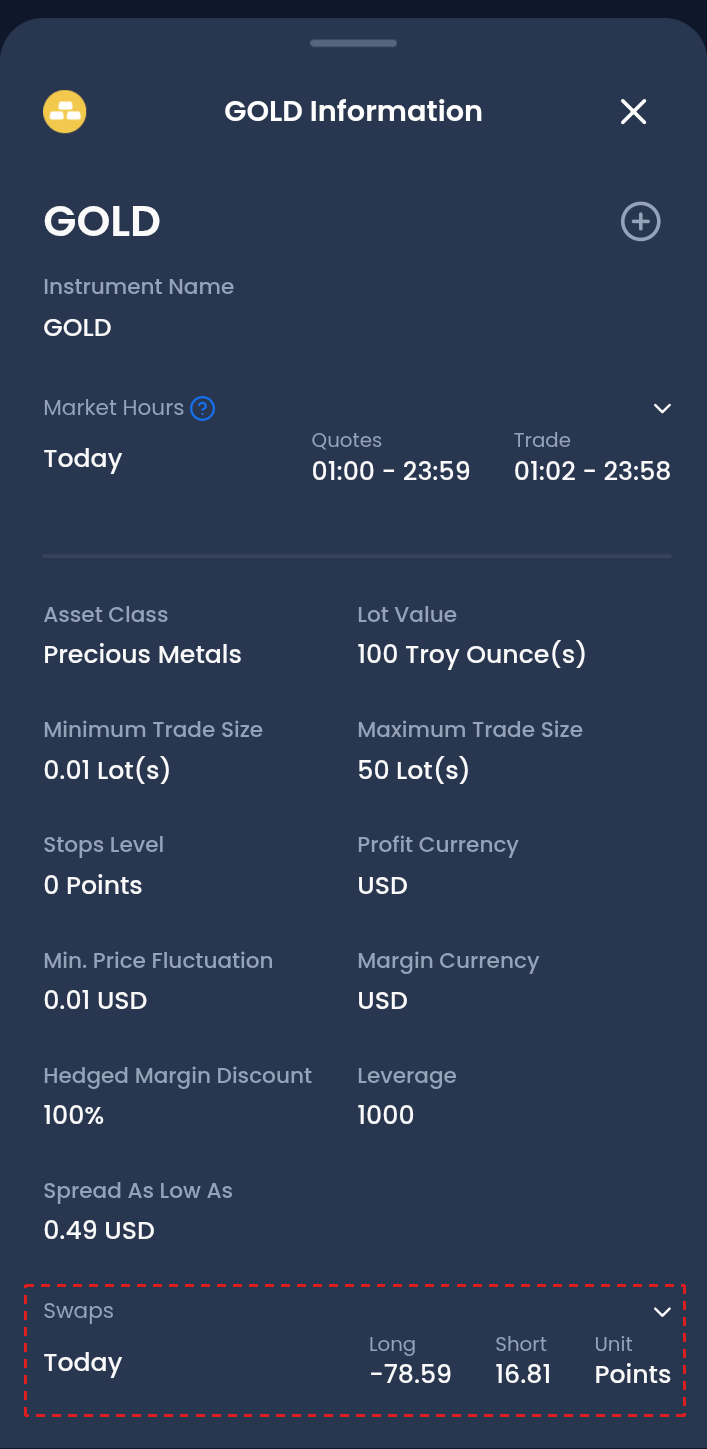
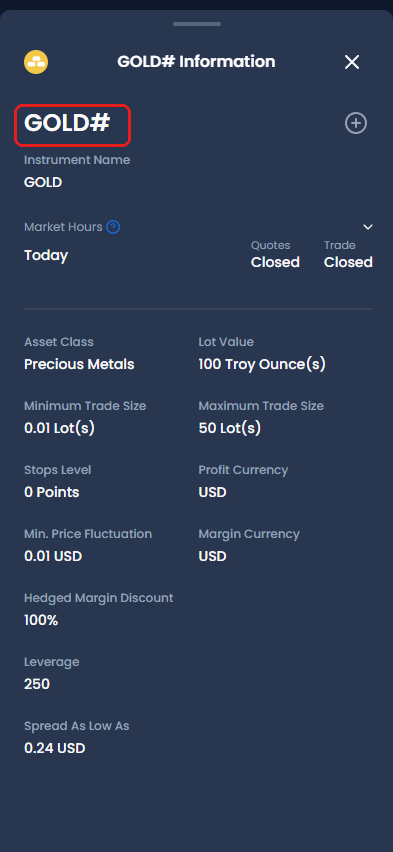
Everything else is the same. Both account types charge no commission, allow scalping and hedging, and use the same margin rules.
The XM fees guide shows the cost of 1 lot in dollars on each account type, before and after the rebate.
How Big Is a Lot on XM?
1 lot on the Standard account is 100,000 units of currency, and 1 lot on the Micro account is 1,000 units of currency.
The table below shows the lot sizes on the Standard and Micro accounts.
| Standard account | Micro account | |
|---|---|---|
| Trade size: 1 lot of EURUSD | 100,000 EUR | 1,000 EUR |
| Trade size: 1 lot of gold | 100 troy ounces | 1 troy ounce |
| Smallest trade on EURUSD | 0.01 lot: 1,000 EUR | 0.1 lot: 100 EUR |
| Gain or loss for 1 pip on 1 lot of EURUSD | about $10 | about $0.10 |
Ultra Low Standard uses the same lot as Standard, and Ultra Low Micro uses the same lot as Micro. The lot sizes are the same on MT4 and MT5.
On the Standard account, one order can be up to 50 lots. However, the largest trade that you can open also depends on your balance, and the lot size calculator shows this size for your balance.
What Account Types Does XM Offer?
XM offers five account types: Standard, Micro, Ultra Low Standard, Ultra Low Micro and Shares. Micro and Ultra Low Micro are the small-lot versions of Standard and Ultra Low. The list of account types was the same in every country we checked.
New clients choose the account type on the registration form. Existing clients, on the other hand, add a trading account of another type from + on the account card on Home.
The XM Standard account guide and the XM Ultra Low account guide explain each account type in detail.
What Rules Apply to Every Account Type?
- Hedging
You can hold a buy and a sell on the same instrument in one trading account. However, XM does not allow hedging across two of your trading accounts. - Scalping
Scalping is allowed on every account type. However, trades closed within three minutes earn no rebate, so you pay the full spread on these trades. - Changing the account type
A trading account cannot change its type, so add a trading account of the new type and move your money across. - Platform
Each trading account runs on either MT5 or MT4. The Shares account and stock CFDs are on MT5 only. - Demo account
On XM, demo accounts come in Standard and Ultra Low Standard, with no Micro demo. Practise on one of them before you open a real Micro trading account. The XM demo account guide shows how to add a demo.
Not with XM yet? Open your first trading account with the button below, and you receive a rebate on every lot you trade, whichever account type you choose.
Questions People Ask About XM Account Types
- What account types does XM offer?
-
XM offers five account types: Standard, Micro, Ultra Low Standard, Ultra Low Micro and Shares. The public account types page groups them as Standard, Ultra Low and Shares.
- What is the difference between Standard and Ultra Low Standard at XM?
-
The Ultra Low Standard account has a lower cost per trade, and gold and the major pairs have no swap on it. The Standard account, on the other hand, gets the deposit bonus.
Both use the standard lot of 100,000 units of currency, and this is what “Standard” means in the Ultra Low Standard name.
- Which XM account type is best?
-
For most traders, the Ultra Low account costs the least. After the rebate, a trade on EURUSD costs about 0.4 pips less than on the Standard account.
However, choose the Standard account for the bonus margin, the Micro account for trades smaller than 1,000 units of currency, and the Shares account to buy shares.
- Does XM have a cent account?
-
No. XM offers the Micro account instead. The XM cent account guide compares Micro with the cent accounts at other brokers.
- Does XM allow hedging?
-
Yes, within one trading account. A hedged position on forex, gold or silver needs no margin.
However, XM does not allow a buy in one of your trading accounts against a sell in another.
- Is the XM Ultra Low account swap-free?
-
Yes, on gold, silver, and the major and cross currency pairs. Other instruments have the same swap as on the Standard account. The XM swap guide lists every rate.
- Can I change my XM account type later?
-
No. Add a trading account of the type you want instead. Tap + on the account card on Home, and then move your balance across. One Members Area login holds up to 10 trading accounts.
- Does XM have an Islamic (swap-free) option?
-
Yes, on Standard and Ultra Low, for clients of the Muslim faith. Apply in the Members Area: profile icon → Settings → Islamic Account.
Once XM approves the request, all your real trading accounts become Islamic.
Which XM Guide Do You Need Next?
Each main account type has its own guide, and the spread and swap tools show today’s figures.
Sources: where each fact on this page comes from
XM’s public pages
- XM account types page (opens in a new tab)
- Which account types receive the bonus, and the minimum deposits: 5 USD, or 10,000 USD on Shares.
- XM Help Centre (opens in a new tab)
- Swap-free instruments on Ultra Low, hedging, scalping, MT4 and MT5, the largest order, demo trading accounts, the number of trading accounts, fixed account types and leverage.
- XM bonus terms (opens in a new tab)
- Losses come out of your balance before the bonus. If you withdraw half of your balance, half of the bonus is also removed.
- XM client agreement (opens in a new tab)
- Section 81, Swap-Free Instruments: what XM treats as misuse of the instruments with no swap, and what XM can do in that case.
- XM promotions page (opens in a new tab)
- The deposit bonus offered in your country. In most countries we checked, a 100 USD deposit received up to 100 USD of bonus.
- XM partner terms (opens in a new tab)
- On a trade where the bonus covers part of the margin, the rebate is paid on the share your own money covers. Trades closed within three minutes earn no rebate.
- XM execution policy page (opens in a new tab)
- XM’s own statement: 99.7% of orders executed in under 66 milliseconds, even around major news.
The XM app and Members Area
- Account type screen
- The five account types, lot sizes, lowest spreads, commission, minimum trade and base currencies. The Shares account appears only when you choose MT5.
- Symbol Information screen
- The Swaps row on GOLD, no Swaps row on GOLD#, and the 50-lot maximum order on gold.
- XM live chat
- The Islamic option on Standard and Ultra Low, and choosing the account type on the registration form.
Forex FanClub
- XM rebate guide
- Rebate amounts per lot: XM’s VIP rate, of which 90% is passed back. A Micro lot earns 1/100 of the Standard amount.
- XM spread tool
- The 24-hour average spreads that the cost tables use.
- XM swap tool
- Swaps on a buy and a sell position, the triple swap day, and the instruments that have no swap on Ultra Low.
- XM margin calculator
- The margin for 0.1 lot of gold at 1:1000 leverage. The tables use this margin to work out how far the gold price can move.
- Account types seen from several countries
- The same five account types appeared in each country we checked from.
Once your XM trading account is open, link it to Forex FanClub. The member area lists every rebate payment day by day, across every broker you use. Registration is free and takes an email address.

Produced and operated by Forex FanClub
Person responsible: Hiroki Sakaida, founder of Forex FanClub
Hiroki Sakaida decides what our content and services cover and which features they offer. He also checks content and functionality and decides on revisions and publication. Our Content and Service Policy explains how we produce and check our content and services, including our use of AI.
Risk warning: Forex and CFD trading involve leverage, and you could lose all the money you invest. This article and tool provide information, not investment advice. The amounts shown are calculated from the collected data and do not guarantee the amounts that will apply to your own trades, or any future profit.
Affiliate disclosure: This article contains XM referral links. Forex FanClub receives referral commission based on registrations and trading through these links.
- Which XM Account Type Should You Choose?
- Day trades
- Using the deposit bonus
- Holding gold for days
- Starting with a few dollars
- Owning shares for the long term
- Still unsure
- How Do Standard and Ultra Low Differ?
- How Big Is a Lot on XM?
- What Account Types Does XM Offer?
- What Rules Apply to Every Account Type?
- Questions People Ask About XM Account Types
- Which XM Guide Do You Need Next?