

XM charges nothing to copy a strategy, from $50. The Strategy Manager takes up to 50% of the new profit.
Copy Trading rules checked on 17 October 2026
With XM Copy Trading (opens in a new tab), your Investor account opens and closes the same trades as the Strategy Manager you choose, in proportion to your money. Before you copy, it helps to know what the fee takes, how much money a copy needs and which trades never reach your account.
Contents
- How Much Does XM Copy Trading Cost?
- How Much Money Do You Need for XM Copy Trading?
- Which XM Strategies Suit a Small Amount?
- Which XM Copy Setting Should You Choose?
- What Does XM Copy Trading Not Copy?
- How Do You Start Copy Trading on XM?
- How Do You Stop Copying a Strategy on XM?
- Can You Become a Strategy Manager on XM?
- Questions People Ask About XM Copy Trading
- Which XM Guide Do You Need Next?
How Much Does XM Copy Trading Cost?
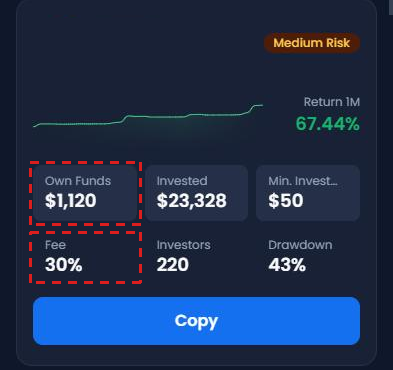
On XM, copying a strategy is free, and you pay the manager only a share of your profit, up to 50%. The share is different on every strategy, because each manager decides it, so check the Fee on the strategy card before you copy.
You also pay only on new profit. If the strategy loses money and then wins it back, you pay no fee on the money it wins back.
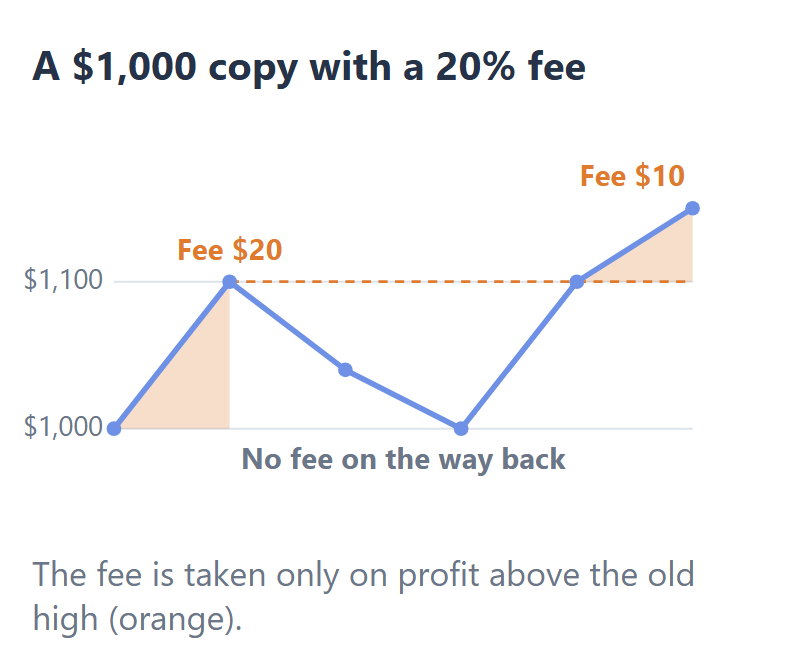
XM works the fee out every day, and it counts profit on open trades too.
How Much Money Do You Need for XM Copy Trading?
You can start XM Copy Trading with $50, but with a small amount, your account misses the manager’s smallest trades. Some strategies also ask for more than $50.
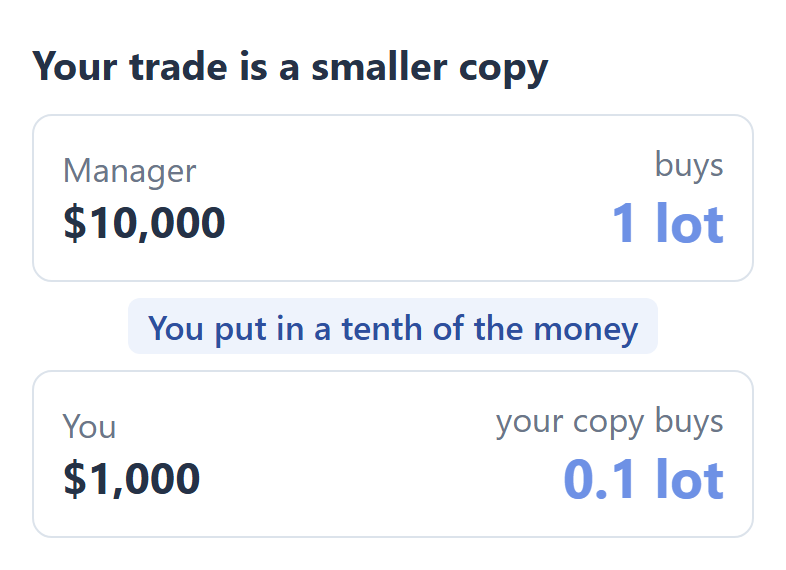
Your trades are a smaller copy of the manager’s trades. If you put in a tenth of the manager’s money, each of your trades is a tenth of the manager’s trade.
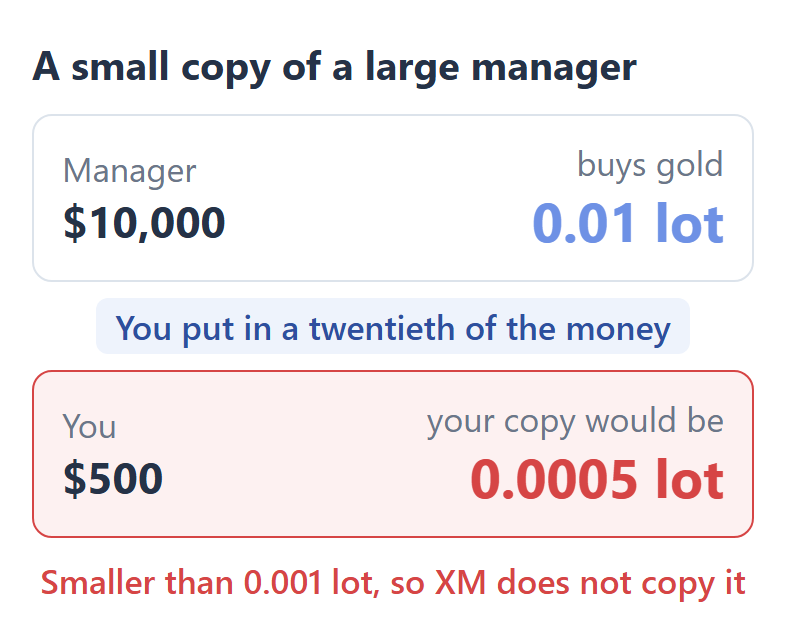
A small amount makes your trades very small, and XM does not copy a forex or gold trade smaller than 0.001 lot. So if you put in $500 and the manager’s account holds $10,000, the manager’s smallest gold trade never reaches your account.
Which XM Strategies Suit a Small Amount?
To receive every trade, put in at least a tenth of the manager’s own money. Each strategy card in XM Copy Trading shows the manager’s own money as Own Funds, so compare it with the amount you plan to invest.
To copy a 0.01 lot gold trade
| You invest | Manager’s Own Funds |
|---|---|
| $50 | Up to $500 |
| $500 | Up to $5,000 |
| $1,000 | Up to $10,000 |
With a small amount, choose from managers with small Own Funds, because more of their trades reach your account.
A strategy’s record shows every trade of the manager, and your copy can miss some of them. So the record of a strategy with large Own Funds can look better than your own copy of it would be.
Which XM Copy Setting Should You Choose?
For most investors, Investment Amount is the better setting, because XM then closes your copy when your loss reaches the amount you put in.
When you press Copy, XM asks how to size your copy. With Investment Amount, your trades follow the money you put in. With Fixed Multiplier, you choose the size yourself. You can also set a stop loss, a take profit and Copy Open Trades.
| Investment Amount | Fixed Multiplier | |
|---|---|---|
| Size of your trades | Follows the amount you invest | The number you choose |
| Automatic stop loss | Yes, equal to your investment | No |
| Manager adds money | Your trades get smaller | Same trade size |
Fixed Multiplier suits you only if you want to choose the trade size yourself. XM sets no stop loss with it, so you have to set one.
What Does XM Copy Trading Not Copy?
XM Copy Trading does not copy the manager’s share trades, so your result can be different from the strategy’s record. Trades that the manager already has open when you start are also left out, unless you turn on Copy Open Trades.
How Do You Start Copy Trading on XM?
To start XM Copy Trading, you first verify your XM profile and then open an Investor account in Copy Trading. XM allows one Investor account for each client, in US dollars, and you cannot place your own trades in it.
Verify your XM profile. The XM verification guide shows the documents. If you have no XM profile yet, the XM registration guide shows how to sign up.
Log in to your XM Members Area (opens in a new tab), and tap Copy Trading on the Home screen.

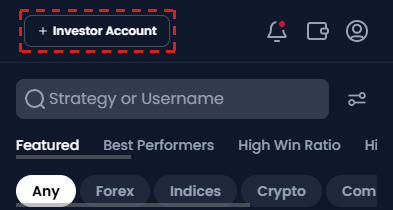
Tap + Investor Account at the top, accept the terms, and press Create Investor Account.
Fund the Investor account with a deposit or an internal transfer from one of your XM trading accounts.
Choose a strategy and press Copy. Then set the amount or the fixed multiplier, and a stop loss if you want one.
Turn on Copy Open Trades if you also want the trades that the manager has open now.
You can copy as many strategies as your money allows, each from $50 or the strategy’s own minimum.
How Do You Stop Copying a Strategy on XM?
On XM, pausing a strategy keeps your open trades, and exiting it closes them all. While a strategy is paused, your account opens no new trades, but it still closes a trade when the manager closes it.
When you exit, XM closes all the trades from that strategy at the current price.
Can You Become a Strategy Manager on XM?
Yes, if your XM trading accounts hold at least $100 in total. In Copy Trading, open Manager Area in the menu at the bottom of the screen, and press the + button to create a strategy.
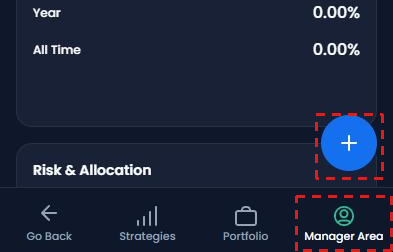
You set your own fee, up to 50% of your investors’ profit, and investors can see the strategy when it holds more than $50.
Questions People Ask About XM Copy Trading
- Is there a demo account for XM Copy Trading?
-
No. XM offers Copy Trading only with real money. To try XM’s platform before you copy, open an XM demo account, which lets you place your own trades.
- Are small trades on indices and crypto skipped too?
-
No, only forex and gold skip a copy that is too small. On indices, crypto and futures, XM opens the trade at the smallest trade size instead, so that trade can be bigger for your money than the manager’s trade.
- Can you use MT4 or MT5 for XM Copy Trading?
-
Yes for Strategy Managers, who can create a strategy from an MT4 or an MT5 account. Investors use the XM website or the XM app instead, because the Investor account opens only there.
- Can you lose more than you invest with XM Copy Trading?
-
Yes, more than the amount you put into one strategy, but not more than the money in your account. The stop loss closes your copy at the next price, so in a fast market the loss can go past it. However, XM gives every client negative balance protection, so your balance does not fall below zero, and you do not owe XM money.
Where the facts and the figures come from:
Sources and how the figures are worked out
The rules
We read the Copy Trading answers in the XM Help Center one by one on 17 October 2026, and XM’s copy trading page (opens in a new tab) on the same day. The fee rules are in the answer on how fees are handled (opens in a new tab), the trade sizes in the answer on the ways to copy trade (opens in a new tab), the limits in the answer on rules and restrictions (opens in a new tab), and pausing and exiting in the answer on pausing a strategy (opens in a new tab).
The calculations
The fee example is our own example of a strategy with a 20% fee. The trade sizes use XM’s formula: your trade is the manager’s trade × your amount ÷ the manager’s equity × 500 ÷ the manager’s leverage. The table takes a manager on 1:500 and the smallest gold trade of 0.01 lot, and finds the largest manager account at which your copy still reaches 0.001 lot, the smallest forex or gold trade that XM copies.
Which XM Guide Do You Need Next?
If you have not opened your Investor account yet, start with XM verification, because XM lets you create it only after your profile is verified. The other guides show how to move money into the Investor account and how XM compares with other brokers.
Once your XM trading account is open, link it to Forex FanClub. The member area lists every rebate payment day by day, across every broker you use. Registration is free and takes an email address.

Produced and operated by Forex FanClub
Person responsible: Hiroki Sakaida, founder of Forex FanClub
Hiroki Sakaida decides what our content and services cover and which features they offer. He also checks content and functionality and decides on revisions and publication. Our Content and Service Policy explains how we produce and check our content and services, including our use of AI.
Risk warning: Forex and CFD trading involve leverage, and you could lose all the money you invest. This article and tool provide information, not investment advice. The amounts shown are calculated from the collected data and do not guarantee the amounts that will apply to your own trades, or any future profit.
Affiliate disclosure: This article contains XM referral links. Forex FanClub receives referral commission based on registrations and trading through these links.
- How Much Does XM Copy Trading Cost?
- How Much Money Do You Need for XM Copy Trading?
- Which XM Strategies Suit a Small Amount?
- Which XM Copy Setting Should You Choose?
- What Does XM Copy Trading Not Copy?
- How Do You Start Copy Trading on XM?
- How Do You Stop Copying a Strategy on XM?
- Can You Become a Strategy Manager on XM?
- Questions People Ask About XM Copy Trading
- Which XM Guide Do You Need Next?