

Move money between your own XM trading accounts instantly with Manage → Transfer.
Checked on 4 October 2026
Transfers between your XM trading accounts at a glance
- Where
- XM Members Area → Manage → Transfer, in the app or on the web. Your own trading accounts only, after your profile is verified.
- Speed
- At once. The money shows in the receiving trading account as soon as you tap Transfer.
- Your bonus
- The bonus moves with the money, in proportion to the balance that you send. The part sent to an Ultra Low or Shares trading account is removed, because those trading accounts get no bonus.
Log in to your XM Members Area (opens in a new tab) to make the transfer.
To pay money into XM from your bank or card, see the XM deposit guide.
Contents
When Should You Use an XM Internal Transfer?
A transfer moves money that you already have at XM, and the money arrives at once. Under XM’s rules (opens in a new tab), you can move money only between your own trading accounts, after your profile is verified.
- More margin now
The money reaches the other trading account at once. So you can add margin to your open trades without waiting for a deposit. - For copy trading
The Investor account for XM Copy Trading also accepts an internal transfer. So you can start copying a strategy with money from your trading account, without a new deposit. - Same currency
Between trading accounts in the same currency, a transfer has no fee. Between different currencies, XM adds 0.3%. For example, a transfer of $1,000 costs about $3. - Between Standard accounts
Your bonus moves with the money to the other Standard account, in proportion to the balance that you send. - To an Ultra Low account
Part of your bonus is removed, in proportion to the balance that you send. The reason is that Ultra Low accounts get no bonus.
The table below shows a Standard account with a $1,000 balance and a $500 bonus. You transfer $500 of the balance, which is half.
| Transfer of $500 | Standard account after the transfer | Receiving account after the transfer |
|---|---|---|
| To a Standard account | $500 and a $250 bonus | $500 and a $250 bonus |
| To an Ultra Low account | $500 and a $250 bonus | $500 and no bonus |
Open your extra trading accounts in the same currency as your first one. Then every transfer is free and arrives at once. So a second trading account can hold spare money for margin.
If your country gets a deposit bonus, deposit straight into the Standard account that you want to trade on. That deposit can get a bonus. Money moved from your other trading account gets no new bonus.
How Do You Transfer Money Between XM Accounts?
Log in to the XM Members Area (opens in a new tab) in the XM app or on the website. On Home, choose the trading account to send from at the top of the account card.
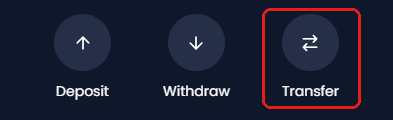
Tap Manage, then the Transfer button.
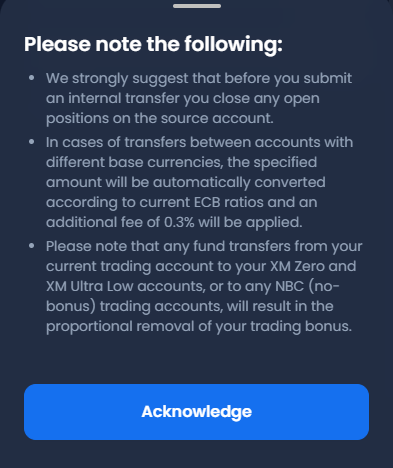
A notice headed Please note the following opens. Read the three points, and tap Acknowledge.
Choose the receiving trading account under Select Account ID. Enter at least the Min Transfer amount, and tap Transfer. The money is in the other trading account at once.
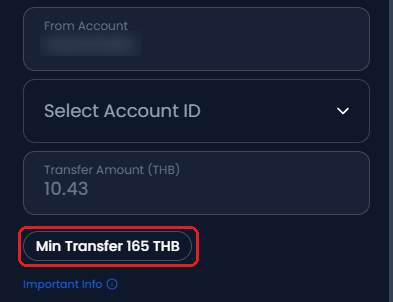
From a USD trading account, the minimum transfer is 5 USD. Trading accounts in other currencies show their own minimum under the amount box.
What Happens to Your XM Bonus When You Move Money?
The bonus moves with the money, in proportion to the balance. The XM Help Centre (opens in a new tab) gives this example: transfer half of the balance, and half of the bonus moves too.
What happens to a trading bonus
- Ultra Low or Shares account
- These trading accounts get no bonus. XM removes the part of the bonus that goes with the money, and that bonus does not come back.
- Bonus alone
- The bonus cannot move on its own. The bonus moves only together with money.
- New bonus
- None. A transfer is not a deposit, so the receiving trading account gets no new bonus.
- Open trades
- XM counts the proportion against the balance plus the open profit or loss of the sending trading account.
The XM account types page (opens in a new tab) shows which trading accounts get a bonus in your country. The XM bonus guide explains how the bonus works.
Does XM Charge a Fee for Internal Transfers?
XM charges a fee only between trading accounts in different currencies.
- Same currency
No fee. The amount that you send arrives in full. - Different currency
The notice on the transfer screen says that XM converts the amount at the current ECB rate and adds a fee of 0.3%. The notice on the day of your transfer is the one that counts. - Checking the currency
The amount box shows the currency of the sending trading account, such as Transfer Amount (USD).
Why Can’t You Transfer Money Between XM Accounts?
- Another person’s account
XM moves money only between trading accounts in your own name. To pay another person, withdraw to your bank, and send the money from there. - Verification
Your XM profile must be verified. XM verifies the profile, not each trading account. Finish the identity check in the Members Area, and try again. - Open trades
XM asks you to close open trades on the sending trading account before a transfer. If the transfer does not go through, close the trades, and try again. - Below the minimum
The minimum shows under the amount box. Enter at least that amount.
If the screen still refuses the transfer, ask XM on live chat with both trading account numbers ready. The XM contact guide lists every channel.
New to XM? Open your trading account through the button below to receive a rebate on every lot you trade.
FAQ on XM Internal Transfers
- How long does an XM internal transfer take?
-
The money arrives at once. Check the new balance under Manage on the receiving trading account.
- What is the minimum internal transfer at XM?
-
5 USD from a USD trading account. Trading accounts in other currencies show their own minimum under the amount box as Min Transfer.
- Can I transfer money to a friend’s or relative’s XM trading account?
-
No. XM moves money only between trading accounts in your own name. To pay another person, withdraw to your bank account, and send the money from there.
The XM withdrawal guide shows the steps and the timing.
- Will I lose my bonus if I move money to an Ultra Low trading account?
-
Part of the bonus is removed, in proportion to the balance that you send. Send 30% of the balance, and 30% of the bonus is removed. The rest stays on the Standard trading account.
- Can I transfer only the bonus?
-
No. The bonus moves only together with money, in proportion to the balance. To move more of the bonus, transfer more of the balance.
- Does a transfer between my trading accounts keep them active?
-
Yes. XM counts a transfer between your trading accounts as account activity, like a trade, a deposit or a withdrawal.
After 90 days with no activity, a trading account becomes dormant.
XM then removes any bonus and charges USD 10 a month. If the balance is under USD 10, the fee is the whole balance.
The XM inactivity fee guide shows the other ways to keep a trading account active.
- Is there a fee for an XM internal transfer?
-
Only between different currencies. XM then adds 0.3% on top of the ECB rate. Between trading accounts in the same currency, a transfer has no fee.
- Can I move money from MyWallet to a trading account?
-
Yes. MyWallet holds the money that you earn from XM programmes. To withdraw that money, move it to one of your trading accounts first. Then withdraw as usual.
XM treats a move from MyWallet like a deposit, so the move can get a deposit bonus.
Which XM Guide Do You Need Next?
Sources: where each fact on this page comes from
- XM Help Centre (opens in a new tab)
- Transfers at once between your own trading accounts after the profile is verified, the conversion between currencies, no transfers to other clients, the part of the bonus that moves or is removed, and MyWallet. Read on 4 October 2026.
- XM bonus programme terms (opens in a new tab)
- Clauses 4 to 6: the bonus moves with the money in proportion to the balance, a transfer gets no new bonus, the bonus cannot move on its own, and how open trades change the proportion.
- XM Client Agreement (opens in a new tab)
- Clause 72.5: XM aims to credit a deposit within one business day. Clause 79: an internal transfer counts as activity, and the fee of USD 10 a month after 90 days with no activity.
- XM Members Area
- The Manage screen, the notice Please note the following (the ECB rate and the 0.3% fee, closing open trades on the sending trading account, and the bonus removed in proportion) and the Internal Transfer form, on 27 September 2026. The pictures show a real trading account with its number hidden.
- XM live chat
- On 27 September 2026, the chat confirmed the minimum transfer of 5 USD from a USD trading account and the 0.3% fee between currencies. On 1 October 2026, the chat confirmed that money that arrives by transfer gets no new bonus. A direct deposit to a new Standard account gets a bonus.
Once your XM trading account is open, link it to Forex FanClub. The member area lists every rebate payment day by day, across every broker you use. Registration is free and takes an email address.

Produced and operated by Forex FanClub
Person responsible: Hiroki Sakaida, founder of Forex FanClub
Hiroki Sakaida decides what our content and services cover and which features they offer. He also checks content and functionality and decides on revisions and publication. Our Content and Service Policy explains how we produce and check our content and services, including our use of AI.
Risk warning: Forex and CFD trading involve leverage, and you could lose all the money you invest. This article and tool provide information, not investment advice. The amounts shown are calculated from the collected data and do not guarantee the amounts that will apply to your own trades, or any future profit.
Affiliate disclosure: This article contains XM referral links. Forex FanClub receives referral commission based on registrations and trading through these links.