

Exness has five account types, and for gold the Raw Spread account costs the least. Standard Cent suits a small deposit.
Checked on 14 October 2026
We compare the five Exness accounts with the 24-hour average spreads that our Exness spread tool records, then show which account fits your deposit and your trading.
Contents
- Which Exness Account Type Should You Choose?
- Is Raw Spread or Zero Cheaper at Exness?
- When Is the Exness Pro Account the Better Choice?
- Which Exness Account Is Best for a Small Deposit?
- What Is the Same on Every Exness Account Type?
- How Do You Open a Second Exness Account Type?
- How Do You Get a Rebate on Every Exness Account Type?
- Exness Account Types FAQ
- Which Page Do You Need Next?
Which Exness Account Type Should You Choose?
For gold, the Exness Raw Spread account costs the least, about $15.03 for 1 lot with the commission, against $24.06 on Standard.
ForexFanClub also pays you a rebate on every lot that you trade at Exness, which returns part of that cost. Raw Spread stays the cheapest account after the rebate too.
1 lot of gold (100 ounces)
| Cost before the rebate | After the rebate | |
|---|---|---|
| Standard account | $24.06 | $15.40 |
| Pro account | $16.88 | $13.08 |
| Raw Spread account | $15.03 | $12.33 |
| Zero account | $15.03 | $12.33 |
On Standard you get back a larger rebate, because the rebate there is 36% of the spread. However, the spread on Standard is so much wider that the trade still costs $3.07 more than on the Raw Spread account. So if you trade 10 lots of gold a month, the Raw Spread account saves you about $31 a month after the rebate.
The cheapest account is not always the right one, though. Your deposit, your trade size and what you trade also decide it.
- Trading gold
Raw Spread is the account for you. Zero costs the same on gold, but Zero charges more on Bitcoin, silver and the stock market indices, so if you open only one account, open a Raw Spread account (opens in a new tab). - Trading currency pairs
Raw Spread and Pro are close. On EURUSD, Raw Spread costs less, and on USDJPY, Pro costs less after the rebate. If you trade mostly the yen pairs, open a Pro account (opens in a new tab). - Starting with a small deposit
Standard Cent lets you trade at one hundredth of the Standard lot size, with the same spread as Standard. It suits your first trades with real money, so open a Standard Cent account (opens in a new tab) to start. - Under the Pro minimum
Standard suits a deposit below the minimum for Pro, Raw Spread and Zero, if you want to trade normal lot sizes, stocks or indices. In that case, open a Standard account (opens in a new tab).
You can hold several account types in one Exness Personal Area. So you can start on Standard or Standard Cent and add a Raw Spread account later, when your deposit reaches the minimum.
Is Raw Spread or Zero Cheaper at Exness?
On gold, Raw Spread and Zero cost the same, $12.33 for 1 lot after the rebate, but on most other instruments Zero costs more. Zero shows a smaller spread, and Zero takes a larger commission instead. On gold, the two differences cancel out exactly.
On Bitcoin, silver and the stock market indices, the commission on Zero is larger than the spread that Zero saves you. The table below shows three of them after the rebate.
| 1 lot after the rebate | Raw Spread account | Zero account |
|---|---|---|
| Bitcoin | $3.38 | $7.17 |
| Silver | $65.35 | $78.35 |
| US30 index | $0.60 | $1.14 |
So the zero spread does not make a trade cheaper. What Zero gives you is a cost that you know before you trade, because most of it is a fixed commission.
If a cost that you know in advance matters more to you than the lowest total cost, open a Zero account (opens in a new tab). On gold and EURUSD, Zero costs the same as Raw Spread. The cost panel in our Exness rebate guide shows what you pay after the rebate on every instrument and account.
When Is the Exness Pro Account the Better Choice?
The Exness Pro account costs the least on some currency pairs, for example USDJPY, and it charges no commission. On gold, Pro costs $13.08 for 1 lot after the rebate, which is $0.75 more than Raw Spread.
| 1 lot after the rebate | Pro account | Raw Spread account |
|---|---|---|
| USDJPY | $4.03 | $4.89 |
| EURUSD | $5.15 | $4.73 |
| Gold | $13.08 | $12.33 |
Across the 16 instruments that we measure, Pro is the cheapest account after the rebate on 5 of them, which are four currency pairs and one index. Raw Spread is the cheapest, or the same as Zero, on the other 11. So if you trade mainly the yen pairs, compare the cost after the rebate on Pro and Raw Spread in the cost panel of our rebate guide before you open a Pro account (opens in a new tab).
Pro is also the only Exness account where you choose how your orders fill. When you open a Pro trading account, the Execution type row offers Market, which is the default, or Instant.
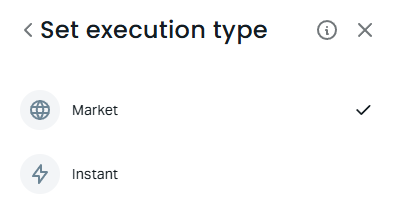
With Market, your order fills at the next available price, as it does on the Standard, Standard Cent, Raw Spread and Zero accounts, so it can fill at a different price from the one on your screen. This gap is called slippage. With Instant, your order fills at the price on your screen, but if the price moves first, Exness can offer you a new price instead. This new offer is called a requote.
Which Exness Account Is Best for a Small Deposit?
Standard Cent is the best Exness account for a small deposit, because every trade there is one hundredth of the same trade on Standard. So your profit, your loss and your cost are also one hundredth, which lets you trade with real money at a very small size.
The spread is the same as on Standard, and so is the rebate of 36% of the spread. So for the same trade size, Standard Cent costs more than the Raw Spread account, but each trade is so small that the cost stays a few cents.
Standard Cent has three limits. Exness offers Standard Cent only as a real account, with no demo version. You can trade only forex, metals and cryptocurrencies there, and you can hold up to 10,000 positions at the same time. If you also want stocks or indices with a small deposit, open a Standard account (opens in a new tab) instead.
Our cent account comparison compares Standard Cent with the cent accounts at other brokers. To open one, use the Standard Cent account (opens in a new tab) sign-up page.
What Is the Same on Every Exness Account Type?
Leverage, the stop out level and the smallest trade are the same on all five Exness accounts. The differences are the cost, the minimum deposit, the execution and the margin call level.
Same on every account
- Maximum leverage, up to unlimited
- Stop out at 0% margin level
- Smallest trade of 0.01 lot
- Swap-free trading available
Different by account
- Commission on Raw Spread and Zero only
- A choice of market or instant execution on Pro only
- Margin call at 60% on Standard and Standard Cent, 30% on the others
- Only forex, metals and crypto on Standard Cent
The margin call is only a warning, because Exness closes positions at the stop out level, which is 0% on every account. So the margin call level does not decide when Exness closes your trade.
The minimum first deposit also differs by account. On Standard and Standard Cent, your payment method sets it. On Pro, Raw Spread and Zero, it is USD 200 in many countries and more in some. The Exness minimum deposit guide shows how to see the figure for your country.
The fees outside your trades are the same on every account type, because Exness charges no deposit, withdrawal or inactivity fee. Our guide to Exness fees and charges lists every fee, from the spread to withdrawals.
How Do You Open a Second Exness Account Type?
You add a new trading account of the type you want in your Exness Personal Area, and your current trading account stays as it is. The type is set when a trading account is opened, so a new trading account is the way to change it.
Sign in to your Exness Personal Area (opens in a new tab).
Open Trading, then Accounts, and press Open account.
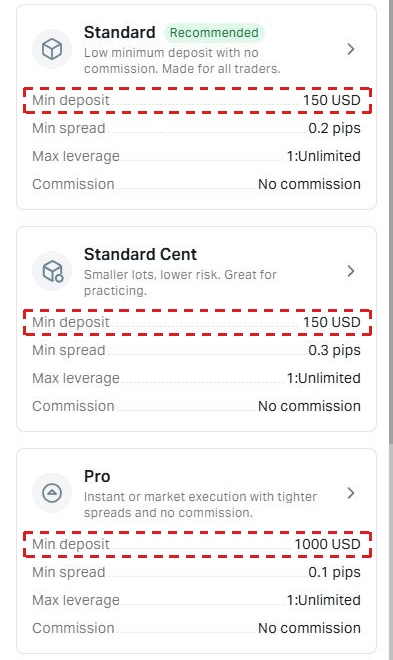
Choose the card of the account type that you want. The cards also show Min deposit for your country.
On Set up your account, keep Real and check the platform, the maximum leverage and the currency. On Pro, this screen also has the Execution type row.
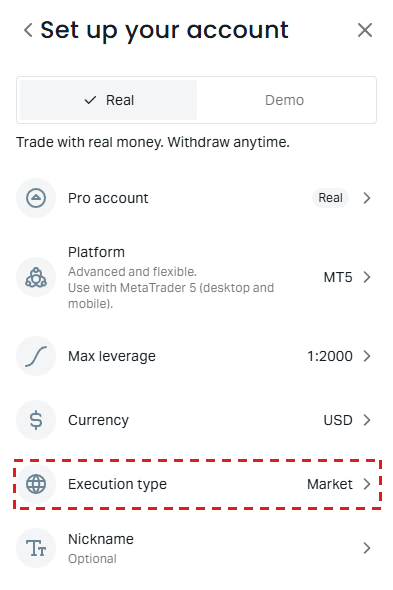
On a computer, the form also has a Trading password field when you choose MT5 or MT4, so set the password there and create the account. On a phone, Exness opens the trading account straight away after Continue, without asking for a password.
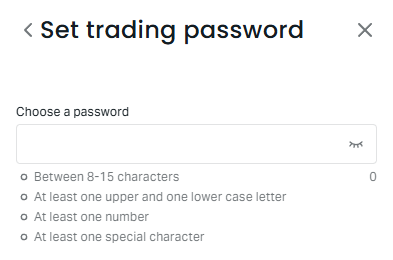
If Exness did not ask for a password, set one before you log in to MT5. In Accounts, open the settings of the new trading account and choose Trading password. Exness asks you to confirm the change with your 2-step verification. An account on the Exness platform needs no trading password, so skip this step there.
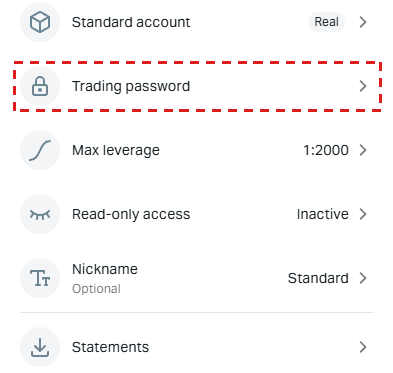
Type the new password and press Save. The password needs 8 to 15 characters with upper and lower case letters, a number and a special character. Exness does not send it by email, so keep it somewhere safe.
In MT5, you sign in with the new trading account’s number, trading password and server, not with your Personal Area password. Our guide to the Exness Personal Area login shows where to find the server and how to fix an “Invalid account” error.
Each trading account has its own balance. So move money to the new trading account with a transfer between your accounts, which our Personal Area shows as instant to 1 day.
How Do You Get a Rebate on Every Exness Account Type?
ForexFanClub pays a rebate on all five Exness account types, if ForexFanClub is the partner of your trading account. On Standard and Standard Cent, 36% of the spread comes back, on Pro it is 22.5%, and on Raw Spread and Zero you receive a set amount per lot. The Exness rebate guide shows the amount on each instrument.
To receive the rebate, register with Exness through the button below. Every trading account that you open in that Personal Area then earns the rebate, whatever its type.
If you already have an Exness Personal Area with another partner, ask Exness to change your partner to ForexFanClub. After Exness approves the change, add a new trading account.
Exness Account Types FAQ
- Which Exness account is best for beginners?
-
Standard Cent is the best start, because every trade there is one hundredth of the size on Standard. When you trade larger sizes, add a Standard account or a Raw Spread account in the same Personal Area.
- Which Exness account has the lowest spread?
-
Zero has the lowest spread, but not the lowest cost. On gold, Raw Spread and Zero cost the same after the commission, and on Bitcoin and the indices Raw Spread costs less.
- Can you change the type of an Exness trading account?
-
You open a new trading account of the other type in your Personal Area. Your old trading account keeps its type, and you can move your money with a transfer between your accounts.
- Do all Exness account types have swap-free trading?
-
Yes. Swap-free trading is available on all five account types. The Exness swap guide explains which instruments stay swap-free and for how long.
Where the facts and the figures come from:
Sources and how the figures are worked out
The cost of each trade
The costs are the 24-hour averages in our rebate ranking, updated on 14 October 2026 at 17:06 UTC. We read the spread separately from Standard, Pro, Raw Spread and Zero MT5 accounts in US dollars and save samples at regular intervals. The commission is the amount for opening and closing 1 lot, and the rebate is what ForexFanClub pays back on the same lot. We do not measure Standard Cent, and the Exness public calculator showed the same spread on Standard Cent as on Standard, so Standard Cent uses the Standard figures per ounce.
The account conditions
The commission, the order execution, the margin call and stop out levels, the instruments, the lot limits and the minimum deposit for each account come from the account details on the public Exness trading calculator page, read on 14 October 2026. The Open account and account set-up screens and the transfer time come from our own Exness Personal Area (set-up screens read on 15 October 2026), cropped so that no account details show. Your country can show other minimum deposits.
Which Page Do You Need Next?
If you have chosen your account, check the minimum deposit for your country, and then the rebate that comes back on it. The spread and swap pages show today’s figures for each account.
Once the new Exness trading account is open, add it to Forex FanClub. The member area lists every rebate payment day by day, across every broker you use. Registration is free and takes an email address.

Produced and operated by Forex FanClub
Person responsible: Hiroki Sakaida, founder of Forex FanClub
Hiroki Sakaida decides what our content and services cover and which features they offer. He also checks content and functionality and decides on revisions and publication. Our Content and Service Policy explains how we produce and check our content and services, including our use of AI.
Risk warning: Forex and CFD trading involve leverage, and you could lose all the money you invest. This article and tool provide information, not investment advice. The amounts shown are calculated from the collected data and do not guarantee the amounts that will apply to your own trades, or any future profit.
Affiliate disclosure: This article contains Exness referral links. Forex FanClub receives referral commission based on registrations and trading through these links.
- Which Exness Account Type Should You Choose?
- Is Raw Spread or Zero Cheaper at Exness?
- When Is the Exness Pro Account the Better Choice?
- Which Exness Account Is Best for a Small Deposit?
- What Is the Same on Every Exness Account Type?
- How Do You Open a Second Exness Account Type?
- How Do You Get a Rebate on Every Exness Account Type?
- Exness Account Types FAQ
- Which Page Do You Need Next?