
The HFM bonus depends on your country. Where HFM offers the Top-Up bonus, every deposit gets 20% extra up to $5,000. You can withdraw the profit that you make with the bonus, but you can never withdraw the bonus itself.
Checked on 16 October 2026
We opened HFM’s bonus pages from 11 countries, and worked out what each bonus does to your withdrawals and your rebate. Your own HFM Client Area shows the offer for your country.
Contents
- Which HFM Bonus Can You Get?
- Does HFM Have a No-Deposit Bonus?
- How Does the HFM Top-Up Bonus Work?
- What Are HFM Shield 500 and the SuperCharged Bonus?
- How Do You Get the HFM Top-Up Bonus?
- What Happens to Your HFM Bonus When You Withdraw?
- Can You Get Both the HFM Bonus and the Rebate?
- FAQ About the HFM Bonus
- Which Page Do You Need Next?
Which HFM Bonus Can You Get?
The HFM bonus that you can get depends on your country. In the 11 countries we checked, it was a Top-Up bonus on deposits, the Shield 500 loss refund, or no bonus at all.
Each of these bonuses gives you money to trade with, but you can never withdraw the bonus itself. So the bonus helps you most when a small deposit needs more margin.
- Top-Up bonus
In Malaysia, for example, HFM adds 20% to every deposit until the bonus reaches $5,000. Indonesia gets 10%, and a few countries also get a limited-time 100% bonus on the first deposit. - Shield 500
In Pakistan, Sri Lanka and Bangladesh, the offer is Shield 500. It pays back your losses from the first 25 days of trading, up to $500, as a bonus that you can trade with. - Shield 500 and SuperCharged
In South Africa and Nigeria, you get Shield 500 and also the 100% SuperCharged bonus, which doubles each deposit on a Premium account as extra margin. - No bonus
In India and the Philippines, HFM had no bonus on deposits. For these two countries, HFM’s bonus page opened the HFM home page instead.
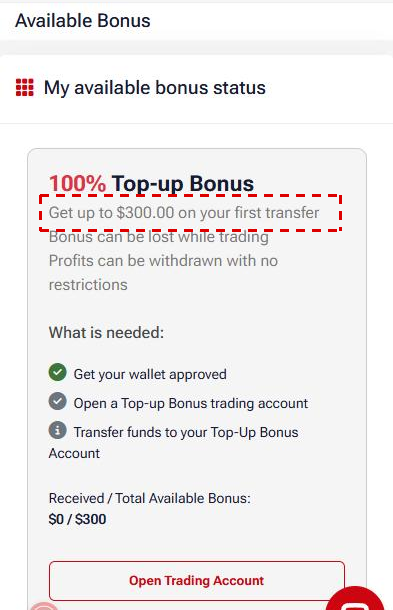
HFM changes these offers often, so the offer that counts is the one in your own HFM Client Area. Under Promotions, then Available Bonuses, it shows the bonus for your country, its limit and what you need to do to receive it.
Does HFM Have a No-Deposit Bonus?
No. In the 11 countries we checked, every HFM bonus needed a deposit first. Only HFM’s Japanese site offered a free trading account instead.
The closest offer is Shield 500, which needs a first deposit of only $10, and HFM’s Bonus Offerings page (opens in a new tab) shows whether your country has it. You still trade with your own money first, and HFM adds the bonus on day 25 only if you have lost money by then.
How Does the HFM Top-Up Bonus Work?
The HFM Top-Up bonus adds a percentage of every deposit that you move into a Top-Up Bonus account, 20% in most countries that offer it. You can use the bonus as margin, and it can also absorb your losses.
A $500 deposit into a Top-Up Bonus account
Your deposit$500
Top-Up bonus at 20%$100
Money to trade with$600
The 20% bonus comes with every deposit that you move into the Top-Up Bonus account, not only the first one. It stops growing at $5,000, so you reach that limit only after $25,000 of deposits.
Our comparison of forex deposit bonuses shows how the HFM Top-Up bonus compares with the XM bonus at the same deposit.
The 100% bonus is a limited-time offer, and it applies to your first deposit only. Its limit is $200 or $300, depending on your country, and your Client Area shows whether the offer is running for you.
Trading on the Top-Up Bonus account costs the same as on the Premium account. Both accounts have spreads from 1.4 pips and the same rebate on gold.
Two things are different. The leverage goes up to 1:1000 instead of Premium’s 1:2000. The Top-Up Bonus account is also not swap-free, so a gold buy held overnight pays the swap at HFM every night.
You can hold one Top-Up Bonus account. If you hedge a trade on it with another account at HFM or with another broker, HFM can cancel the bonus.
The account also needs some activity. If it has no deposit, withdrawal or trade for 60 days, HFM closes it without notice, moves any profit to your wallet and removes the bonus.
What Are HFM Shield 500 and the SuperCharged Bonus?
HFM Shield 500 pays back the losses from your first 25 days of trading, up to $500, as a bonus that you can trade with. The 100% SuperCharged bonus is a different offer for a Premium account. It doubles each deposit as credit, which adds margin but cannot absorb a loss.
| Shield 500 | SuperCharged | |
|---|---|---|
| Account | Its own Shield 500 account | Premium account |
| Smallest deposit | $10, not by crypto | $250, or $50 in Africa |
| What you receive | Your losses back as a bonus on day 25 | Credit equal to each deposit |
| Most bonus | $500 | $50,000 |
For example, you deposit $300 with Shield 500 and lose $200 in the first 25 days. On day 25, HFM adds a $200 bonus, so you have $300 to trade with again.
SuperCharged works differently. A $250 deposit gives you $500 of equity. However, once your losses reach your own $250, HFM removes the credit. So the credit keeps your margin level higher, but it never pays for a loss.
How Do You Get the HFM Top-Up Bonus?
You get the HFM Top-Up bonus by opening a Top-Up Bonus account in your Client Area and moving money into it with Transfer Funds. There is nothing to apply for, because HFM adds the bonus when the transfer arrives.
- Log in to your HFM Client Area (opens in a new tab). Your phone number must be verified, and your profile fully approved.
- Open Promotions, then Available Bonuses. The screen shows the bonus for your country, its limit and what is needed.
- Open Trading Accounts, then Open Live Account, and open a Top-Up Bonus account on the Bonus Accounts tab.
- Deposit into myWallet. The deposit methods in our HFM minimum deposit guide show the minimum for each method.
- Open Transfer Funds, choose myWallet in From and your Top-Up Bonus account in To, and send the transfer. The bonus appears in the Top-Up Bonus account.
What Happens to Your HFM Bonus When You Withdraw?
When you withdraw from an HFM Top-Up Bonus account, the bonus goes down by the same percentage as the share of your withdrawable money that you take out. For example, if you take out half of your money, HFM removes half of the bonus.
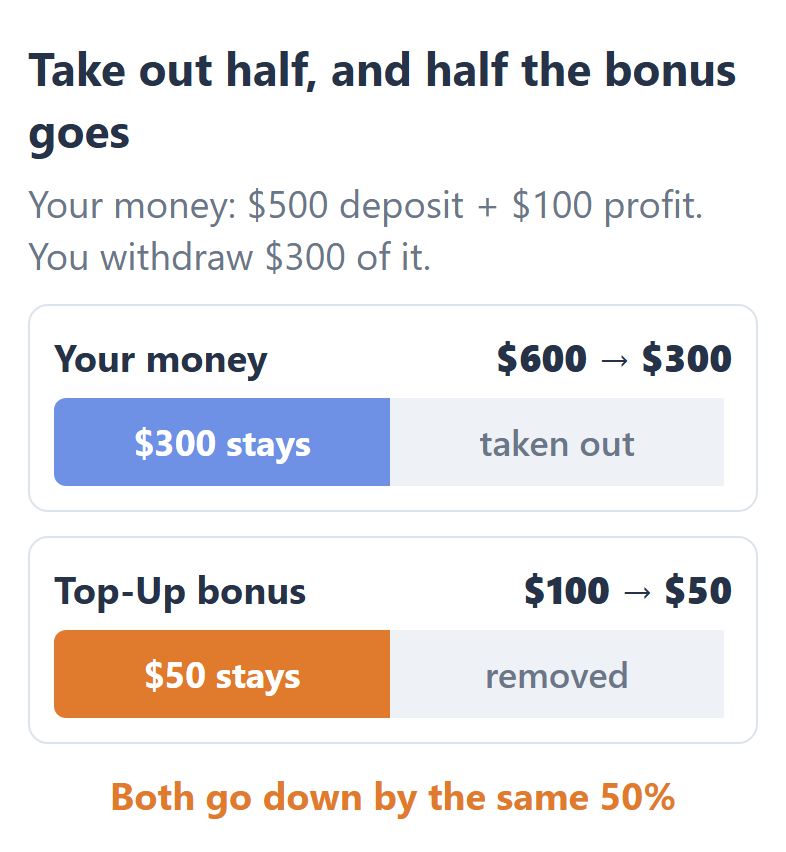
A transfer back to myWallet counts the same way. So if you need only part of your money, taking out only that part keeps more of the bonus in the account. Our HFM withdrawal guide shows when the money arrives.
Shield 500 and SuperCharged follow their own rules. If you withdraw in the first 25 days, you lose Shield 500, and after that it goes down by the same percentage as your withdrawal. With SuperCharged, each dollar that you withdraw removes one dollar of the credit.
Can You Get Both the HFM Bonus and the Rebate?
Yes. The HFM Top-Up Bonus account earns the ForexFanClub rebate, but the part of a trade’s margin that the bonus covers earns no rebate. The rebate returns part of the spread and commission on every lot, in your myWallet the next day.
1 lot of gold, with the bonus covering half the margin
Rebate on 1 lot of gold$13.50
Margin from your own money50%
Rebate you receive$6.75
So the smaller the bonus is against your deposit, the less your rebate goes down. HFM’s partner team confirmed this rule to us, and HFM’s loyalty points work the same way, because they count only the volume traded with your own money.
To receive the rebate on a Top-Up Bonus account, register with HFM through the button below. If you already have an HFM Client Area, you can add a new trading account through ForexFanClub instead.
FAQ About the HFM Bonus
- Do you need a partner code to get the HFM bonus?
-
No. HFM’s bonus terms do not mention a partner code. A partner code only decides who your partner at HFM is, and ForexFanClub’s code 314605 adds the rebate to the bonus.
- Why is the bonus in my Client Area different from HFM’s promotions page?
-
Your Client Area shows the offer for your country, and HFM’s terms say that the percentage and the limit are set there. So a public page can show a lower limit than your Client Area.
- How do you stop the HFM Top-Up bonus?
-
To stop the HFM Top-Up bonus, you email tradingdesk@hfm.com. Only the Top-Up Bonus account receives this bonus, so you can also trade on the Premium account without it.
Where the facts come from:
Sources and how the examples are worked out
The offers in each country
On 16 October 2026, we opened HFM’s Promotions, Bonus Offerings and Top-Up Bonus Account pages as a visitor from 11 countries in Asia and Africa. Pages for Egypt, Kenya, Ghana and Iraq opened HFM’s European site, so we could not read them. HFM changes its offers often, and the limited-time 100% bonus runs for a few days at a time.
The rules of each bonus
The Top-Up rules come from the Top-Up Bonus Terms and Conditions of March 2026, the Shield 500 rules from its terms of May 2026, and the SuperCharged rules from its terms of March 2026. The Available Bonus screen comes from our own HFM Client Area, read without sending anything. The withdrawal example uses the proportional rule of the Top-Up terms with a deposit and a profit that we chose.
The rebate
HFM’s partner team told us in October 2026 that a trade made partly with bonus money earns commission on the share of real money. The gold rebate is the current rate in the HFM rebate table, and the loyalty rule comes from the HFM Loyalty Program terms of July 2026.
Which Page Do You Need Next?
If you plan to open a Top-Up Bonus account, the account types guide compares it with HFM’s other accounts, and the minimum deposit guide shows how much to deposit.
Once the HFM trading account is open, add it to Forex FanClub. The member area lists every rebate payment day by day, across every broker you use. Registration is free and takes an email address.

Produced and operated by Forex FanClub
Person responsible: Hiroki Sakaida, founder of Forex FanClub
Hiroki Sakaida decides what our content and services cover and which features they offer. He also checks content and functionality and decides on revisions and publication. Our Content and Service Policy explains how we produce and check our content and services, including our use of AI.
Risk warning: Forex and CFD trading involve leverage, and you could lose all the money you invest. This article and tool provide information, not investment advice. The amounts shown are calculated from the collected data and do not guarantee the amounts that will apply to your own trades, or any future profit.
Affiliate disclosure: This article contains HFM referral links. Forex FanClub receives referral commission based on registrations and trading through these links.
- Which HFM Bonus Can You Get?
- Does HFM Have a No-Deposit Bonus?
- How Does the HFM Top-Up Bonus Work?
- What Are HFM Shield 500 and the SuperCharged Bonus?
- How Do You Get the HFM Top-Up Bonus?
- What Happens to Your HFM Bonus When You Withdraw?
- Can You Get Both the HFM Bonus and the Rebate?
- FAQ About the HFM Bonus
- Which Page Do You Need Next?