

Exness leverage goes up to Unlimited, on a trading account with less than USD 5,000 of equity and enough past trades. Otherwise the maximum is 1:2000, and around news and the weekend, the leverage on gold can fall to 1:100.
Checked on 19 October 2026
We read the Exness leverage rules and the margin data that our Exness margin calculator receives from Exness MT5, then work out when your leverage drops and what that does to a gold trade.
The leverage of each of your trading accounts, and whether the Unlimited option is open to you, shows in your Exness Personal Area.
Contents
What Leverage Does Exness Give You?
Exness gives you Unlimited leverage on gold and currency pairs once you meet three conditions, and up to 1:2000 until then. On a normal day, both let you open a large gold trade with very little money.
At 1:2000, 1 lot of gold needs only $208 of margin. Around high-impact news and the weekend, the leverage on a new gold trade can fall to 1:100, so the same 1 lot needs $4,165, 20 times as much.
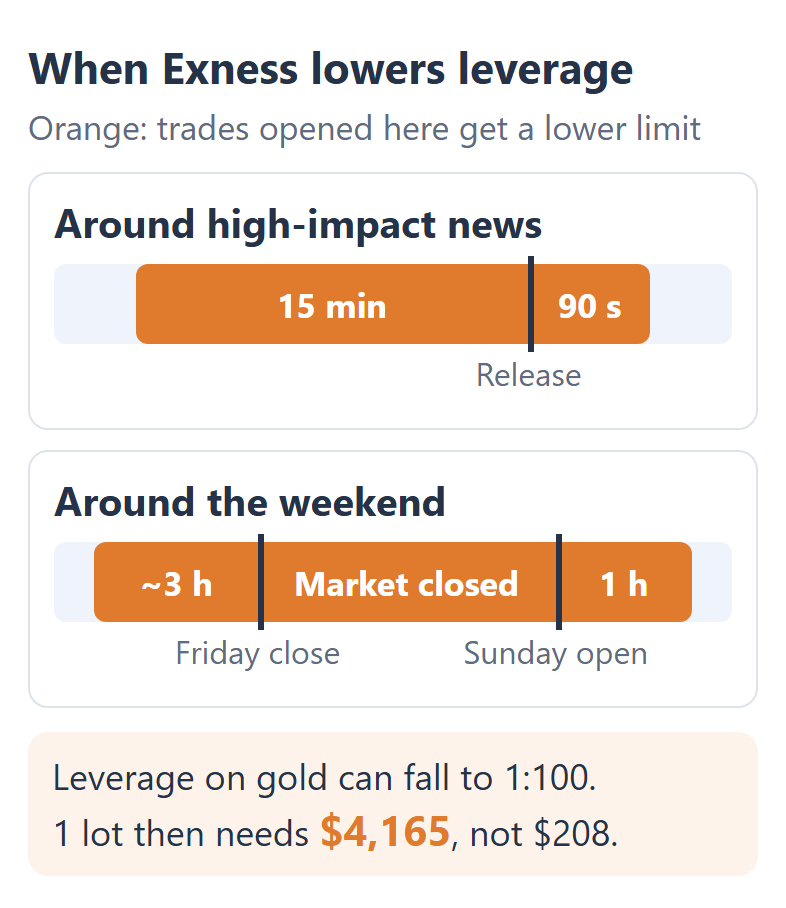
So in those periods, 1:100 decides how large a new gold trade can be. A gold trade that you opened earlier keeps its margin, unless you close one side of a hedge.
If you open gold trades around news or late on Friday, plan their size with 1:100, the lowest limit in those periods. At other times, 1:2000 and Unlimited are the leverage that you really get.
Exness does not publish which traders get which level between 1:100 and 1:1000, so the low end is the only figure that you can plan with.
How Do You Get Unlimited Leverage on Exness?
On a real Exness trading account, you can choose Unlimited leverage once your equity is under USD 5,000 and you have closed 10 orders with a total of 5 lots. Until then, the option shows in grey.
- Equity under USD 5,000
Your equity needs to be under USD 5,000 on the trading account that you set to Unlimited. - 10 closed orders
Your closed orders count across all the real trading accounts in your Personal Area. Pending orders that never filled do not count. - 5 lots in total
Those closed orders need to add up to at least 5 lots. On Standard Cent, Exness counts 500 cent lots.
If you trade small, the lots take the longest. At 0.01 lot a trade, 5 lots means 500 closed trades.
With Unlimited, gold, silver and the currency pairs on Exness’s list need almost no margin. The list has all the major and minor pairs and a few others, and our Exness margin guide shows the margin on each.
Unlimited ends once your equity reaches USD 5,000, and Exness applies 1:2000 again. The news and weekend limits also apply on Unlimited.
When Does Exness Lower Your Leverage?
Exness lowers the leverage for new trades around high-impact news and the weekend, and your maximum leverage also falls as your equity grows.
Exness calls the news and weekend periods Higher Margin Requirements, or HMR. They cover the trades that you open at these times.
- From 15 minutes before a high-impact release until 90 seconds after it
- From about 3 hours before the Friday close until 1 hour after the market opens
- For gold and silver, from about 30 minutes before the daily break until 10 minutes after it
A trade that you opened earlier keeps its margin. Exness names only two exceptions. One is a stock trade during the company’s earnings report, when the margin rises to 20%, and the other is closing one side of a hedge during HMR.
Say you hold 1 lot buy and 1 lot sell of EURUSD on USD 100. If you close the sell during HMR, the buy alone needs $562 at 1:200, more than you hold. So Exness does not let you close the sell until the period ends.
Your equity sets the other limit. Exness lowers your maximum leverage in steps as your equity grows.
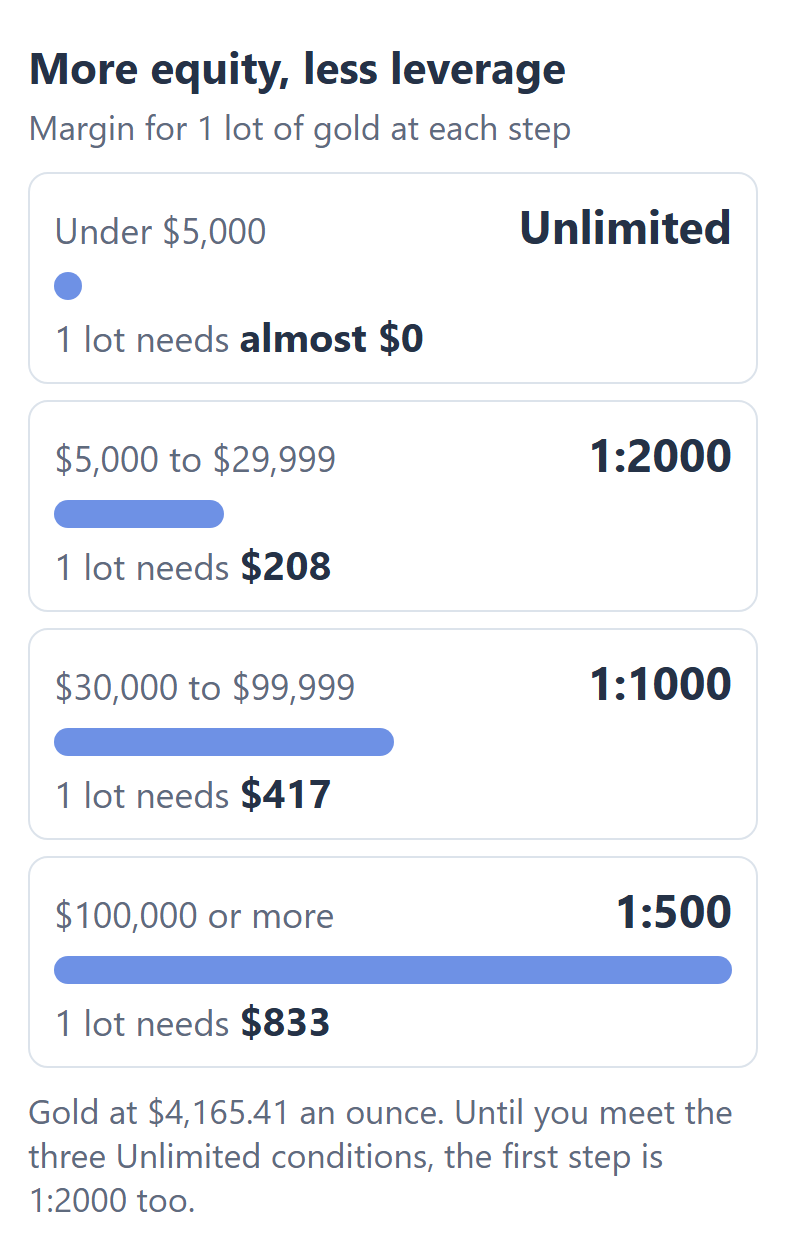
For a normal trade, the steps hardly matter. With USD 30,000 in your trading account, 1 lot of gold at 1:1000 uses only 1.4% of your equity.
Which Instruments Ignore Your Exness Leverage?
Stocks, the stock market indices and some exotic currency pairs keep a fixed leverage at Exness, whatever leverage you choose. The table below shows what 1 lot of each needs.
| Fixed leverage | 1 lot needs | |
|---|---|---|
| Apple stock, 100 shares | 1:20 | $1,720 |
| US30 index | 1:400 | $130 |
| Germany 40 index | 1:200 | $143 |
| USDZAR | 1:200 | $500 |
| USDMXN | 1:50 | $2,000 |
The US30 row may change soon. Exness plans to move the US30, US500, USTEC and JP225 indices to your account leverage on 24 October 2026.
Crypto moved on 10 October, and oil, natural gas, platinum and the other metals on 17 October. The move can raise your margin. Bitcoin had a fixed 1:400, so 1 lot needed $202. Now it needs $40 at 1:2000, but $404 at 1:200, twice as much as before.
Exness’s Unlimited page still names only currency pairs, gold and silver. So for Bitcoin, oil and platinum, plan with the leverage of your trading account.
How Do You Change Your Leverage on Exness?
You change the leverage of an Exness trading account with Adjust leverage in your Personal Area, and you can change it at any time. You can choose any level from 1:2 to Unlimited, or set your own with Custom.
- Sign in to your Exness Personal Area (opens in a new tab) and open My accounts.
- Press the three dots next to the trading account, and choose Adjust leverage.
- Choose a level from 1:2 to 1:Unlimited, or choose Custom to set your own.
- Press Continue, then Confirm.
If your equity or an HMR period allows less than your setting, Exness applies the lower limit. The account card in My accounts shows the leverage that really applies.
A lower setting does not change the profit or the loss of a trade, because your lot size decides that. It changes the largest trade that you can open.
At 1:200, for example, HMR does not change the margin on currency pairs, because 1:200 is already their HMR limit. To work out a trade size that fits your account, use our lot size calculator.
Exness Leverage FAQ
- Can you use Unlimited leverage on an Exness demo account?
-
Yes. On an Exness demo account, you can choose Unlimited at any time, without the trading history. It applies only while the demo equity is under USD 5,000.
- Does Stop Out Protection work with Unlimited leverage?
-
Not always. Exness says that Stop Out Protection may not be available on a trading account set to Unlimited.
With Stop Out Protection, Exness can keep your trades open after your equity goes under zero, for example when a spread widens for a moment.
Without it, your trades close when your equity reaches zero. Your Personal Area shows whether you have it, under Exness benefits, Trading conditions.
- Why is the maximum leverage lower in some countries?
-
Your maximum leverage at Exness depends on the Exness company that you are registered with. For example, clients of the Kenyan company can use up to 1:400.
The footer of your Personal Area shows which company you are with.
- Does leverage change the rebate that you receive?
-
No. The rebate on your Exness trades depends on the lots that you trade, not on your leverage. The Exness rebate guide shows the rebate on each instrument and account.
Where the facts and the figures come from:
Sources and how the figures are worked out
The leverage rules
The equity limits, the Unlimited conditions, the news and weekend periods, the limits during those periods, the move of some instruments to the account leverage and the steps to change your leverage come from the Exness Help Centre articles on leverage, Unlimited leverage, Higher Margin Requirements, margin and trading account settings, read on 19 October 2026. The choice of leverage levels comes from the account set-up screen of our own Exness Personal Area.
The margin figures
The margin is the value of 1 lot divided by the leverage. The prices, the lot sizes and the fixed margin rates come from the data that our margin calculator received from Exness MT5 on 18 October 2026 at 20:02 UTC, when the market was closed for the weekend, so the prices are the Friday closing prices. The figures are the same on the Standard, Pro, Raw Spread and Zero accounts. The margin level example assumes a USD 1,000 account with no other open trades.
Which Page Do You Need Next?
To see the margin for your own trade at your leverage, use the Exness margin calculator. The other pages compare Exness with other brokers and show the rebate on each account.
Once the new Exness trading account is open, add it to Forex FanClub. The member area lists every rebate payment day by day, across every broker you use. Registration is free and takes an email address.

Produced and operated by Forex FanClub
Person responsible: Hiroki Sakaida, founder of Forex FanClub
Hiroki Sakaida decides what our content and services cover and which features they offer. He also checks content and functionality and decides on revisions and publication. Our Content and Service Policy explains how we produce and check our content and services, including our use of AI.
Risk warning: Forex and CFD trading involve leverage, and you could lose all the money you invest. This article and tool provide information, not investment advice. The amounts shown are calculated from the collected data and do not guarantee the amounts that will apply to your own trades, or any future profit.
Affiliate disclosure: This article contains Exness referral links. Forex FanClub receives referral commission based on registrations and trading through these links.