

NinjaBull is a free AI forecast for gold and bitcoin that shows buy, sell or wait every hour.
All details checked on 19 October 2026
Every hour, NinjaBull reads the economic calendar, the latest news and the charts, and shows whether the AI leans to buy, sell or wait. It also shows the price levels that the AI is watching.
NinjaBull is our most popular free tool. You can open it without signing up, and today’s AI forecast is already on the screen. The AI can be wrong, so use it as a second opinion next to your own trading plan.
Contents
How Do Traders Use NinjaBull?
Traders use NinjaBull at four moments: at the start of the day, when they check today’s news, right before they place an order, and while they hold a position. Each time, you check one thing, whether the news and your trade point in the same direction.
- At the start of your day
Your first check is the direction. The sentiment score and the core strategy show which way the news is pushing gold today, so you know whether to look for buys or sells on your own chart. - Today’s events
Today’s economic data and news show which releases are due and what each one could mean for gold. So you know in advance when the price may jump, and you can plan your trades around those times. - Right before you place an order
An order that points against the core strategy, or a WAIT note before a big release, is a reason to stop and check again. In this way, NinjaBull works as a filter on the trades you already planned. - While you hold a position
The AI updates its plan every hour, so it is worth checking again while your position is open. A new headline or a changed plan tells you early that the reason for your trade may have changed.
Because you check NinjaBull several times a day, it helps to keep it on your phone’s home screen. Open NinjaBull and add it once, and from then on it opens from an icon, like an app.
- iPhone
In Safari, tap the Share button, then tap Add to Home Screen. - Android
In Chrome, tap the ⋮ menu, then tap Add to Home screen. - Computer
On Windows, press Ctrl+D to bookmark NinjaBull. On a Mac, press ⌘+D.
How Does NinjaBull Make Its Forecast?
Once an hour, NinjaBull’s AI reads the economic calendar, the latest news and the charts on several timeframes, and decides which way gold and bitcoin lean. It does not try to guess the number in a data release. Instead, it looks at how the price is likely to react when the number comes out.
On gold, a US interest rate decision (FOMC) or the US jobs report can move the price further in a few minutes than a pattern on a short chart does, which is why the AI starts from the news.
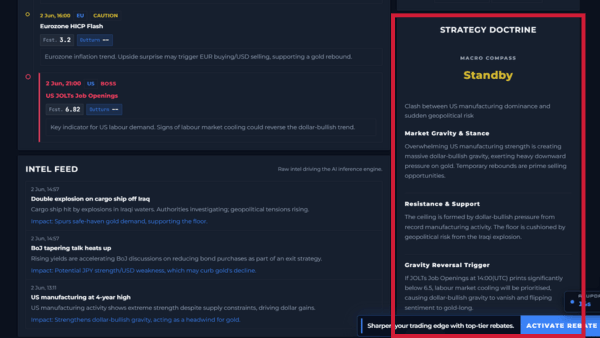
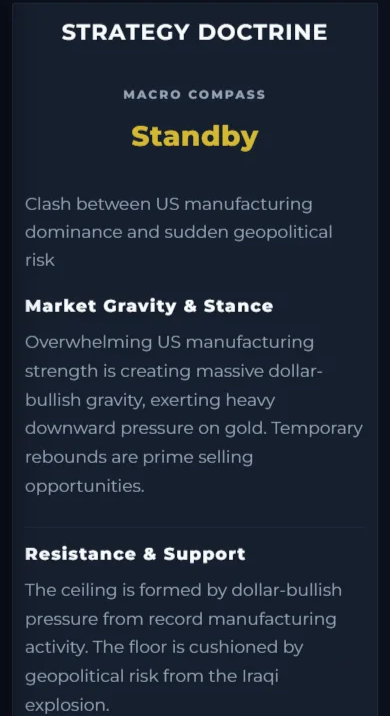
The AI writes its plan on the dashboard in three parts.
- Core strategy
This is the plan in a few words, for example “sell every rally” or “buy the dip only”. - Upper and lower walls
These are the support and resistance levels where the AI expects the price to stop, with the reason for each one. - Trigger
This is the event or price move that would turn the plan around.
When an important data release is close, the plan also shows a WAIT note. For example, it can ask you not to open new trades from 30 minutes before a US release, because big orders often push the price both ways right after the number comes out.
What Do You See on the NinjaBull Screen?
The NinjaBull screen has three main parts: the Macro Compass, the risk scenarios, and today’s economic data and news. You can switch between gold and bitcoin at the top, and between English and Japanese.
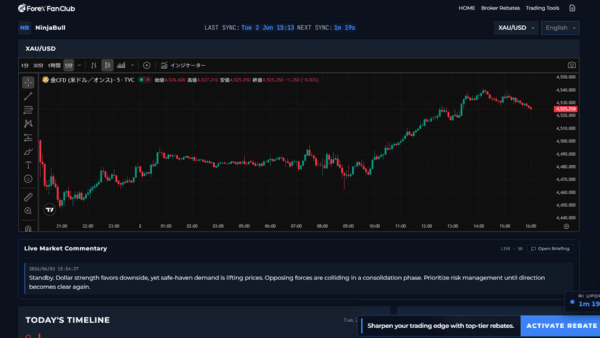
Macro Compass
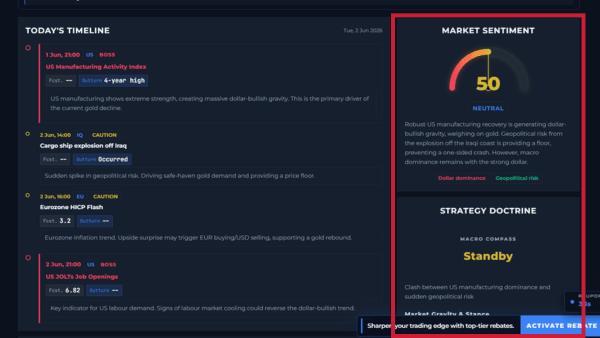
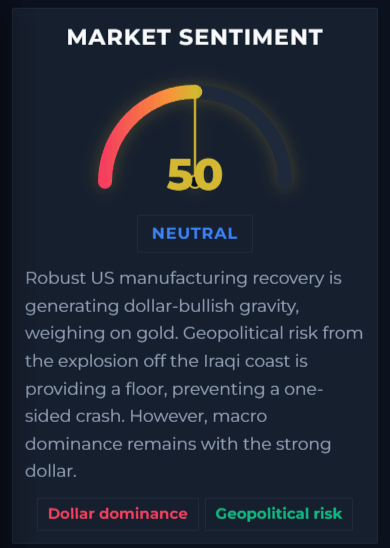
The Macro Compass is where the AI’s hourly plan appears, with the core strategy, the walls and the trigger. Above it, a market sentiment score from 0 to 100 and a short summary of the news behind it show the direction in a few seconds. So you can see the bigger picture before you look at your own chart.
Risk Scenarios (Black Swan Watch)
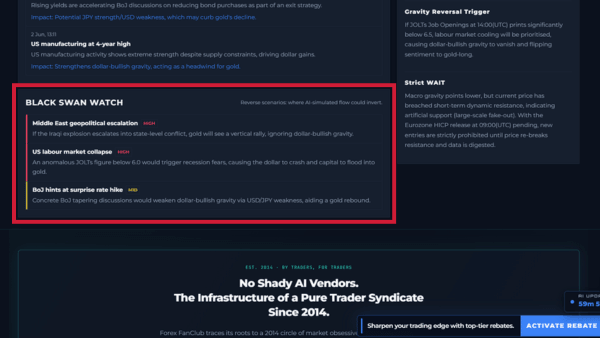
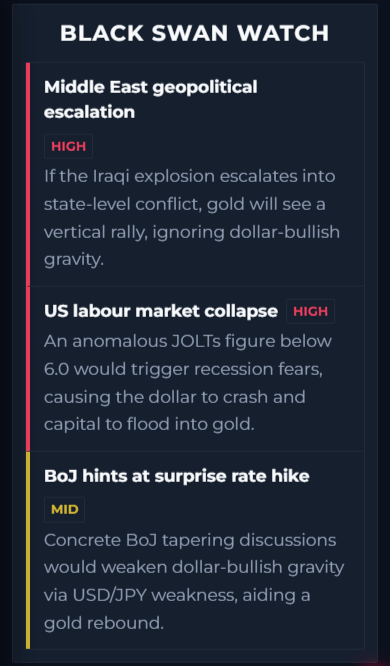
This part lists the events that could suddenly turn the market, such as remarks from officials, central bank meetings or a conflict, and marks the risk of each one as HIGH or MID. So you know in advance which headlines could move gold sharply.
Today’s Economic Data and News
This part lists today’s economic releases with the forecast and the actual number, and the latest headlines. Each one has a short line on what it means for gold, so you can see why the AI leans the way it does.
Can Your EA Use the NinjaBull Forecast?
Yes, the NinjaBull API sends the hourly forecast to an EA on MT4 or MT5 as BUY, SELL or WAIT, with a score from 0 to 100. Most EAs only read the chart, so they keep opening trades just before big news. With the API, your EA keeps its own entry rules and skips the trades that point against the forecast.
The request, the reply and the sample code for MT4 and MT5 are on the NinjaBull API page.
Why Is NinjaBull Free?
NinjaBull is free because ForexFanClub earns from broker rebates, not from selling tools. There is no monthly fee and no paid version.
When you open a trading account through our link, the broker pays us a commission on your trades, and we pay most of it back to you as a rebate. You get 90% of our commission at XM, HFM and Exness, and 80% at XS.com, and we add nothing to your spread.
So the free tools and the rebates work together. The tools help you trade, and the rebates lower what each trade costs you. You can use NinjaBull without opening an account with us, and you can compare the rebate at each broker when you want to.
Which Page Do You Need Next?
Open NinjaBull to see today’s AI forecast, or read the NinjaBull API page if you want your EA to use the same signal.
GET STARTED
Get cash back from your very next trade.
NinjaBull helps you read the news, and a rebate lowers what your trades cost. Pick your broker, open your trading account through our link and trade as usual. The broker pays the rebate whether your trade wins or loses.

ForexFanClub is run by CHIHEWANLE Ltd. at https://www.fxfan.club/.
Operated by: CHIHEWANLE Ltd.
Registration No.: 24917404
Address: No.50 12F-3, Chenggong Rd, North District, Tainan City, Taiwan