

An HFM withdrawal sent before 10:00 server time is processed the same business day. Skrill and crypto then reach you within a day, and a card or an international bank transfer takes 2 to 10 business days.
Checked on 16 October 2026
10:00 HFM server time is 07:00 UTC in summer and 08:00 UTC in winter. Other time zones
We read HFM’s withdrawal rules and the Withdraw screen of our own HFM Client Area, then work out when your money arrives and how to make it arrive sooner. HFM offers different withdrawal methods in each country, so sign in to your HFM Client Area to see the methods, minimums and times for your country.
Contents
- How Long Does It Take to Withdraw Money from HFM?
- What Is the Daily Cut-Off for HFM Withdrawals?
- Which Way to Withdraw Money from HFM Is the Fastest?
- What Is the HFM Minimum Withdrawal?
- Why Can Your Money from HFM Take Longer to Arrive?
- How Do You Withdraw Money from HFM?
- Can You Withdraw Your HFM Rebate the Same Way?
- FAQ About Withdrawing Money from HFM
- Which Page Do You Need Next?
How Long Does It Take to Withdraw Money from HFM?
An HFM withdrawal sent before 10:00 server time is processed on the same business day, and the payment method then takes from a few minutes to 10 business days. So the method that you use decides most of the wait.
HFM handles the request first, between 7:00 and 17:00 server time. After that, your bank, card company, e-wallet or the crypto network pays the money to you. The table shows how long that second stage takes for each method.
After HFM processes the request
| Method | Time until the money arrives |
|---|---|
| Skrill | Instantly |
| Crypto | Within 24 hours |
| Local bank transfer | 24 hours to 3 business days, by country |
| Card | 2 to 10 business days |
| International bank transfer | 2 to 10 business days |
Our own HFM withdrawals were faster than these times. HFM processed each request in the same minute that we sent it, and an e-wallet withdrawal was completed 17 minutes after the request. A local bank transfer was completed about an hour and a half after the request, on the same day.
The time of day also matters. A request sent after 10:00 server time on a Friday waits until Monday, because HFM processes withdrawals on business days only. The picture shows the same crypto withdrawal sent at two different times.
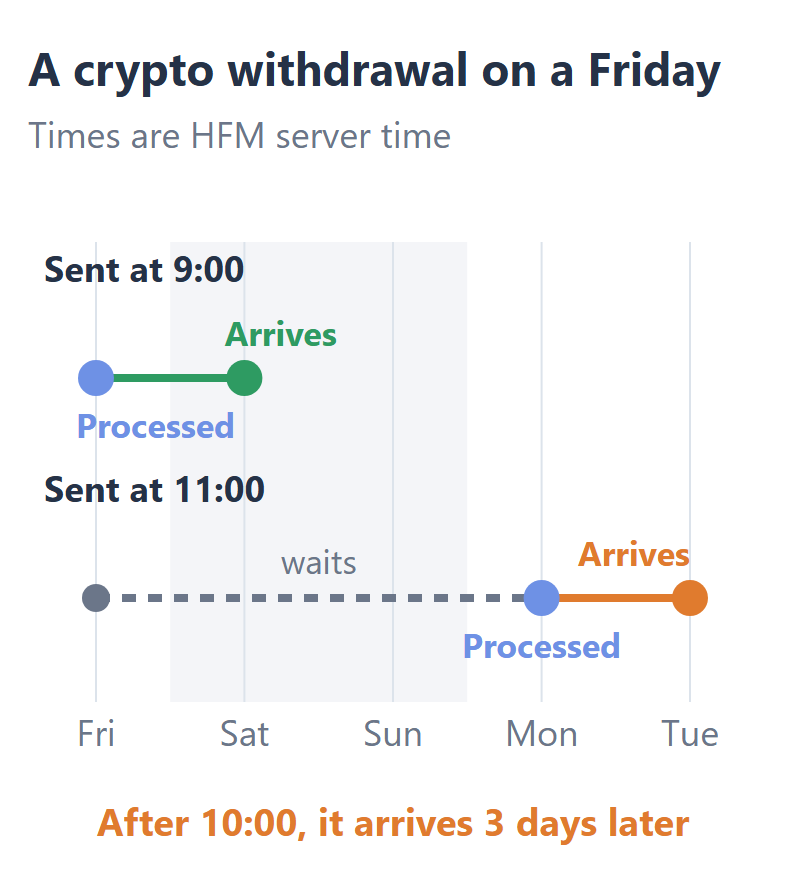
So missing the cut-off on a Friday makes the same withdrawal arrive three days later. If you need the money before the weekend, send the request before 10:00 server time on Friday.
What Is the Daily Cut-Off for HFM Withdrawals?
The HFM withdrawal cut-off is 10:00 server time, which is 07:00 UTC in summer. HFM’s server clock follows European daylight saving time, so from 25 October the cut-off becomes 08:00 UTC.
Choose your time zone to see the cut-off on your own clock, and whether a request that you send now is processed today.
Before 10:00
In HFM server time, Monday to Friday
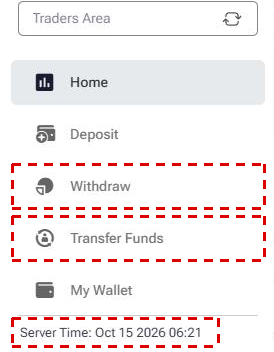
The menu of your HFM Client Area also shows the server time on its last line, and MT5 shows the same clock in the Market Watch window. If that clock shows a time before 10:00 on a business day, your request is processed that day.
Which Way to Withdraw Money from HFM Is the Fastest?
Skrill is the fastest way to withdraw money from HFM, and crypto comes next, but HFM pays you back by the method that you deposited with. HFM calls this its return-to-source policy, so the speed of your withdrawal is decided when you choose how to deposit.
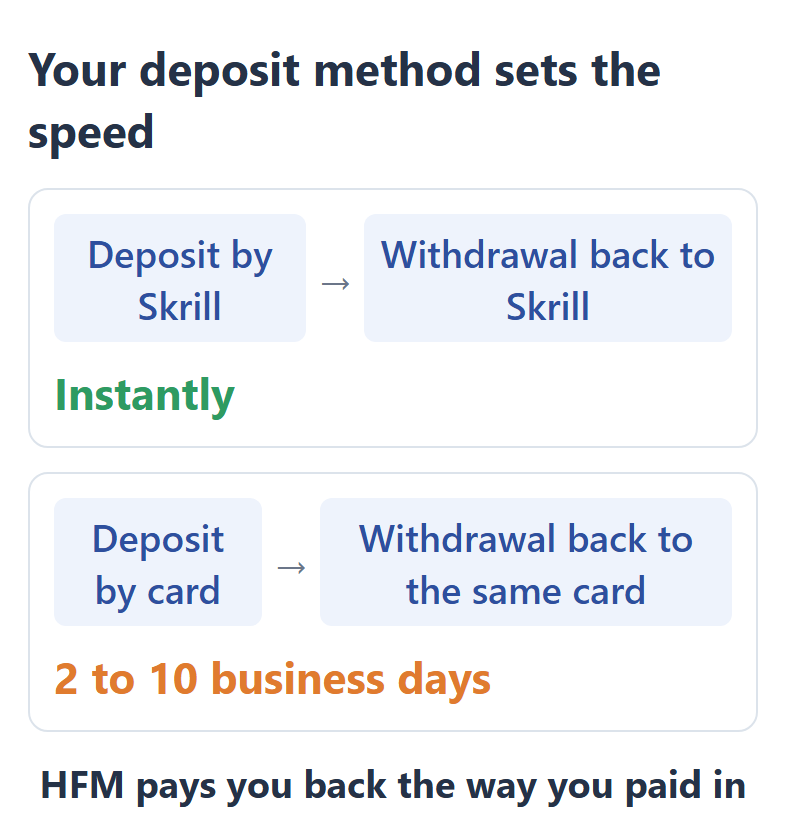
A card deposit gives you the slowest withdrawals, because the card company takes up to 10 business days to pay the money back. Cards with Visa Direct or Mastercard MoneySend can also receive your profit, and HFM’s Withdraw Options page (opens in a new tab) explains the card rules.
So if fast withdrawals matter to you, deposit with Skrill, crypto or a local bank transfer that your Withdraw screen also lists. The deposit methods in our HFM minimum deposit guide show the minimum for each of them.
What Is the HFM Minimum Withdrawal?
The HFM minimum withdrawal is USD 5, by card or Skrill. Crypto starts at USD 10 and an international bank transfer at USD 100, and a local bank transfer has its own minimum in each country.
Smallest withdrawal by method
| Method | Minimum |
|---|---|
| Card | USD 5 |
| Skrill | USD 5 |
| Crypto | USD 10 |
| International bank transfer | USD 100 |
| Local bank transfer | USD 5 to 70, by country |
HFM charges no fee on any withdrawal method. On an international bank transfer, the banks between HFM and your bank can still take their own fee, so this method suits large amounts better than small ones.
Each method also has a maximum for each request. The withdrawal form shows the minimum, the maximum and the time for the method before you send anything.
Why Can Your Money from HFM Take Longer to Arrive?
An HFM withdrawal takes longer when your money is still in a trading account, your verification is not finished, your open trades need the money as margin, or you choose a different method from your deposit. So check these four things in your Client Area before you send the request.
- Money in a trading account
Your withdrawal can only come from myWallet, the wallet in your HFM Client Area. So move the money from your trading account to myWallet with Transfer Funds first. - Verification
Your profile must be fully approved, which means that HFM has checked both your ID and your proof of address. HFM checks the documents within 48 hours, so upload them before you need the money. - Open trades
On most HFM accounts, the withdrawal must leave a margin level of at least 150% on weekdays and 300% at weekends. If your trades are open, withdraw a smaller amount or close a trade first. - The deposit method
The withdrawal goes back to the method and the account that you deposited with. So choose that method on the Withdraw screen, and send the money to the account in your own name that you paid from.
You can follow each request in four stages: Request Submitted, Processed by HFM, Received by Payment Provider and Request Completed. If HFM has processed the request and the money has not arrived within 24 hours, HFM asks you to get a bank statement for those days and contact its support team. HFM support is on live chat 24 hours a day.
How Do You Withdraw Money from HFM?
You withdraw in your HFM Client Area, first moving the money to myWallet and then sending a request from the Withdraw screen. The whole request takes a few minutes.
Log in to your HFM Client Area (opens in a new tab). The page has a Login button at the top.
Tap the menu button with three lines at the top right. The menu has Transfer Funds and Withdraw, and its last line shows the server time.
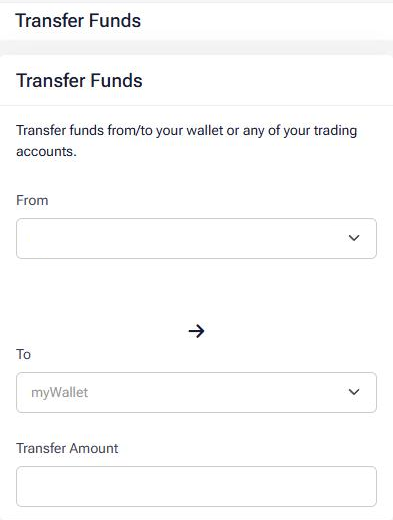
Open Transfer Funds. Choose your trading account in From and myWallet in To, enter the amount and press Transfer Funds. Skip this step if the money is already in myWallet.
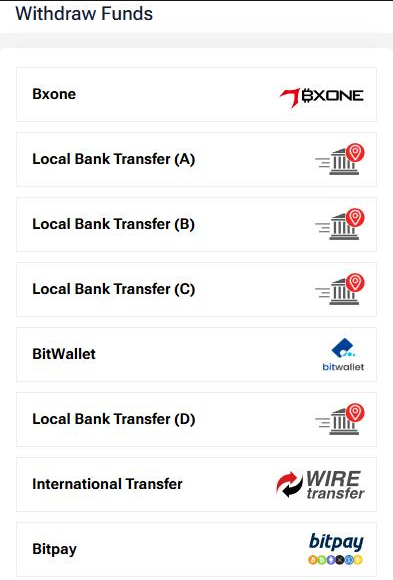
Open Withdraw and choose the method that you deposited with. The list of methods depends on your country.
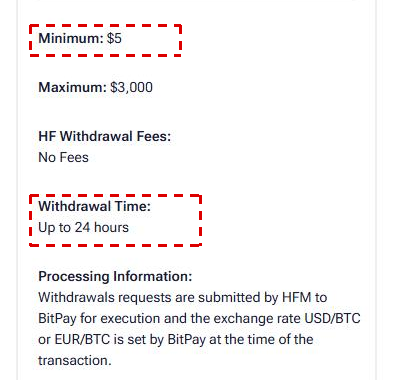
Check the minimum, the maximum and the withdrawal time on the form, enter the amount and press Withdraw. To follow the request, open My Wallet, then Wallet Actions and Wallet Finances, and tap View progress on the Withdrawals tab.
Can You Withdraw Your HFM Rebate the Same Way?
Yes. The ForexFanClub rebate arrives in your HFM myWallet the next day, so you can withdraw it with the same steps. There is no transfer to make first, because the rebate is already in myWallet.
The rebate returns part of the spread and commission on every lot that you trade, and the HFM rebate guide shows the amount for each account and instrument.
To receive the rebate, register with HFM through the button below. If you already have an HFM Client Area, you can keep it and add a new trading account through ForexFanClub instead.
FAQ About Withdrawing Money from HFM
- How long does it take to withdraw money from HFM in South Africa?
-
In South Africa, an HFM local bank withdrawal takes 1 to 3 business days after HFM processes it. Skrill reaches you within 10 minutes.
The cut-off of 10:00 server time is 09:00 in South Africa in summer. From 25 October, when HFM’s server moves to winter time, the cut-off is 10:00 in South Africa.
- What happens to an HFM Top-Up bonus when you withdraw?
-
If you withdraw 30% of the money that you can withdraw, HFM also removes 30% of your Top-Up bonus. The bonus always goes down by the same percentage as your withdrawal. Profits made with the bonus can be withdrawn in full.
Where the facts come from:
Sources and how the times are worked out
The times and the minimums
The time and the minimum of each method come from HFM’s Withdraw Options page, read on 16 October 2026. HFM shows a different list of local methods in each country, and we read that page for several countries to find the range of local bank transfers. The processing hours and the cut-off come from HFM’s Help FAQs and from the note on the Withdraw screen of our own Client Area, which also gives the server time in summer and in winter.
The Friday example adds the time of a crypto withdrawal to HFM’s processing day. It does not count a delay on the side of the crypto network.
The rules
The return-to-source rule, the margin level that a withdrawal must leave and the verification rule come from the HFM Client Agreement of August 2026 and from the Withdraw Options page. The Top-Up bonus rule comes from the Top-Up Bonus Terms and Conditions of March 2026. The screenshots come from our own Client Area, read without sending any request, and they show no account details.
Which Page Do You Need Next?
If you have not deposited yet, choose a deposit method that also withdraws quickly, and then the account type that fits your trading. The rebate guide shows what comes back into myWallet on every lot.
Once the HFM trading account is open, add it to Forex FanClub. The member area lists every rebate payment day by day, across every broker you use. Registration is free and takes an email address.

Produced and operated by Forex FanClub
Person responsible: Hiroki Sakaida, founder of Forex FanClub
Hiroki Sakaida decides what our content and services cover and which features they offer. He also checks content and functionality and decides on revisions and publication. Our Content and Service Policy explains how we produce and check our content and services, including our use of AI.
Risk warning: Forex and CFD trading involve leverage, and you could lose all the money you invest. This article and tool provide information, not investment advice. The amounts shown are calculated from the collected data and do not guarantee the amounts that will apply to your own trades, or any future profit.
Affiliate disclosure: This article contains HFM referral links. Forex FanClub receives referral commission based on registrations and trading through these links.
- How Long Does It Take to Withdraw Money from HFM?
- What Is the Daily Cut-Off for HFM Withdrawals?
- Which Way to Withdraw Money from HFM Is the Fastest?
- What Is the HFM Minimum Withdrawal?
- Why Can Your Money from HFM Take Longer to Arrive?
- How Do You Withdraw Money from HFM?
- Can You Withdraw Your HFM Rebate the Same Way?
- FAQ About Withdrawing Money from HFM
- Which Page Do You Need Next?