

Our XM partner code is GJQYM. Enter it when you open a trading account, and that trading account earns the rebate.
Checked on 4 October 2026
If you already trade with XM, the code still works. Add one more trading account and enter GJQYM in the form.
Contents
What Is the XM Partner Code, and Where Do You Enter It?
GJQYM
Where the code goes, and what it does
- Where it goes
- The Partner Code (Optional) box is on the form for a new trading account. Step 5 below shows where it is.
- What the code does
- Makes ForexFanClub the partner of that trading account, so the trading account earns the ForexFanClub auto rebate.
- What comes back
- A rebate is cash that comes back to you on every trade you close. You get $18 back per lot on gold with a Standard account, and $9 with an Ultra Low account. The XM rebate page lists every instrument.
XM reads the code to see which partner introduced a trading account, and the rebate comes through that partner. The code costs nothing, and spreads, execution and leverage stay exactly as XM publishes them.
The partner code is separate from XM’s own promotions. XM’s deposit bonuses and its Refer a Friend scheme run on XM’s terms and vary by region, and our XM bonus page covers what applies where.
If you are an XM partner looking for your own code, that sits in the XM partner programme (opens in a new tab) rather than on this page.
If you already trade at XM without our rebate, add a new trading account with GJQYM, and trade on the new trading account. The new trading account takes a few minutes, and your login and your money stay inside XM.
With 10 lots of EURUSD a month on a Standard account, the rebate comes to $81.00 a month.
How Do You Use the Code If You Already Trade at XM?
Add one more trading account from your Members Area, and type the code into that trading account’s form.
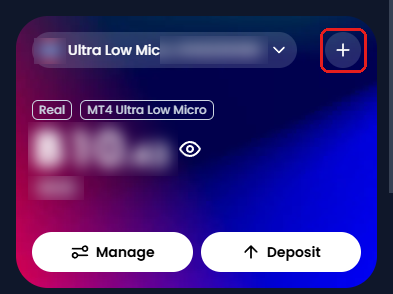
Log in to the XM Members Area (opens in a new tab) that you already use. On Home, tap the + in the top right of the account card.
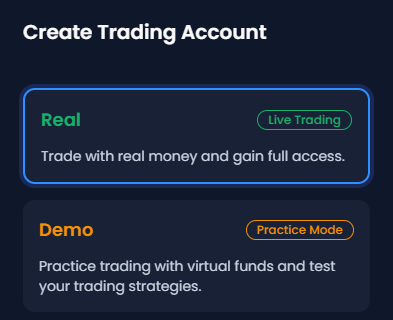
A panel headed Create Trading Account opens. Keep Real selected, and tap Continue.
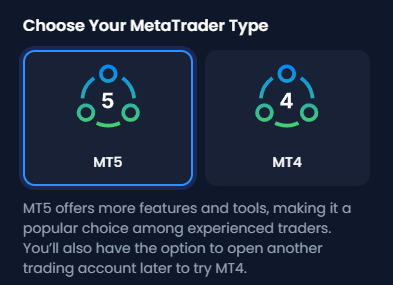
Choose the platform, MT5 or MT4.
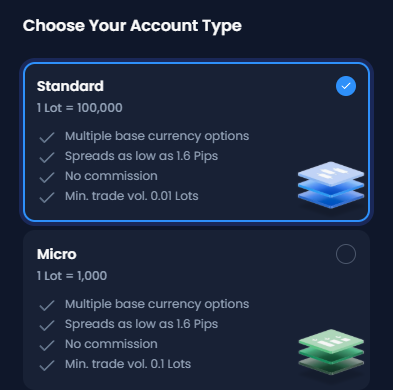
Choose the type of trading account, for example Standard.
On the next screen, tap Have a Partner Code? Copy GJQYM with the button below, paste it into the box that appears, tick the declaration, and tap Continue.
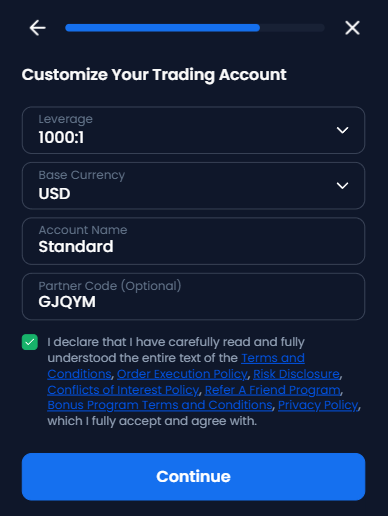
GJQYM
On the next screen, set the password for MetaTrader, and tap Complete.
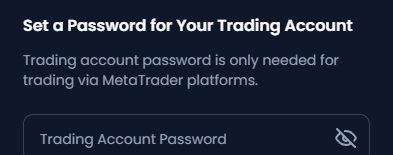
Fund the new trading account with an internal transfer or a deposit. The rebate starts from the first order that you close on the new trading account.
The XM additional account guide explains the other choices on these screens.
- Your existing trading account
The trading account stays open, with its history and any positions still open. - Your money
Your balance stays inside XM. An internal transfer moves the balance to the new trading account in a moment, with no withdrawal to make. - Your login
Your login stays the same. Both trading accounts sit under the same Members Area login and email address.
XM changes your partner automatically when you open a trading account through another partner’s link. So if you want to keep the ForexFanClub rebate, open any later trading account from your Members Area, and not through a link from another partner.
How Do You Use the Code If You Are New to XM?
Register through the button below, and your trading account has ForexFanClub as its partner from its first day. The link carries the referral on its own.
On the registration form, also tap Enter here under the password. Copy GJQYM with the Copy button, and paste it into the Code (Optional) box.
GJQYM
The referral can drop out when cookies are blocked or cleared, or when you switch browser between the link and the form. The code keeps ForexFanClub as the partner of the trading account in every one of those cases.
What Does the Code Bring Back?
You get $18 back per lot on gold with a Standard account, paid into MyWallet the day after you trade.
The table below shows the rebate for 1 lot, opened and closed, at today’s rates.
| Instrument | Standard account | Ultra Low account |
|---|---|---|
| Gold | $18.00 | $9.00 |
| EUR/USD | $8.10 | $3.15 |
| GBP/USD | $9.00 | $3.15 |
| USD/JPY | $8.10 | $2.70 |
XM works out the partner commission once a day for the previous day’s closed orders, and 90% of it comes to you as cash in MyWallet. From MyWallet you can move the money to a trading account with an internal transfer, or withdraw it.
Three XM rules decide which orders count.
- Time open
A position earns the rebate only if it stays open for longer than 3 minutes. - Funding
Your trading account must be funded. - Buy and sell together
Each position must be closed on its own. If you use Close by in MetaTrader, neither order earns the rebate.
All other closed orders earn the rebate, on every instrument XM offers, shares included. The XM rebate page has the amount for each instrument and a panel that shows what a trade costs after the rebate.
How Do You Add the Trading Account to ForexFanClub?
XM pays the rebate whether you add the trading account to ForexFanClub or not. On ForexFanClub, you see every payment in one place and get the member rewards.
- Register at the ForexFanClub member area (opens in a new tab) with your email address.
- Open Dashboard, choose XM and enter the number of the trading account you have just opened.
- Approval takes 15 minutes at most. Your rebate history then appears under Auto Rebate History, with the same view for any other broker you add.
Only trading accounts that have ForexFanClub as their partner can be added, so add the new trading account straight after you open it.
Members also collect USDT from a daily login and from the quest board, and adding your first trading account is one of the quests. The member area shows the current amounts and conditions.
XM Partner Code FAQ
- What is an XM partner code?
-
A five-character code that tells XM which partner introduced a trading account. It goes in the Partner Code (Optional) box on the form for opening a trading account, and the ForexFanClub code is GJQYM.
From the code, XM records which partner introduced the trading account, and the rebate comes through that partner.
- Can I add a partner code to the XM trading account I already have?
-
The code goes in the form for a new trading account, so a trading account you already hold has no box for it.
Open one more trading account from your Members Area, type GJQYM into the box, and trade on that one.
Your first trading account, its history and its balance stay as they are, and an internal transfer moves the money across.
- How do I change my partner code in XM?
-
Open one more trading account with GJQYM in the Partner Code (Optional) box. XM sets your partner from the link or the code you use when you open a trading account, so there is no separate setting to change.
The new trading account has ForexFanClub as its partner. Your login stays the same, and your existing trading account keeps its history.
The ForexFanClub member area accepts only trading accounts that have ForexFanClub as their partner, so adding the new trading account to ForexFanClub also confirms the partner.
- Is the partner code the same as a referral code or a promo code?
-
XM’s form calls it Partner Code, and people often say referral code or IB code for the same thing.
Promo codes belong to XM’s own promotions, which run on XM’s terms and by region. The partner code decides only which partner a trading account sits under.
- Does the XM partner code give a bonus?
-
The code makes ForexFanClub the partner of the trading account, and what that brings is cash on every closed order: $18 a lot on gold with a Standard account.
XM’s deposit bonuses are separate, apply on XM’s own conditions and depend on where you live. Our XM bonus page has the details.
- Is the partner code free, and does it change my trading conditions?
-
Free, and nothing changes. Your spreads, execution and leverage are the ones XM publishes for the account type you choose, and the rebate comes on top of them, from XM’s partner commission.
The Rest of the XM Numbers
The rebate is one side of what a trade costs. The pages below cover the others.
Once the new XM trading account is open, link it to Forex FanClub. The member area lists every rebate payment day by day, across every broker you use. Registration is free and takes an email address.

Produced and operated by Forex FanClub
Person responsible: Hiroki Sakaida, founder of Forex FanClub
Hiroki Sakaida decides what our content and services cover and which features they offer. He also checks content and functionality and decides on revisions and publication. Our Content and Service Policy explains how we produce and check our content and services, including our use of AI.
Risk warning: Forex and CFD trading involve leverage, and you could lose all the money you invest. This article and tool provide information, not investment advice. The amounts shown are calculated from the collected data and do not guarantee the amounts that will apply to your own trades, or any future profit.
Affiliate disclosure: This article contains XM referral links. Forex FanClub receives referral commission based on registrations and trading through these links.