

XM has no cent account. Micro trades from 100 units of currency and gets XM’s deposit bonus.
All details checked on 3 October 2026
The smallest Micro trade is 100 units of currency. For example, on EURUSD, a 1-pip move on this trade is worth about 1 cent.
Contents
Which XM Account Should You Use Instead of a Cent Account?
Choose Micro for the deposit bonus, or Ultra Low Micro for a lower trading cost. The list below shows which account fits each way of trading.
- For the bonus
Micro gets XM’s deposit bonus, but Ultra Low Micro does not. With the bonus, a small deposit can keep a trade open through a much bigger price move. The XM bonus guide explains the offer. - Day trades
For trades that you close on the same day, Ultra Low Micro is the better choice. After the Forex FanClub rebate, one trade on EURUSD costs about 0.5 pips less on Ultra Low Micro. - Gold buys held for days
On Ultra Low Micro, gold has no swap. So you pay no swap on a buy position on gold, even if you hold it for many days. - Already on Standard
For smaller trades, add a Micro trading account. You keep the same Members Area login, and the XM additional account guide shows the steps. - Smaller trades
If you want trades smaller than 100 units of currency, or a balance shown in cents, choose a cent account at another broker. The table below compares cent accounts with Micro.
| XM Micro account | Cent accounts | |
|---|---|---|
| Smallest trade on EURUSD | 100 EUR | 10 EUR |
| Currency of the balance | Dollars | Cents |
| Deposit bonus | Yes | No |
Exness, HFM and XS each have a cent account, and our rebate guide for each broker explains it.
We recommend opening the Micro account first if your country offers the bonus. Then add the Ultra Low Micro account for day trades, and for buy positions on gold that you hold for a few days.
However, trades closed within three minutes earn no rebate. So if most of your trades close within three minutes, compare the spreads of different brokers in our lowest spread comparison.
Does XM Have a Cent Account?
No. XM offers Micro and Ultra Low Micro instead.
The XM Help Centre (opens in a new tab) also says that XM has no cent account. On a Micro trading account, the balance stays in a normal currency such as USD.
A cent account shows the balance in cents, so a 10 USD deposit appears as 1,000. Micro, on the other hand, keeps the balance in dollars and trades from 100 units of currency.
How Much Money Do You Need to Trade on XM Micro?
5 USD, the minimum deposit, is enough to open the smallest Micro trade.
What the smallest Micro trade needs
| EURUSD | Gold | |
|---|---|---|
| Smallest trade size | 100 EUR | 0.1 troy ounce |
| Margin needed at 1:1000 leverage | about $0.11 | about $0.41 |
| Gain or loss for each price move | 1 pip: about $0.01 | $1: $0.10 |
| Price move that 5 USD can cover | about 490 pips | about $46 |
The margin is the money that opening the trade sets aside. The rest of the deposit then covers losses when the price moves against you, and the last row shows how far the price can move before the 5 USD is used up.
5 USD opens the trade, but the same 5 USD is also all the money that covers your losses.
So choose a deposit that leaves enough money for a normal price move on your instrument. If your country offers the bonus, the bonus also adds to this margin.
The XM margin calculator shows the margin for any instrument at today’s prices, and Micro needs 1/100 of the Standard figure.
The lot size calculator shows the largest trade your balance allows and how far the price can move before a stop-out. In the calculator, choose XM and the Micro account to see the result in Micro lots.
The table below shows the lot sizes on the Micro and Standard accounts.
| Micro account | Standard account | |
|---|---|---|
| Trade size: 1 lot of EURUSD | 1,000 EUR | 100,000 EUR |
| Smallest trade on EURUSD | 0.1 lot: 100 EUR | 0.01 lot: 1,000 EUR |
| Trade size: 1 lot of gold | 1 troy ounce | 100 troy ounces |
Ultra Low Micro uses the same lot sizes as Micro, on both MT4 and MT5.
How Do You Open a Cent Account on XM?
Open a Micro trading account instead, because XM has no cent account.
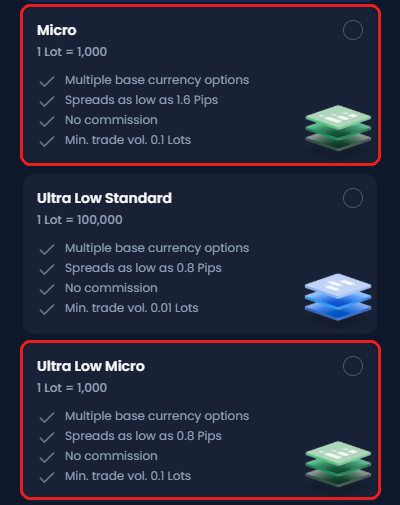
- New to XM
On the registration form, pick Micro or Ultra Low Micro, and then deposit at least 5 USD. The XM registration guide shows each step. - Already with XM
From the Home screen, tap +, then Create Trading Account, and choose Micro or Ultra Low Micro. The XM additional account guide shows each step.
Not with XM yet? Open your first trading account with the button below, and you receive a rebate on every lot you trade, Micro included.
How Do Micro and Ultra Low Micro Differ?
The Ultra Low Micro account has the tighter spread, and it has no swap on gold or on the major pairs. The Micro account, on the other hand, gets the deposit bonus.
| Micro | Ultra Low Micro | |
|---|---|---|
| Lowest spread | 1.6 pips | 0.8 pips |
| Deposit bonus | Yes | No |
| Swap on gold and the major pairs | You pay or receive | None |
| Swap on other instruments | You pay or receive | You pay or receive |
| Rebate on 1 lot of EURUSD | $0.081 | $0.0315 |
Everything else is the same. On both account types, 1 lot is 1,000 units of currency, there is no commission, and the minimum deposit is 5 USD.
However, XM’s terms limit the no-swap benefit for large positions kept for weeks. The XM Ultra Low account guide explains this limit and what to do.
The XM fees guide shows what each trade costs in dollars, before and after the rebate.
To compare every item with the other XM account types, use the comparison tool in the XM account types guide.
Questions People Ask About the XM Cent Account
- Does XM have a cent account?
-
No. XM offers the Micro account instead. On Micro, the smallest trade is 100 units of currency.
- Which brokers offer a cent account?
-
Exness, HFM and XS each have one. Their cent accounts let you trade from 10 units of currency, but none of the three gets a deposit bonus.
At XM, Micro is the small account that gets the bonus. The cent account comparison shows which of the four brokers has the lowest spread.
- What is the minimum deposit for XM Micro?
-
5 USD. Ultra Low Micro, Standard and Ultra Low need the same.
However, some payment methods set a higher minimum, and the deposit screen shows the minimum for each payment method. The XM deposit guide explains each step.
- What is the lot size on XM Micro?
-
1 Micro lot is 1,000 units of currency. The smallest trade is 0.1 lot, which is 100 units of currency.
For example, a 1-pip move on 1 Micro lot of EURUSD is worth about 0.10 USD.
- Does the XM bonus reduce my rebate?
-
Only when you use the bonus for part of a trade’s margin. The rebate on that trade goes down by the same share.
For example, if the bonus covers half of the margin, you receive half of the rebate. The XM rebate guide explains this rule in detail.
- Is there an XM Micro demo account?
-
No. Practise on a Standard or Ultra Low Standard demo instead. XM’s demo accounts come in these two types. The XM demo account guide shows how to add a demo, and then you can open a real Micro trading account when you are ready.
- Does XM have nano or mini accounts?
-
No. Micro and Standard cover those sizes.
To trade 100 units of currency, open 0.1 lot on Micro. To trade 10,000 units of currency, open 0.1 lot on Standard.
- Can I switch my Standard account to Micro?
-
No. Add a Micro trading account instead. Tap + on the account card on Home. One Members Area login holds up to 10 trading accounts.
Which XM Guide Do You Need Next?
The account types guide compares all five types, and the rebate guide shows what you get back on Micro.
Sources: where each fact on this page comes from
XM’s public pages
- XM Help Centre (opens in a new tab)
- That XM has no cent, nano or mini accounts and no Micro demo. The Micro account, the minimum deposit, fixed account types and up to 10 trading accounts.
- XM promotions page (opens in a new tab)
- The deposit bonus shown in nine countries we checked, and the highest rate on the first part of a deposit.
- XM account types page (opens in a new tab)
- Which account types receive the bonus: Standard and Micro, not Ultra Low.
- XM bonus terms (opens in a new tab)
- The bonus cannot be withdrawn. If you withdraw half of your balance, half of the bonus is also removed.
- XM client agreement (opens in a new tab)
- Section 81, Swap-Free Instruments: what XM treats as misuse of the instruments with no swap, and what XM can do in that case.
- XM partner terms (opens in a new tab)
- On a trade where the bonus covers part of the margin, the rebate is paid on the share your own money covers. Trades closed within three minutes earn no rebate.
The XM app
- Account type screen
- Lot sizes, lowest spreads, commission and minimum trade of Micro and Ultra Low Micro.
- Symbol Information screen
- The 0.1-lot minimum on GOLDm# on MT4.
Other brokers’ pages
- Exness Partners Help Centre: Standard Cent accounts (opens in a new tab)
- On the Standard Cent account, symbols end in c, such as EURUSDc. 2 cent lots of EURUSDc move 0.20 USD per pip, so 1 cent lot is 1/100 of a standard lot.
- Exness Help Centre: Standard Cent account
- The balance in cents and the smallest trade, checked on 28 September 2026. The Help Centre now asks visitors to sign in.
- Exness Partners Help Centre: bonus coefficient (opens in a new tab)
- Exness states that it no longer gives bonuses to clients.
- HFM account comparison (opens in a new tab)
- The Cent account, the smallest Cent trade, and the bonus row (Cent excluded).
- XS Cent account (opens in a new tab)
- Cent lots, the balance in cents, MT5 only.
Forex FanClub
- XM rebate guide
- Rebate amounts per lot: XM’s VIP rate, of which 90% is passed back. A Micro lot earns 1/100 of the Standard amount.
- XM spread tool
- The 24-hour average spreads behind the cost of a day trade.
- XM margin calculator
- The margin for 0.1 lot of EURUSD and gold at 1:1000 leverage, and the leverage steps by equity.
- XM swap tool
- The instruments that have no swap on Ultra Low Micro.
Once your XM trading account is open, link it to Forex FanClub. The member area lists every rebate payment day by day, across every broker you use. Registration is free and takes an email address.

Produced and operated by Forex FanClub
Person responsible: Hiroki Sakaida, founder of Forex FanClub
Hiroki Sakaida decides what our content and services cover and which features they offer. He also checks content and functionality and decides on revisions and publication. Our Content and Service Policy explains how we produce and check our content and services, including our use of AI.
Risk warning: Forex and CFD trading involve leverage, and you could lose all the money you invest. This article and tool provide information, not investment advice. The amounts shown are calculated from the collected data and do not guarantee the amounts that will apply to your own trades, or any future profit.
Affiliate disclosure: This article contains XM referral links. Forex FanClub receives referral commission based on registrations and trading through these links.