

HFM has no minimum deposit on Cent, Premium and Zero. The Pro account starts at USD 100, and the payment methods and their smallest amounts depend on your country.
Checked on 15 October 2026
Your HFM Client Area shows the minimum for each account type on the Open Live Account screen, and the smallest amount for each payment method on the Deposit screen. Both can differ by country, so sign in through the button below to see your own figures, or register first if you have no Client Area yet.
Contents
How Much Is the HFM Minimum Deposit?
HFM asks for no minimum deposit on its Cent, Premium and Zero accounts, and for USD 100 on the Pro account. The Top-Up Bonus account, the one that gets the HFM deposit bonus, also has no minimum. If you are choosing between these accounts, our HFM account types guide compares what a gold trade costs on each of them.
| Account type | Minimum deposit |
|---|---|
| Cent | None |
| Premium | None |
| Zero | None |
| Pro | USD 100 |
| Top-Up Bonus | None |
These are the figures on HFM’s account pages and on the Open Live Account screen of our own Client Area. The minimums can differ by country, so the card of each account type on your own screen shows the figure that applies to you.
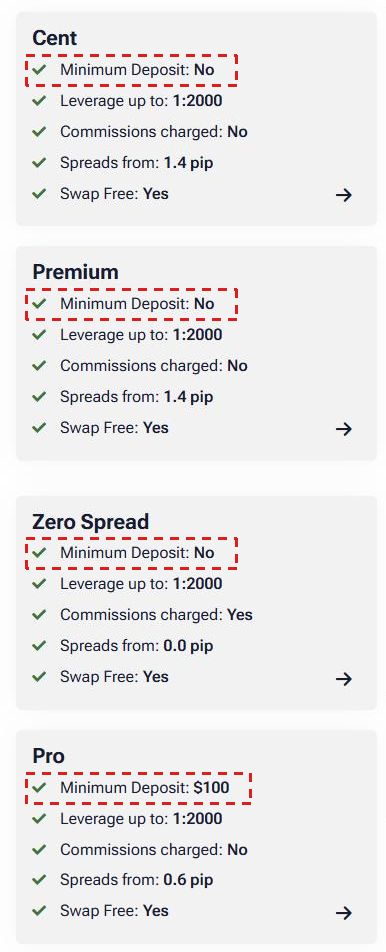
In some countries, HFM also offers an Unlimited account. Its name and minimum deposit depend on the country. In India, the account is called InfinityX and starts at USD 250. In Japan, it is called KATANA and starts at USD 500. In other countries, check the account list on the Open Live Account screen of your Client Area.
If you pay in your own currency, the deposit form shows the exchange rate and the amount that will arrive in US dollars, so you can check it before you pay.
What Is the Smallest Amount You Can Deposit at HFM?
The smallest deposit at HFM depends on your country and on your payment method. For example, in the HFM Client Area that we use, a card deposit starts at USD 5, and crypto, BinancePay and the PESKA e-wallet start at USD 10.
| Smallest deposit | Time | |
|---|---|---|
| Debit or credit card | USD 5 (USD 15 on some cards) | Up to 10 minutes |
| Crypto | USD 10 | Instant |
| BinancePay | USD 10 | Instant |
| PESKA e-wallet | USD 10 | Up to 10 minutes |
HFM offers different payment methods in each country, so your Deposit screen can list other methods with other limits, such as local bank transfers. HFM charges no deposit fee on the methods in the Client Area that we use, although a crypto network can charge its own fee.
Your deposit method also decides how fast you can withdraw, because HFM sends a withdrawal back to the method that you deposited with. For example, a crypto withdrawal takes under 24 hours, and a card withdrawal can take up to 10 business days. Our guide to withdrawing money from HFM shows the time for each method.
Can You Trade Gold with the HFM Minimum Deposit?
Yes. On a Premium account, the smallest gold trade is 0.01 lot, and it needs only about $2.05 of margin. So a deposit of USD 10 can open it.
The amount you deposit decides how far gold can move against you before HFM closes the trade. HFM compares the money in your trading account with the margin of your trades, and this is called the margin level. At a margin level of 50%, HFM sends a warning, which is called a margin call. At 20%, HFM closes your trades, which is called a stop out.
On a gold trade of 0.01 lot, you gain or lose 1 dollar each time gold moves by 1 dollar. So the table below shows how far gold can move against you before HFM closes the trade.
| Deposit amount | Price move before stop out |
|---|---|
| USD 10 | $9.24 (0.2%) |
| USD 100 | $99.24 (2.4%) |
| USD 1,000 | $999.24 (24%) |
So USD 10 is enough to open the trade, but a move of less than 1% against you closes it. A deposit of USD 100 gives the same trade about ten times as much room, and the lot size calculator shows how many lots your own deposit can carry.
There is one more limit on a small balance. Around major news, HFM lowers the leverage to 1:300 for about 20 minutes. The smallest gold trade then needs about $13.63 of margin, so with USD 10 you can open it at normal times, but not in those minutes. The HFM margin calculator shows the margin for any trade at these times.
If you want a small deposit to survive much larger moves, open a Cent account (opens in a new tab) instead. There, a trade of 0.01 cent lot gains or loses only 1 cent when gold moves by 1 dollar.
A USD 10 deposit on Cent, trading 0.01 cent lot of gold
Trade size0.01 ounce
Each $1 move in gold1 cent
Price move before stop out$999 (24%)
That is about a quarter of the gold price, so a normal gold move will not close this trade.
How Do You Deposit at HFM?
You deposit from your HFM Client Area. In the Client Area that we use, card, crypto and e-wallet deposits arrive within about 10 minutes.
Log in to your HFM Client Area (opens in a new tab). The page has a Login button at the top, and if you have no Client Area yet, you can register on the same page first.
Tap the menu button with three lines at the top right, and choose Deposit.
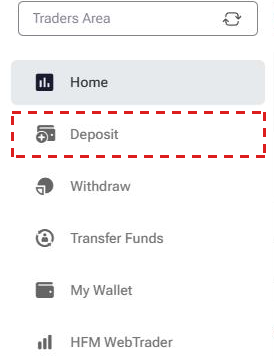
In Deposit to, pick the trading account that should receive the money, or myWallet.
Choose a payment method. Each method shows its Minimum, Maximum, Deposit Fees and Processing Time before you pay.
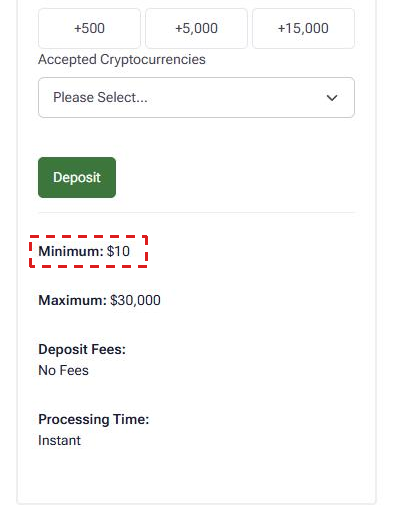
Type the amount and press Deposit, then finish the payment with your card, wallet or crypto app.
If the money went to myWallet, move it to a trading account with Transfer Funds. Bank wires always arrive in myWallet first.
The payment account must be in your own name, because HFM accepts no deposits from another person’s card or bank account.
How Do You Get a Rebate on Your HFM Trades?
Every trade at HFM costs a spread, and on the Zero account also a commission. ForexFanClub pays a rebate that returns part of that cost on every lot you close, and the HFM rebate guide shows the amount for each account and instrument.
To receive the rebate, register with HFM through the button below. HFM then records ForexFanClub as the partner of your trading accounts.
If you already have an HFM Client Area, you can keep it and add a new trading account through ForexFanClub instead.
HFM Minimum Deposit FAQ
- Can you start trading at HFM with USD 5?
-
Yes, on Cent, Premium and Zero, if a card method is offered in your country. USD 5 opens 0.01 lot of gold at normal times, but gold then needs to move only about $4 against you to close the trade.
- What is the HFM minimum deposit in ZAR?
-
In South Africa, HFM shows its own figures in rand. Cent, Premium and Top-Up Bonus have no minimum deposit. Zero starts at R450, and Pro starts at R900. You can open the trading account in rand or in US dollars.
- Does a larger deposit give a larger rebate?
-
No. The rebate is paid on every trade that you close, whatever your balance, and the amount depends on the account type and the instrument, not on the deposit.
- Does HFM charge a fee for deposits?
-
No. HFM charges no deposit fee, and its Deposit screen shows “No Fees” on every method. A crypto deposit can still pay a small network fee to the blockchain.
Where the facts and the figures come from:
Sources and how the figures are worked out
The minimum deposit
The minimum for each account type comes from the Open Live Account screen of our own HFM Client Area, read on 15 October 2026, and matches the account pages on hfm.com on the same day. One FAQ answer on the Zero account page gives USD 25, but we use the account table on the same page and the Client Area, which both show no minimum. The InfinityX and KATANA figures come from HFM’s Unlimited account terms, and HFM shows those account pages only in the countries that offer them. The rand figures come from HFM’s South African account pages, read on 15 October 2026 through a South African connection. There, the account table of the Pro page gives R900, while one FAQ answer on the same page gives USD 100, and we use the figure in the account table.
The payment methods, their smallest deposits, fees and processing times come from the Deposit screen of our own HFM Client Area on 15 October 2026. We opened the forms without sending a payment, and the screens are cropped so that no account details show. The fee and own-name rules come from the HFM deposit options page.
The gold calculations
The margin for 0.01 lot of gold is lots × contract size × price ÷ leverage, at the gold price saved by our HFM margin tool (14 October 2026, 17:34 UTC), on the Premium account at 1:2000, and at 1:300 for the news window. The spread is the 24-hour average of our HFM spread data on the Premium account, divided by 100 for 0.01 lot. The move before stop out is the deposit minus that spread and minus 20% of the margin, because HFM closes trades on Premium, Pro and Zero when the margin level falls to 20%.
The cent figures use 0.01 cent lot, which is 0.01 ounce, so each 1 dollar move in gold is 1 cent. All amounts are in US dollars, and the gold price changes every day, so your own figures will differ a little.
Which Page Do You Need Next?
If you are choosing which HFM account to open, start with the account types page, which compares what a gold trade costs on each account. The other pages show the spread and the rebate on each account, the overnight swap and the margin for each position.
Once the HFM trading account is open, add it to Forex FanClub. The member area lists every rebate payment day by day, across every broker you use. Registration is free and takes an email address.

Produced and operated by Forex FanClub
Person responsible: Hiroki Sakaida, founder of Forex FanClub
Hiroki Sakaida decides what our content and services cover and which features they offer. He also checks content and functionality and decides on revisions and publication. Our Content and Service Policy explains how we produce and check our content and services, including our use of AI.
Risk warning: Forex and CFD trading involve leverage, and you could lose all the money you invest. This article and tool provide information, not investment advice. The amounts shown are calculated from the collected data and do not guarantee the amounts that will apply to your own trades, or any future profit.
Affiliate disclosure: This article contains HFM referral links. Forex FanClub receives referral commission based on registrations and trading through these links.