
See whether a market is open right now, when it closes and reopens in your time zone, and where XM, HFM, XS and Exness differ.
Hours checked on 18 October 2026

OPEN Gold is open now at all 4 brokers. It closes at about Friday 21:00 UTC and reopens at about Sunday 22:00 UTC. On weekdays at HFM, XS.com and Exness it trades round the clock with a daily break from about 21:00 to 22:00 UTC. XM keeps different hours, shown in the table.
From each broker's MT5 symbol specification, read 23:15 UTC. Holiday hours appear only once a broker has put them into MT5.
Gold by broker (UTC)
| Broker | Week | Each weekday |
|---|---|---|
| XMGOLDOpen, closes 20:58 | Sun 21:02 → Fri 20:58 | 00:00 to 19:58 22:02 to 24:00 |
| HFMXAUUSDOpen, closes 20:55 | Sun 22:05 → Fri 20:55 | 00:00 to 20:58 22:02 to 24:00 |
| XS.comXAUUSDsOpen, closes 20:55 | Sun 22:05 → Fri 20:55 | 00:00 to 20:59 22:00 to 24:00 |
| ExnessXAUUSDmOpen, closes 20:58 | Sun 22:01 → Fri 20:58 | 00:00 to 20:58 22:00 to 24:00 |
Times are the broker's MT5 trading sessions converted to the zone you pick. Bold = differs from the other brokers by more than 5 minutes. Winter time moves by itself.
- OPEN / CLOSEDWhether the symbol trades now at the brokers.
- DIFFERSOpen at some brokers and closed at others.
- WeekThe first open and the last close of the week.
- Light blueHours when only some brokers are open.
When you open your trading account through ForexFanClub, you get part of the cost of every lot back as a rebate at XM, HFM, XS and Exness. Our rebate page compares how much each broker pays back.
Contents
What Are the Forex Market Hours?
At XM, HFM, XS and Exness, the forex market is open from Sunday 5 pm to Friday 5 pm New York time. While New York is on summer time, that is Sunday 21:00 to Friday 21:00 UTC, and currency pairs have no daily break in between.
The week follows New York because 5 pm there is the end of the forex trading day. So the open and the close stay at 5 pm New York time all year, and in many other time zones they move by one hour when New York changes its clocks.
The table below shows when the forex week opens in eight time zones. It closes at the same clock time five days later.
| Summer | Winter | |
|---|---|---|
| India | Monday 02:30 | Monday 03:30 |
| Pakistan | Monday 02:00 | Monday 03:00 |
| Thailand | Monday 04:00 | Monday 05:00 |
| Kenya | Monday 00:00 | Monday 01:00 |
| South Africa | Sunday 23:00 | Monday 00:00 |
| Nigeria | Sunday 22:00 | Sunday 23:00 |
| UK | Sunday 22:00 | Sunday 22:00 |
| UTC | Sunday 21:00 | Sunday 22:00 |
Gold, silver, US oil (WTI) and the US stock indices open one hour later, at 6 pm New York time, and stop for about one hour every weekday. So from 5 pm to 6 pm, you can trade EURUSD but not gold.
Which Markets Have Different Hours at Each Broker?
Stock indices, share CFDs, Brent oil and crypto keep different hours at each broker. Currency pairs, gold and silver open and close within 5 minutes of each other at XM, HFM, XS and Exness, so for them the broker makes no difference to your hours.
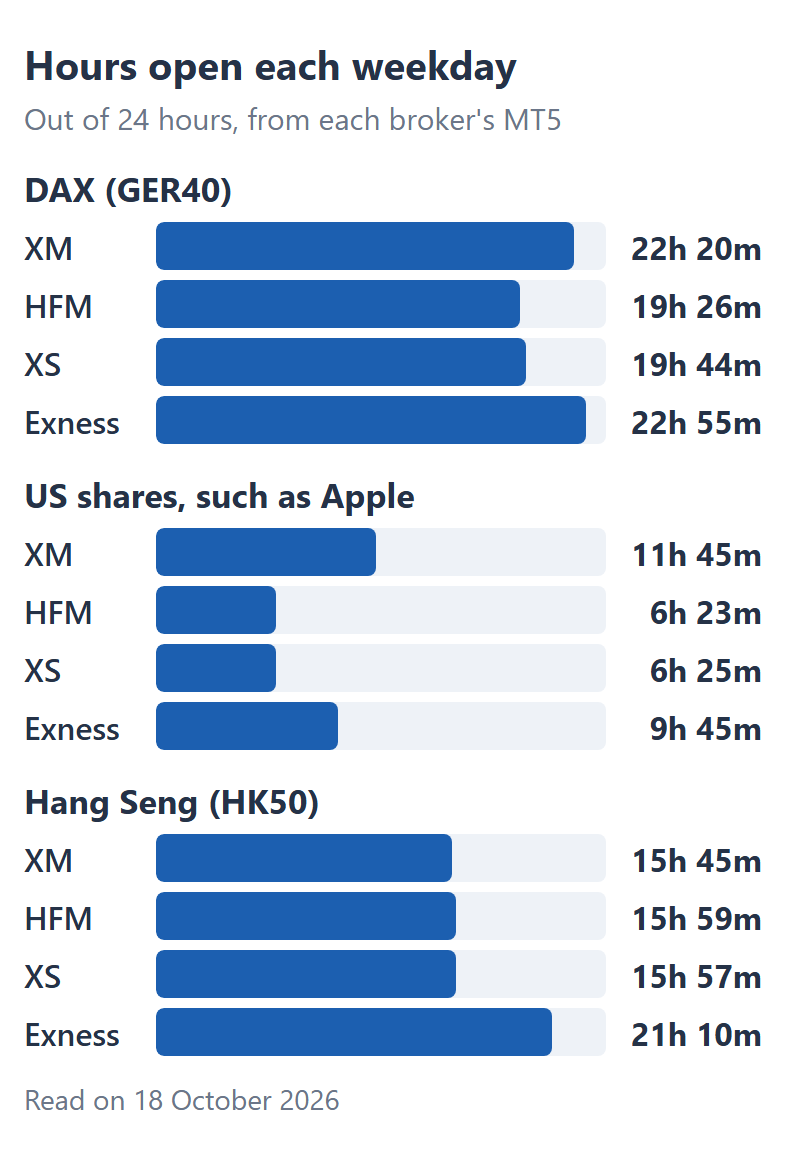
On DAX (GER40), you get about 3 more hours a day at XM and Exness than at HFM and XS. HFM and XS close DAX just before the New York stock market closes and reopen it after midnight UTC, so in the US evening DAX is open at XM and Exness.
The Hang Seng (HK50) has a gap of the same kind. Exness keeps it open for about 21 hours a day, while XM, HFM and XS trade it for about 16 hours, in three sessions that follow the Hong Kong exchange.
On US shares such as Apple, you get the longest hours at XM. XM opens them more than 2 hours before the New York session starts and closes them almost 3 hours after it ends, so you can trade on company results released outside the session.
HFM and XS open US share CFDs during the session only, and Exness opens them 3.5 hours early and closes them 15 minutes before the session ends.
Three smaller differences matter when you hold a trade overnight or over the weekend:
- Brent oil
HFM and Exness open Brent about 2 hours later than XM and XS at the start of the week. - Crypto
Bitcoin and the other crypto CFDs trade 24 hours a day, 7 days a week, at HFM and Exness. XM stops them for 30 minutes every Saturday, and XS for 1 minute every day. - Euro Stoxx 50 (EU50)
XS trades it for about 14 hours a day, from the morning in Europe until the US afternoon. XM, HFM and Exness also open it in the Asian hours.
So for an index or a share outside its main session, your broker decides whether you can trade at all. The broker table in the tool shows each broker’s hours for the symbol you choose, on your own clock.
What Are the Gold Trading Hours?
Gold trades from Sunday 6 pm to Friday 5 pm New York time at XM, HFM, XS and Exness, with a daily break from 5 pm to 6 pm. The four brokers open and close gold within 4 minutes of each other, so you get the same gold hours at any of them.
The tool opens on gold, so its first sentence tells you whether gold is open now and when that changes. Our gold market hours page gives the gold times in India, Pakistan, the UAE, Malaysia and the UK, and the weekend gold symbols.
What Happens on Public Holidays?
On a public holiday, a broker can close a market for the day or close it early. The tool reads each broker’s MT5 timetable every 30 minutes, so the changed hours appear in the week bar and the broker table soon after the broker enters them.
Brokers can enter a holiday at different times. On Sunday 18 October 2026, Exness already showed the Hang Seng (HK50) closed for the next day, a Hong Kong holiday, while XM, HFM and XS still showed normal Monday hours.
So for a holiday such as Thanksgiving or Christmas, the holiday notice in the news on your broker’s website is the second place to find the changed hours.
When Do the Hours Change for Winter Time?
On the first Sunday of November, New York changes to winter time, and the forex week opens at 22:00 UTC instead of 21:00 UTC. In New York time nothing changes, so the move shows up in UTC and in countries that keep the same clocks all year.
If you live in India, Pakistan, Thailand, Kenya, South Africa or Nigeria, the forex week opens one hour later in winter, because your clocks do not change. The Winter column of the time zone table shows the new time.
In the UK, the open stays at 22:00 on Sunday, because the UK clocks also go back. The UK changes one week before New York, however, so in that one week the market opens at 21:00 UK time.
Indices that follow a stock exchange in another city, such as DAX, change with that city’s clocks, so their hours can move on a different day. The tool shows the new hours soon after the broker enters them in MT5.
How Are the Hours Read?
ForexFanClub’s tool reads the trading sessions of each symbol from the MT5 servers of XM, HFM, XS and Exness every 30 minutes, and converts them from each broker’s server time to UTC and to your time zone.
How the hours are read
- Data accounts
- XM Standard, HFM Premium, XS Standard and Exness Standard.
- Source
- The weekly trading sessions in each symbol’s MT5 specification, read every 30 minutes.
- Time zone
- Each broker’s server clock is read with the sessions, so a change to winter time moves the hours by itself. In October 2026, XM, HFM and XS ran on GMT+3 and Exness on UTC.
- Short pauses
- A pause of 10 minutes or less, such as 2 minutes at HFM on currency pairs, is shown in the table but not counted as a close.
- Symbols
- 51 symbols in the menu. A JSON file, latest.json, gives the hours of every symbol at each broker, and history.jsonl records each change of a timetable.
Your trading account normally has the same hours as the tool shows, even though the hours come from our own data accounts. When we compared the trading accounts at each broker, they had the same hours for almost every symbol.
Questions People Ask About Forex Market Hours
- Is the forex market open 24 hours?
-
Yes, currency pairs trade 24 hours a day from Sunday 5 pm to Friday 5 pm New York time at XM, HFM, XS and Exness. HFM pauses them for 2 minutes at 5 pm New York time, and the other three brokers do not.
At the weekend, the forex market is closed, so you can trade only crypto CFDs and the weekend gold symbols.
- Why does a broker open or close a few minutes later than another?
-
Each broker sets the hours of its own MT5 symbols, so the open and the close of the week can differ by a few minutes.
Those minutes matter on Friday, if you close your trades before the weekend. The broker table in the tool shows the last minute at your broker, so you can close a few minutes before it.
- Why does MT5 show a different time from the tool?
-
MT5 shows the broker’s server time, and the tool shows UTC and your own time zone.
In October 2026, the servers of XM, HFM and XS ran 3 hours ahead of UTC, and Exness ran on UTC. So on an XM chart, the forex week opens at about 00:00 on Monday, which is 21:00 on Sunday in UTC.
Our free LocalTime indicator adds your own time to the MT5 chart.
Which Page Do You Need Next?
The best time to trade map shows the hours of the day when a market moves the most, and the spread comparison shows what the same symbol costs at each broker.
Once your rebate account is open, link it to Forex FanClub. The member area lists every rebate payment day by day, across every broker you use. Registration is free and takes an email address.

Produced and operated by Forex FanClub
Person responsible: Hiroki Sakaida, founder of Forex FanClub
Hiroki Sakaida decides what our content and services cover and which features they offer. He also checks content and functionality and decides on revisions and publication. Our Content and Service Policy explains how we produce and check our content and services, including our use of AI.
Risk warning: Forex and CFD trading involve leverage, and you could lose all the money you invest. This article and tool provide information, not investment advice. The amounts shown are calculated from the collected data and do not guarantee the amounts that will apply to your own trades, or any future profit.
Affiliate disclosure: The broker pages linked from this page contain referral links. Forex FanClub receives referral commission based on registrations and trading through those links.