

An Exness withdrawal by crypto usually reaches you within 15 minutes, and Exness processes over 98% of withdrawals automatically, 24/7. Your money goes back the way you deposited it, and a card deposit is refunded to the card first.
Checked on 21 October 2026
We read Exness’s withdrawal rules, the Withdrawal screen of our own Exness Personal Area and the timeline of our own withdrawals, then work out when your money arrives.
Exness offers different withdrawal methods in each country, so sign in to your Personal Area to see the methods, times and limits for your country.
Contents
- How Long Does It Take to Withdraw Money from Exness?
- Where Does Exness Send Your Withdrawal?
- How Much Can You Withdraw from Exness per Day?
- How Do You Withdraw from Exness to Your Bank Account?
- Why Is Your Exness Withdrawal Taking Longer?
- Can You Withdraw Your Exness Rebate the Same Way?
- FAQ About Withdrawing Money from Exness
- Which Page Do You Need Next?
How Long Does It Take to Withdraw Money from Exness?
An Exness withdrawal by crypto, such as USDT, usually arrives within 15 minutes, and a bank transfer takes from 24 hours to several days. Exness approves most requests at once, so the method that you choose decides most of the wait.
You can send a withdrawal 24/7, and a crypto withdrawal goes out at weekends too. Exness’s deposits and withdrawals page (opens in a new tab) says over 98% of withdrawals are automatic.
A request that is not instant is processed within 24 hours, and then your bank or payment service still needs its own time. The table below shows the time for each method on the Withdrawal screen of our own Exness Personal Area.
Time shown on our Withdrawal screen
| Time | |
|---|---|
| Crypto: USDT, USDC, ETH, TRON, BNB | Instant to 15 minutes |
| BinancePay, Peska | Instant to 30 minutes |
| Bitcoin | Instant to 1 hour |
| Local bank transfer | 24 hours to 5 days |
Your own screen can list other local methods with their own times, because Exness offers different methods in each country.
We timed our own two USDT withdrawals to a wallet on the BNB Smart Chain. The table splits each one into the wait for Exness to process it, read in our Transaction history, and the time from there to the blockchain.
| Wait for Exness | Then to the blockchain | |
|---|---|---|
| September 2026 | Under 1 minute | Under 1 minute |
| August 2026 | 17 minutes | Under 1 minute |
Both reached the blockchain less than a minute after Exness processed them. So in our withdrawals, the only wait came before Exness processed the request, and your Transaction history shows that time for each request.
Where Does Exness Send Your Withdrawal?
Exness sends your money back by the method that you deposited with, and a card deposit goes back to the card before any profit. Your profit then goes out by another method, such as crypto or a bank transfer, to an account in your own name.
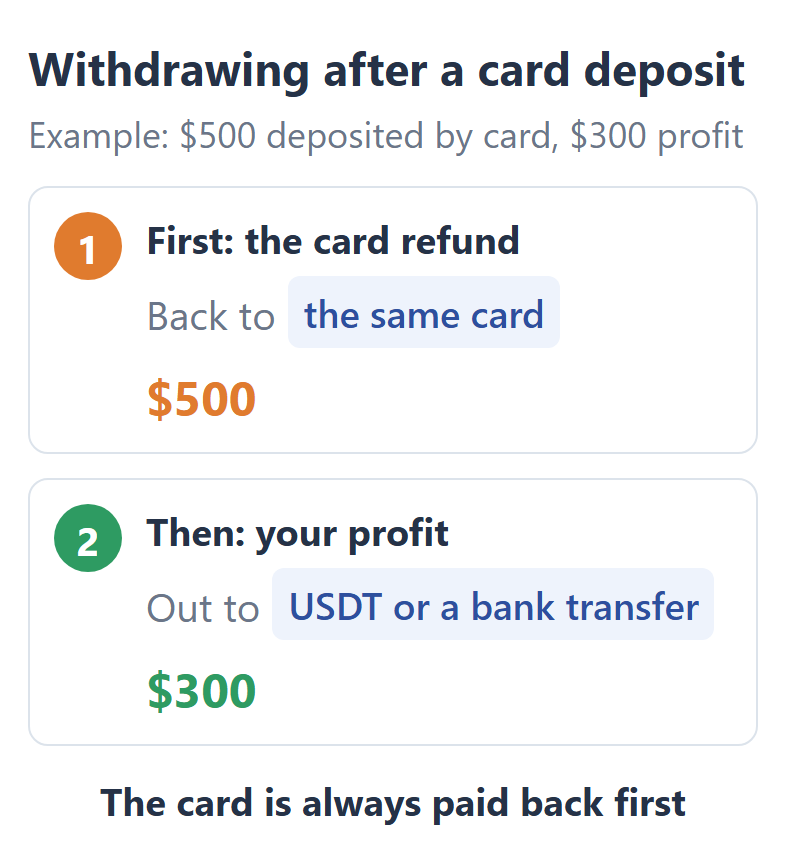
After a card deposit, your first withdrawals are refunds to the card, up to the amount that you deposited by card. While a refund is waiting, the Withdrawal screen shows it at the top, so you can see how much still has to go back to the card.
So your deposit method also decides how fast your money comes back. For fast withdrawals, deposit with crypto or a local method that your Withdrawal screen also lists. The Exness minimum deposit guide shows each deposit method.
You also withdraw in the same currency that you deposited with. If the method that you deposited with is no longer offered when you withdraw, contact the Exness support team on live chat, and the team gives you another way.
How Much Can You Withdraw from Exness per Day?
Exness has no limit on the number of withdrawals per day, and each withdrawal can be as large as the free margin of your trading account. Free margin is the money that your open trades are not using as margin.
For example, if your trading account holds $1,000 and your open trades use $300 as margin, you can withdraw up to $700 at once. To withdraw more, close a trade first, and the margin that it used becomes free margin again.
The Exness margin calculator shows how much margin a trade needs. Each payment method also has its own minimum and maximum for one request, and on our screen most methods start at USD 10.
Limits per request on our screen
| Minimum | Maximum | |
|---|---|---|
| Crypto, most coins | USD 10 | USD 1,000,000 |
| Bitcoin | USD 20 | USD 1,000,000 |
| BinancePay | USD 10 | USD 100,000 |
| Peska | USD 10 | USD 10,000 |
| Local bank transfer | USD 200 | USD 60,000 |
Because the number of requests has no limit, an amount larger than a method’s maximum can go out in two or more requests on the same day.
Exness charges no fee on withdrawals, although your bank or payment service can still take its own fee. The Exness fees guide lists every fee that Exness can charge.
How Do You Withdraw from Exness to Your Bank Account?
You withdraw to a bank account from Withdrawal under Payments & wallet in your Exness Personal Area, using the bank transfer that your screen lists. The request takes a few minutes, and the bank account must be in your own name.
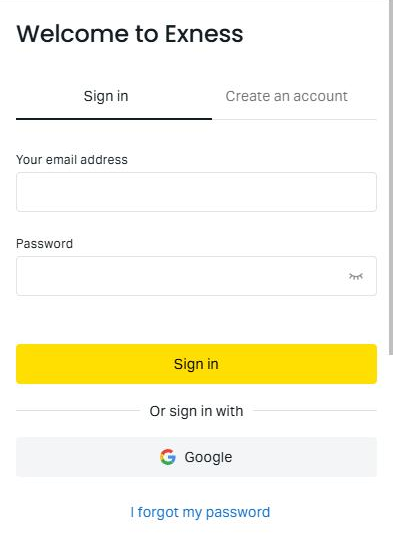
Sign in to your Exness Personal Area (opens in a new tab) with your email address and password.
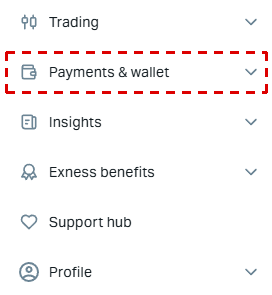
Open the menu with three lines at the top left, then open Withdrawal under Payments & wallet.
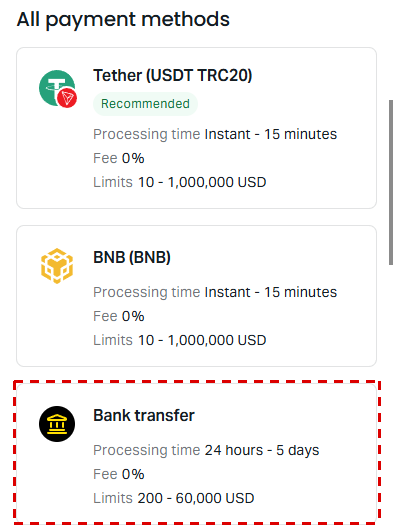
Choose the bank transfer under All payment methods. Each method shows its processing time, fee and limits, and a method that you used before is at the top of the screen.
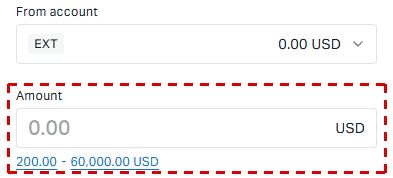
Choose the trading account in From account, enter the amount and the details of your own bank account, and press Continue. The figures under Amount are the smallest and largest request.
Confirm the request with the code that Exness sends to your phone, your email or your authenticator app.
Follow the request in Transaction history, under Payments & wallet.
On our screen, a bank transfer starts at USD 200, so an amount smaller than that needs another method, such as crypto. If you deposited by card, the refund to the card still comes before any bank transfer.
A bank transfer can also wait for business days. On our bank transfer form, a request sent after a set time on Friday is processed on Monday. The weekend note on your own form gives that time, so check it before you send a bank transfer late in the week.
Why Is Your Exness Withdrawal Taking Longer?
An Exness withdrawal takes longer when your verification is not finished, the names do not match, you changed your security type within 24 hours, or Exness is in weekend maintenance. So check these in your Exness Personal Area (opens in a new tab) first.
- Verification
Exness must have checked your ID and your proof of address. The check takes up to 24 hours, so upload the documents before you need the money. - The name on the payment account
The bank account, card or wallet must be in exactly the same full name as your Exness Personal Area. A different name, even a short form of your name, makes the withdrawal fail. - A security change
After you change your security type, for example from your phone to email, withdrawals can stop for up to 24 hours. So change your security settings well before a withdrawal. - An archived trading account
Exness can archive a trading account after 3 days with no trade, deposit or withdrawal, and an archived account cannot send withdrawals. You restore it for free under My accounts. - Weekend maintenance
Exness services its servers at weekends, usually from 05:00 to 09:00 UTC on Sunday and for four hours on Saturday, and withdrawals can pause for that time.
05:00 UTC, when the Sunday maintenance usually starts, is 07:00 in South Africa and 10:30 in India.
Your Transaction history shows where each request is. Processing means that the money is still on its way, and Done means that the withdrawal is complete.
If a request takes longer than the time shown for its method, tap Get support on that request. You can also ask Exness on live chat, which is open 24 hours a day.
Can You Withdraw Your Exness Rebate the Same Way?
Yes. The ForexFanClub rebate is paid into your Exness trading account the day after you close a trade, so you withdraw it like any other money. There is no transfer to make first, because the rebate arrives in the same trading account that you traded on.
The rebate returns part of the spread and commission on every lot that you trade, and the Exness rebate guide shows the amount for each account type and instrument.
To receive the rebate, open your Exness trading account through the button below. If you already trade on Exness through another partner, you can ask Exness to change your partner instead.
FAQ About Withdrawing Money from Exness
- Can you withdraw from Exness to a Capitec account?
-
Yes, if your Exness Withdrawal screen lists a local bank transfer for South Africa, because Capitec is a South African bank. Choose that method and enter your own Capitec account.
Check the time and the minimum on the form before you send the request. If your screen lists no bank transfer, ask Exness on live chat which method can reach your bank account.
- Can you withdraw profit to a prepaid card?
-
It depends on the card issuer, because some prepaid cards cannot receive profit.
If the issuer does not accept the profit, the money comes back to your trading account within a few hours. You can then send it again by crypto or a bank transfer.
Where the facts come from:
Sources and how the times are measured
The times and the limits
The time, the minimum and the maximum of each method come from the Withdrawal screen of our own Exness Personal Area, read on 21 October 2026. Exness shows a different list of local methods in each country, so your screen can differ. The share of automatic withdrawals, the 24/7 service and the 24-hour processing of requests that are not instant come from the Exness deposits and withdrawals page (opens in a new tab), read on the same day.
Our own withdrawals
We read the timeline of our two USDT (BEP20) withdrawals of August and September 2026 in our Transaction history, and the time that each one reached the BNB Smart Chain from the public block record. We show no amounts, wallet addresses or account details.
The rules
The order of card refunds, the free margin limit, the name and currency rules, the security change, the archived accounts and the weekend maintenance come from the Exness Help Centre, read on 16 October 2026.
Which Page Do You Need Next?
If you have not deposited yet, choose a deposit method that also withdraws quickly, and then the account type that fits your trading. The rebate guide shows what comes back to your trading account on every lot.
Once the new Exness trading account is open, add it to Forex FanClub. The member area lists every rebate payment day by day, across every broker you use. Registration is free and takes an email address.

Produced and operated by Forex FanClub
Person responsible: Hiroki Sakaida, founder of Forex FanClub
Hiroki Sakaida decides what our content and services cover and which features they offer. He also checks content and functionality and decides on revisions and publication. Our Content and Service Policy explains how we produce and check our content and services, including our use of AI.
Risk warning: Forex and CFD trading involve leverage, and you could lose all the money you invest. This article and tool provide information, not investment advice. The amounts shown are calculated from the collected data and do not guarantee the amounts that will apply to your own trades, or any future profit.
Affiliate disclosure: This article contains Exness referral links. Forex FanClub receives referral commission based on registrations and trading through these links.
- How Long Does It Take to Withdraw Money from Exness?
- Where Does Exness Send Your Withdrawal?
- How Much Can You Withdraw from Exness per Day?
- How Do You Withdraw from Exness to Your Bank Account?
- Why Is Your Exness Withdrawal Taking Longer?
- Can You Withdraw Your Exness Rebate the Same Way?
- FAQ About Withdrawing Money from Exness
- Which Page Do You Need Next?