

XM charges $10 a month on a trading account with no activity for 90 days. One trade, deposit or withdrawal starts the 90 days again.
Inactivity fee rules checked on 26 October 2026
If you have stopped trading on XM for a while, check your trading accounts in your XM Members Area before the 90 days run out.
Contents
When Does XM Charge the Inactivity Fee?
You pay the XM inactivity fee of $10 a month after your trading account has no activity for 90 days. If your balance is under $10, the fee takes the whole balance, but a trading account with a zero balance pays nothing.
So the money you leave in an idle trading account does not last long. For example, $50 left after your last trade is gone after five monthly fees.
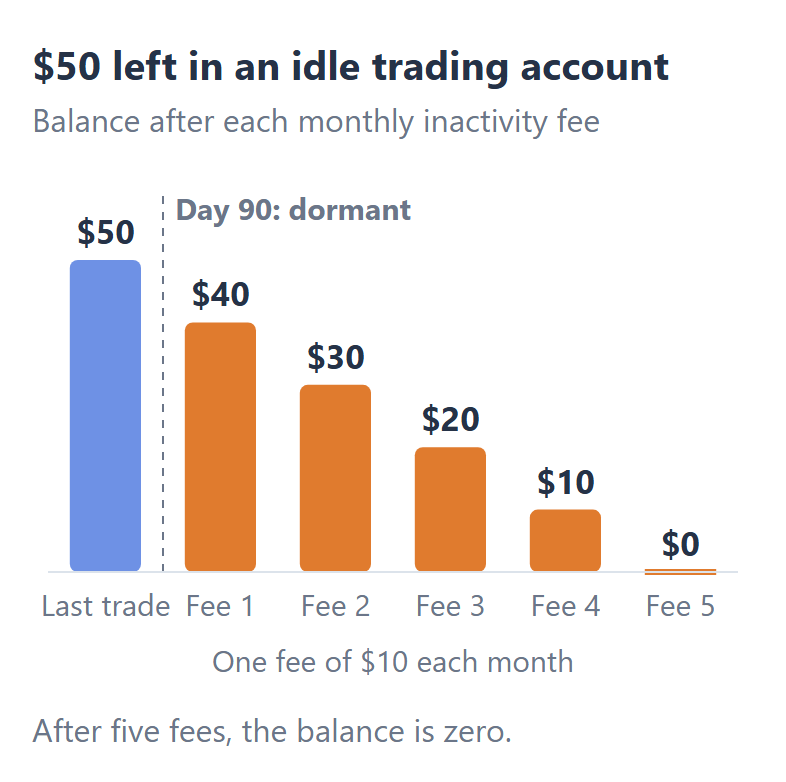
Day 90 also brings other changes. On that day, XM removes any bonus, promotion credit and XMC points left in the trading account. XM may also delete your pending orders.
What else happens on day 90 depends on your balance in the trading account.
| Balance on day 90 | What XM does |
|---|---|
| $0 | No fee, but XM archives the trading account |
| Under $5 | XM archives the trading account |
| $5 to $10 | The first fee takes it all |
| $10 or more | $10 a month until the balance is $0 |
What Counts as Activity on XM?
A trade, a deposit, a withdrawal or an internal transfer starts the 90 days again on XM. XM’s help answer also counts opening another trading account and registration activity in your Members Area as activity.
XM’s rules do not say whether a trade that you simply keep open counts as activity. So if your only trade has been open for weeks, you should place a small new trade or make a deposit before day 90 to keep the trading account active.
XM charges the fee on each dormant trading account. So if you keep money in more than one XM trading account, you need to do one of those activities in each trading account.
How Can You Avoid the XM Inactivity Fee?
The cheapest way to avoid the XM inactivity fee is one small trade before day 90. For example, a 0.01 lot trade on EURUSD in a Standard account costs about $0.21 in spread, but one month of the fee costs $10. The XM spread guide shows today’s spread on each instrument.
The best way depends on your plans for the money.
- A short break
One small trade before day 90 keeps the trading account active, and that trade also keeps the bonus and the XMC points in the trading account. - No plans to trade
In that case, a withdrawal of your whole balance leaves nothing for the fee to take. XM’s smallest withdrawal is $5, and the XM withdrawal guide shows the withdrawal methods for your country. - A bonus in the account
A trade keeps the bonus, but a withdrawal removes the same share of the bonus as the share of the balance that you take out. So a small trade is the better way to keep your bonus.
If you stop trading for more than three months, withdraw your balance instead of leaving the money in the trading account.
For example, $50 left in an idle trading account is gone after five monthly fees, and XM charges nothing for the withdrawal.
However, if you want to keep a bonus or XMC points, you should place one small trade every 90 days instead.
What Should You Do If XM Has Already Charged the Fee?
Once XM has charged the inactivity fee, XM treats that trading account as archived, and you cannot open an archived trading account again.
So to trade with XM again, you need to add a new trading account under your existing Members Area login. You keep the same login and your verified profile, so you do not register again.
If money was left in the old trading account, ask XM support where that balance is now, because XM does not publish what happens to that money. The XM contact guide shows the live chat and the email address.
- Does XM charge the inactivity fee on a demo account?
-
No, XM does not charge the inactivity fee on a demo account, because a demo account holds no real money.
XM closes a demo account that you do not use for 60 days, but you can open a new XM demo account at any time.
- What happens to an XM trading account that you never funded?
-
XM archives a trading account that you never funded after 60 days. You pay no fee, because your balance is zero. If you want to trade later, you need to add a new trading account under the same Members Area login.
- Does XM close your whole XM profile?
-
XM ends your client agreement after 12 months with no activity in all of your trading accounts. If you want to close your trading accounts or your Members Area yourself, you can follow the XM account closure guide.
Where the facts and the figures come from:
Sources and how the figures are worked out
The rules
We read XM’s help answers on the inactivity fee (opens in a new tab) and on archived trading accounts (opens in a new tab) on 26 October 2026, and section 79, “Dormant and Archiving Policy”, of the XM client agreement (opens in a new tab) on the same day. The end of the client agreement after 12 months is in its section 102.
The calculations
The cost of the small trade is the 24-hour average spread on EURUSD of an XM Standard account, 2.09 pips in our spread data, at 0.10 USD a pip for 0.01 lot. The picture assumes $50 left in a trading account with no bonus, and one fee of $10 a month.
Which XM Guide Do You Need Next?
If you have decided to stop trading for a while, start with the XM withdrawal guide, because a withdrawal leaves nothing for the inactivity fee to take. The other guides cover the rest of what you pay at XM and how to start again.
Once your XM trading account is open, link it to Forex FanClub. The member area lists every rebate payment day by day, across every broker you use. Registration is free and takes an email address.

Produced and operated by Forex FanClub
Person responsible: Hiroki Sakaida, founder of Forex FanClub
Hiroki Sakaida decides what our content and services cover and which features they offer. He also checks content and functionality and decides on revisions and publication. Our Content and Service Policy explains how we produce and check our content and services, including our use of AI.
Risk warning: Forex and CFD trading involve leverage, and you could lose all the money you invest. This article and tool provide information, not investment advice. The amounts shown are calculated from the collected data and do not guarantee the amounts that will apply to your own trades, or any future profit.
Affiliate disclosure: This article contains XM referral links. Forex FanClub receives referral commission based on registrations and trading through these links.