

HFM gives up to 1:2000 leverage while your trading account has less than USD 5,000 of equity. Around major news, the limit falls to 1:300, and at the start and end of the trading week to 1:100.
Checked on 26 October 2026
We read HFM’s leverage rules in its risk disclosure of September 2026 and checked the Change Leverage screen in our own HFM Client Area. Your Client Area shows the leverage of each trading account, and you change it there.
Contents
How Much Leverage Can You Use at HFM?
At HFM, you can use up to 1:2000 on currency pairs and gold while your trading account has less than USD 5,000 of equity. However, HFM lowers that limit around major news and at the start and end of the trading week. The lower limit decides how large a trade you can open.
Gold shows the difference best. With USD 1,000 in your trading account and gold at $4,015.25 an ounce, the largest gold trade that you can open depends on when you open the trade.
| USD 1,000 account | Maximum leverage | Gold lots you can trade |
|---|---|---|
| Normal hours | 1:2000 | 4.98 lots |
| Around major news | 1:300 | 0.74 lot |
| Friday, last hour | 1:200 | 0.49 lot |
| Friday, last 30 minutes | 1:100 | 0.24 lot |
So the same USD 1,000 opens almost five lots on a quiet afternoon, but less than one lot in the minutes around a major news release. The picture shows when each limit starts and ends.
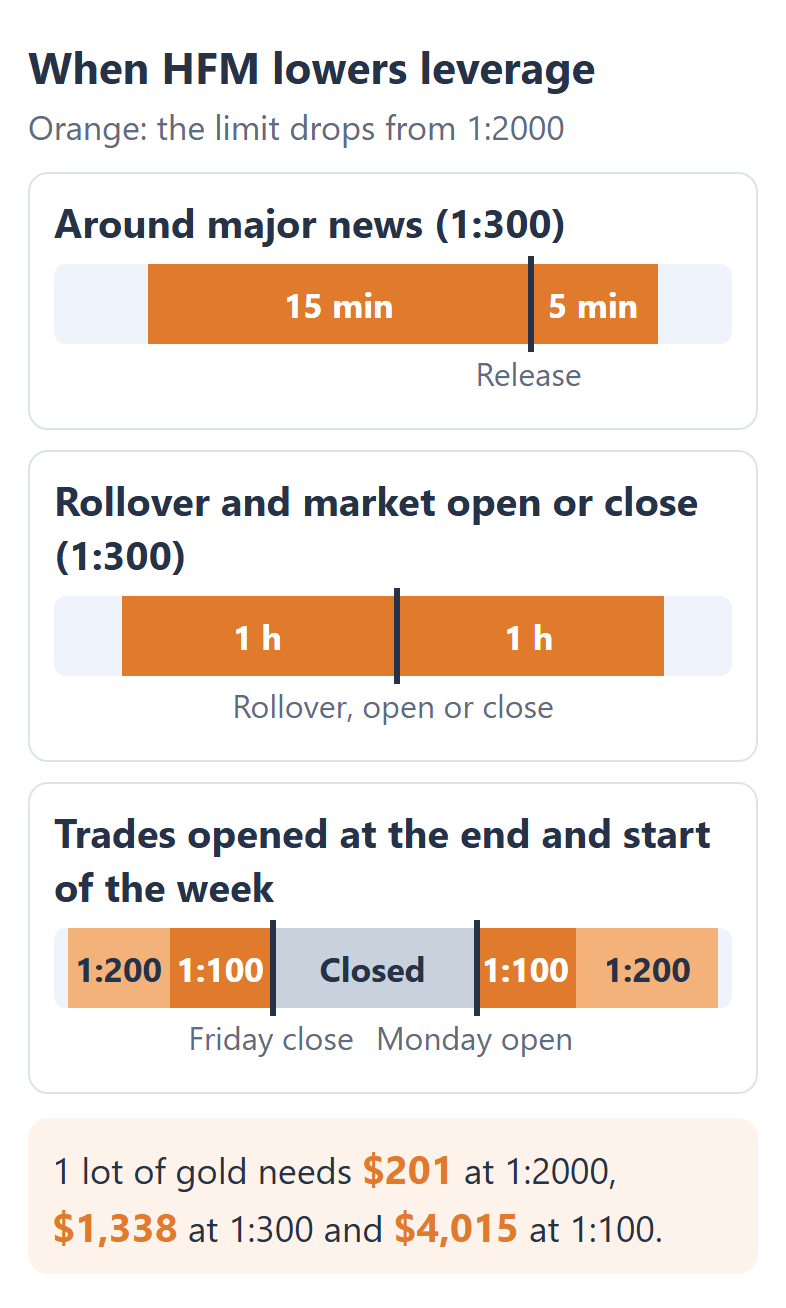
If you trade gold around news, plan the size of the trade at 1:300, not at 1:2000. A trade sized for 1:2000 can fail to open in the news window, because the trade needs 6.7 times the margin.
1:2000 is still useful, because the limit leaves a large free margin on quiet days. Just treat the maximum as the limit for the hours without news.
Does HFM Reduce Leverage During News?
From 15 minutes before until 5 minutes after major economic news, HFM lowers the maximum leverage from 1:2000 to 1:300. For 1 lot of gold, the margin then rises from $201 to $1,338.
HFM’s risk disclosure (opens in a new tab) applies the same limit at two other busy times of the day:
- 1 hour before and 1 hour after the daily rollover, for currency pairs
- 1 hour before and 1 hour after each market opens and closes, for gold and stock market indices
If your equity has already lowered your maximum, the news limit cuts less. The table below shows the limit for each step.
| Your normal maximum | During news |
|---|---|
| 1:2000 | 1:300 |
| 1:1000 | 1:300 |
| 1:500 | 1:200 |
| 1:200 | 1:200 |
HFM’s rule says that the limit applies during the news, and the rule does not say that the limit covers only new trades. So if you keep a gold trade open into the news, plan as if the margin of the trade can rise too.
For example, 1 lot of gold on USD 1,000 has a margin level of about 498% at 1:2000. At 1:300, the margin level is about 75%, and that level is still above HFM’s margin call at 50%. A second lot of gold would take the margin level under the margin call.
24/7 gold (XAUUSD247) has its own rule. During major news, the first 5 lots get 1:100, and any volume above 5 lots gets 1:1.
Does HFM Lower Leverage at the Weekend?
At HFM, a trade that you open in the first hour after the Monday open or in the last hour before the Friday close gets at most 1:200, and 1:100 in the 10 minutes after the open and the 30 minutes before the close. The windows apply to every instrument, and the windows count from that instrument’s own open and close.
| Trade opened | Maximum leverage |
|---|---|
| Monday, first 10 minutes | 1:100 |
| Monday, 10 minutes to 1 hour | 1:200 |
| Friday, 1 hour to 30 minutes before the close | 1:200 |
| Friday, last 30 minutes | 1:100 |
Unlike the news limit, the weekend limit is written for the trades that you open in these windows. Gold and the indices also have the 1:300 limit for 1 hour around each market close, so the end of the week combines both limits.
In the last 30 minutes before the close, 1 lot of gold needs $4,015, 20 times the margin at 1:2000. HFM also treats a public holiday on a weekday like a weekend, so the day before the holiday ends like a Friday and the day after starts like a Monday.
Does Your Balance Change Your HFM Leverage?
HFM’s 1:2000 applies only while your equity is under USD 5,000, and the maximum falls step by step to 1:200 as your equity grows. Equity is your balance plus the profit or loss of your open trades. HFM changes the leverage of the whole trading account automatically, and the broker does not tell you first.
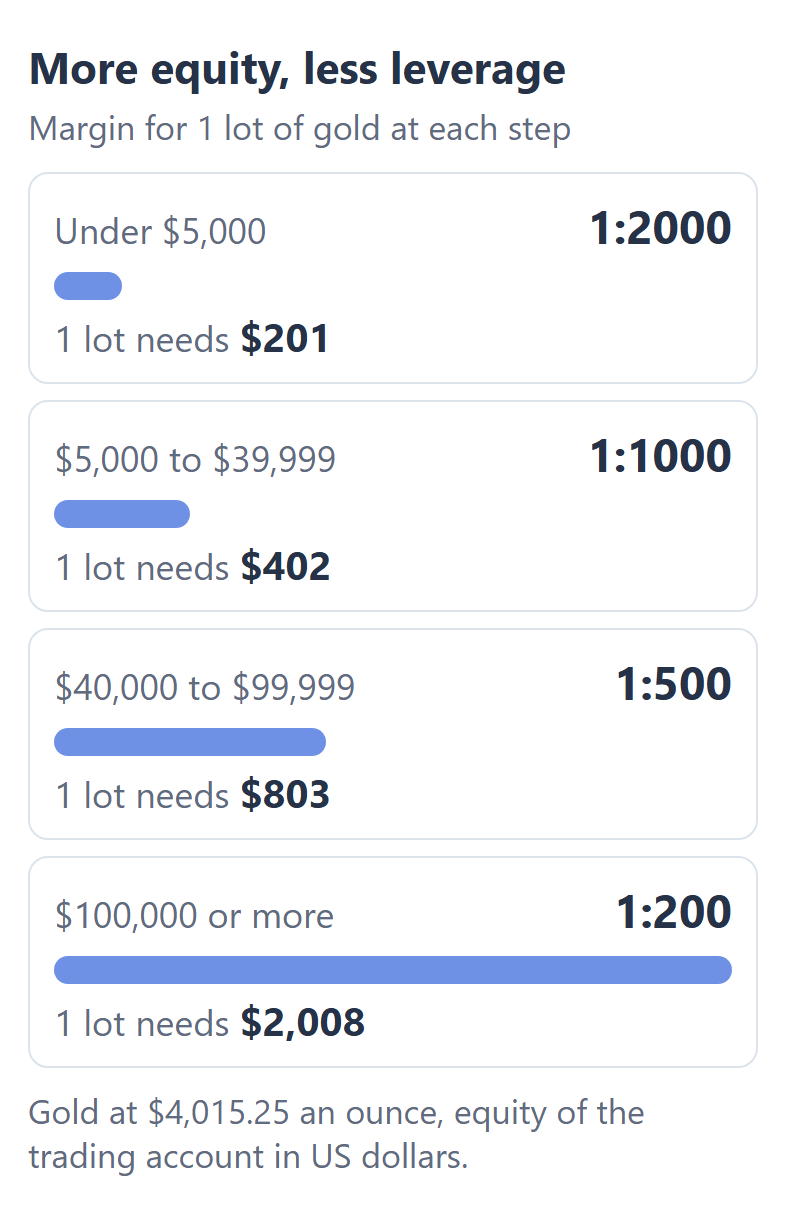
The first step matters most. Just under USD 5,000, 1 lot of gold uses about 4% of your equity. At USD 5,000, the same lot uses about 8%, because the margin doubles while the equity hardly changes.
At USD 100,000 or more, 1 lot of gold needs $2,008, but that margin is only about 2% of your equity. So the higher steps rarely limit a large account, and the news limit cuts less there, from 1:1000 to 1:300 for example.
Two account types work differently. The HFM Cent account steps down much sooner, to 1:1000 from USD 500 of equity and to 1:200 from USD 1,500. The Top-Up Bonus account starts at 1:1000.
Which HFM Instruments Have Their Own Leverage Limit?
At HFM, only currency pairs and gold follow the leverage of your trading account. Stock market indices, oil and silver have their own maximum, so a higher setting does not lower the margin on those instruments.
| Instrument | Maximum leverage |
|---|---|
| Currency pairs and gold | 1:2000, your setting |
| US indices and GER40 | 1:1000 |
| JP225, UK100 and other indices | 1:500 |
| Spot oil (USOIL.S, UKOIL.S) | 1:500 |
| Oil futures (USOIL, UKOIL) | 1:200 |
| Silver (XAGUSD) | 1:100 |
| Crypto and 24/7 gold | Depends on the number of lots |
Your setting changes the margin on these instruments only when your setting is lower than their own limit. For example, USA30 needs the same margin at 1:2000 and at 1:1000, but the index needs more margin at 1:100.
To see the margin for your own lot size on each instrument, use our HFM margin calculator.
How Do You Change Your Leverage on HFM?
You change the leverage of an HFM trading account in your HFM Client Area, with Change Leverage in the menu of that trading account. You choose from 14 levels between 1:2000 and 1:1, and you can change each trading account up to 30 times there.
Log in to your HFM Client Area (opens in a new tab). Under My Trading Accounts, tap the arrow on the row of the trading account to see its leverage.
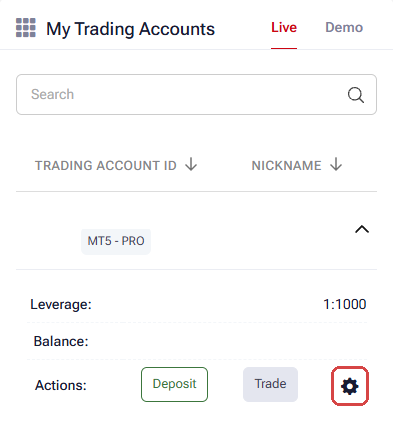
Tap the gear icon, then Change Leverage.
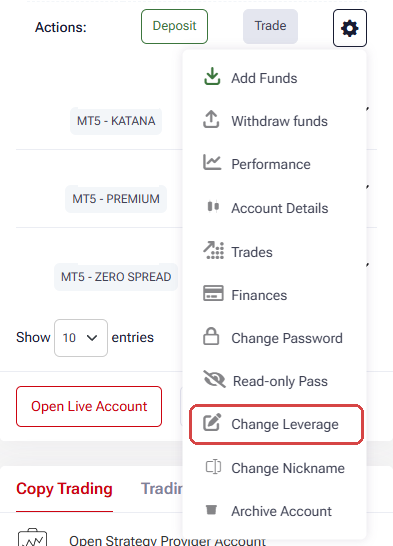
Choose the level under New Leverage and tap Request.
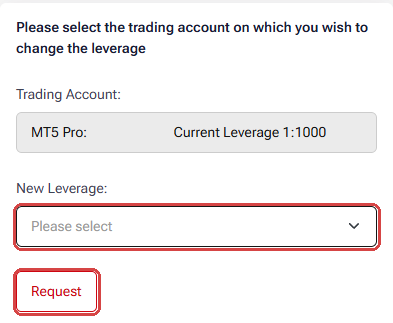
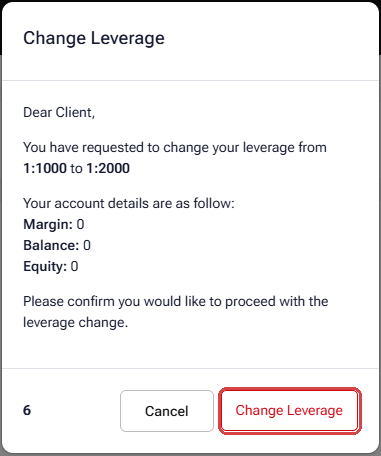
Tap Change Leverage in the window that opens. The window closes after a few seconds.
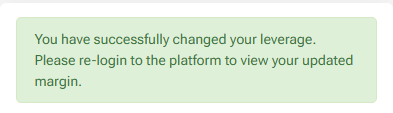
After the success message, log in to MetaTrader again to see the margin at the new leverage. Our HFM login guide shows where to find the login and server of each trading account.
You can raise the leverage at any time. To lower the leverage, your open trades need a margin level above 100%, and on a demo account you can change the leverage as often as you like.
A lower setting does not change the profit or the loss of a trade, because your lot size decides the profit or the loss. The setting changes the largest trade that you can open. At 1:300 or lower, the news limit no longer changes the margin on currency pairs and gold.
To work out a trade size that fits your account and your stop loss, use our lot size calculator.
HFM Leverage FAQ
- Does HFM offer unlimited leverage?
-
HFM offers unlimited leverage on a separate Unlimited account, which HFM calls InfinityX in India and KATANA in Japan. Up to 5 lots in each asset class, such as currency pairs or metals, need almost no margin.
HFM sets the leverage of this account itself, so Change Leverage is not available there. Our HFM margin guide explains the limits and the margin call.
- Why is my maximum leverage at HFM lower than 1:2000?
-
Your maximum depends on your equity, your account type and the HFM company that you are registered with. This page follows HF Markets (SV) Ltd, the company for most countries. HFM’s companies in Kenya and South Africa have their own terms, so the limits of those companies can differ.
The Legal line at the bottom of your HFM Client Area shows which company you are with.
- Does leverage change the rebate that you receive?
-
The rebate on your HFM trades depends on the lots that you trade, and the rebate does not depend on your leverage. The HFM rebate guide shows the rebate on each account and instrument.
Where the facts come from:
Sources and how the examples are worked out
The rules
The leverage limits come from section 4 of HFM’s risk disclosure for CFDs, version September 2026, of HF Markets (SV) Ltd, which we read on 26 October 2026. The steps of the Change Leverage screen, the 14 levels and the notes on that screen come from our own HFM Client Area, read without changing the leverage. The limit of 30 changes comes from HFM’s Client Agreement.
The examples
The margin examples use the gold and EURUSD prices and the margin settings that our HFM margin calculator saved from an HFM Premium MT5 account on 26 October 2026, 08:34 UTC, with gold at $4,015.25 an ounce. 1 lot of gold is 100 ounces. The largest trade is the equity divided by the margin for 1 lot, rounded down to 0.01 lot, before the spread.
Which Page Do You Need Next?
To see the margin for your own trade at any leverage, the HFM margin calculator works it out by instrument and lot size.
Once the HFM trading account is open, add it to Forex FanClub. The member area lists every rebate payment day by day, across every broker you use. Registration is free and takes an email address.

Produced and operated by Forex FanClub
Person responsible: Hiroki Sakaida, founder of Forex FanClub
Hiroki Sakaida decides what our content and services cover and which features they offer. He also checks content and functionality and decides on revisions and publication. Our Content and Service Policy explains how we produce and check our content and services, including our use of AI.
Risk warning: Forex and CFD trading involve leverage, and you could lose all the money you invest. This article and tool provide information, not investment advice. The amounts shown are calculated from the collected data and do not guarantee the amounts that will apply to your own trades, or any future profit.
Affiliate disclosure: This article contains HFM referral links. Forex FanClub receives referral commission based on registrations and trading through these links.