

XM gives up to 1:1000 leverage on trading accounts with up to USD 40,000, also during major news. At the weekend, XM lowers gold and currency pairs to 1:250.
Leverage rules checked on 27 October 2026
Your XM Members Area shows the leverage of each trading account, and you can change it there at any time.
Contents
How Much Leverage Can You Use at XM?
XM gives up to 1:1000 on gold and most currency pairs while your trading account has up to USD 40,000 of equity. XM keeps that limit around major news, but XM lowers the maximum leverage from Friday evening until the markets open again. So the weekend is the time when the leverage limit decides how large a trade you can hold.
Gold shows the difference best. With USD 1,000 in your trading account and gold at $3,996.58 an ounce, the largest gold trade that you can open depends on the day of the week.
| USD 1,000 account | Maximum leverage | Largest gold trade |
|---|---|---|
| Weekday | 1:1000 | 2.50 lots |
| Around major news | 1:1000 | 2.50 lots |
| Weekend | 1:250 | 0.62 lot |
So the same USD 1,000 opens two and a half lots on a weekday, but less than two thirds of a lot at the weekend. The weekend limit is the limit to plan for if you keep trades open from Friday to Monday.
If you hold gold over the weekend at XM, size the trade for 1:250, not for 1:1000. A trade that fits at 1:1000 needs 4 times the margin at 1:250, and that higher margin can bring your margin level close to the margin call while you cannot trade.
On weekdays, 1:1000 is useful because the high leverage leaves a large amount of free margin. Just remember that the free margin does not make the trade safer, because your lot size decides the loss on each price move.
Does XM Reduce Leverage During News?
XM’s leverage page says that the leverage stays at 1:1000 during major news, such as the US non-farm payrolls. So at XM, you can open the same size of trade a minute before the news as on a quiet afternoon. Some brokers lower the leverage in these minutes, and XM presents the unchanged limit as its Stable Leverage (opens in a new tab) feature.
XM’s client agreement (opens in a new tab) still keeps a right for unusual markets. XM can ask for a higher margin before and during major news, before the Friday close and when the market is expected to be very volatile. The agreement adds that the higher margin can also apply to trades that are already open.
The bigger risk in the news is the price itself, because the leverage does not change your loss. For example, 1 lot of gold on USD 1,000 needs $399.66 of margin. A move of about $9.20 an ounce against that trade then brings the account to XM’s stop out level of 20%.
Gold can move that far in a few seconds after a major release. So before the news, choose a lot size that your trading account can carry through a large move. Our lot size calculator shows how far the price can move before your balance runs out.
Does XM Lower Leverage at the Weekend?
From Friday evening until the markets open again on Sunday, XM lowers the maximum leverage to 1:250 on currency pairs and gold, and to 1:50 on oil. For currency pairs, the weekend limit starts at about 20:00 UTC on Friday. Stocks, ETFs and crypto keep their usual limits.
We read these limits in XM’s trading screen on a Saturday, when 91 instruments showed a lower weekend limit. On Monday, all those instruments were back to their usual limits.
The weekend limit matters most for a trade that you keep open. XM’s client agreement allows the higher weekend margin to apply to open trades, so plan as if your trade needs the weekend margin from Friday evening.
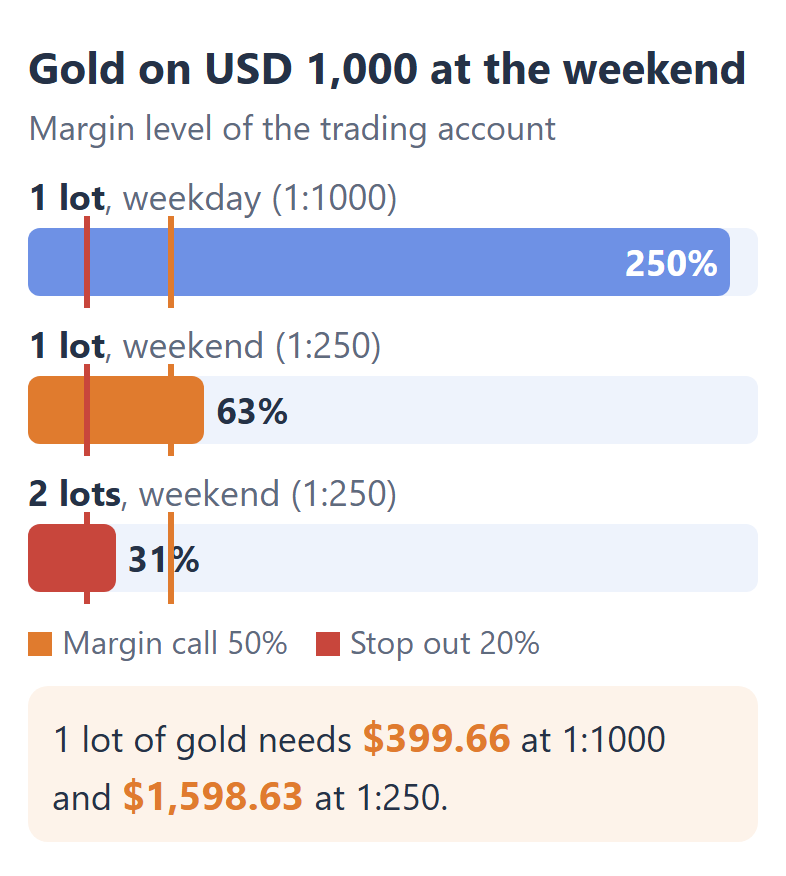
So with USD 1,000, one lot of gold stays above XM’s margin call at 50% over the weekend, but a second lot takes the trading account under the margin call. Under the margin call, you cannot open new trades until the price moves back or you add funds.
Does Your Balance Change Your XM Leverage?
XM’s 1:1000 applies while your equity is up to USD 40,000, and the maximum falls step by step to 1:100 as your equity grows. Equity is your balance plus the profit or loss of your open trades.
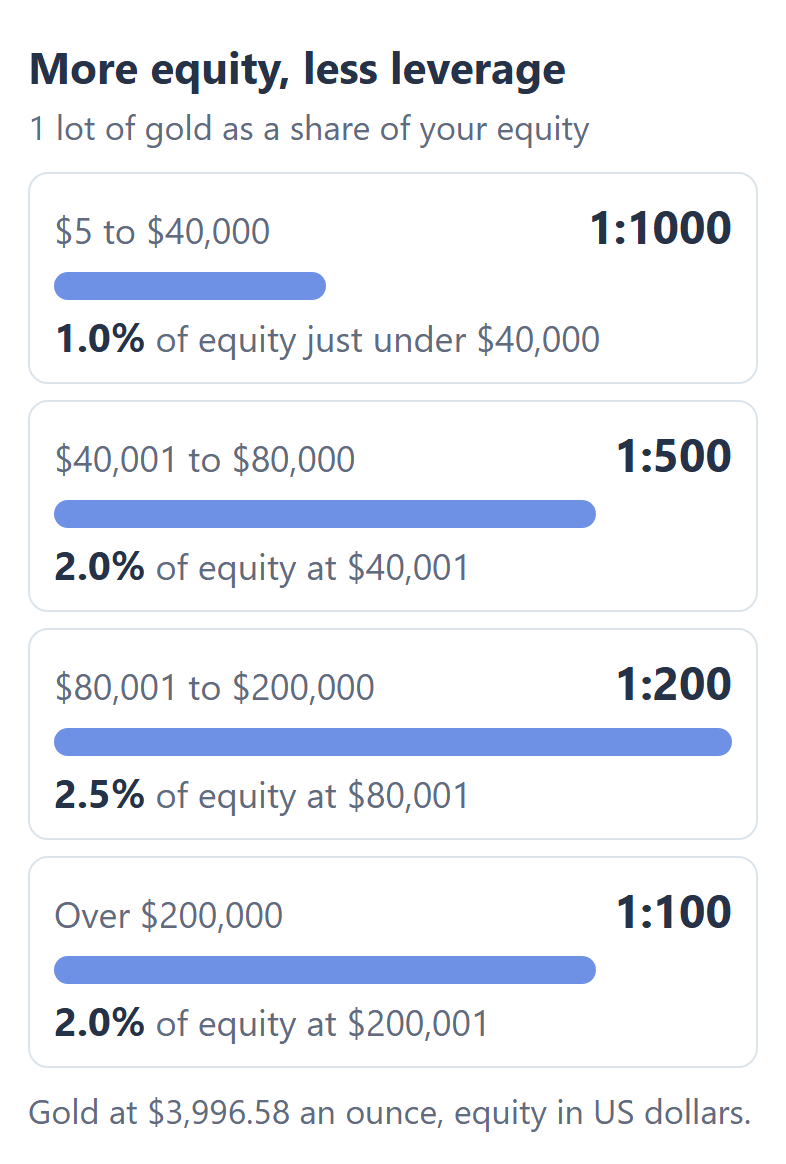
These equity steps limit your trading less than they seem to. Just under USD 40,000, 1 lot of gold uses about 1.0% of your equity. Just over USD 40,000, the same lot uses about 2.0%, because the margin doubles at 1:500 while the equity hardly changes.
At every higher step, 1 lot of gold stays at about 2.0% to 2.5% of your equity. So a large account still has plenty of free margin, and the equity steps rarely limit how much you can trade.
Which XM Instruments Have Their Own Leverage Limit?
At XM, gold and most currency pairs follow your own leverage setting, while silver, stock market indices, oil and stocks have a lower maximum of their own. On those instruments, XM uses their own limit even when your trading account is set to 1:1000.
| What you trade | Maximum leverage |
|---|---|
| Gold and most currency pairs | 1:1000, your setting |
| USDCHF and silver | 1:400 |
| US30, US100 and GER40 | 1:500 |
| Crude oil | 1:200 |
| Stocks | 1:5 to 1:20 |
Your setting changes the margin on these instruments only when your setting is lower than their own limit. For example, US30 needs the same margin at 1:1000 and at 1:500, but the index needs more margin at 1:100.
To see the margin for your own lot size on each instrument, use our XM margin calculator.
How Do You Change Your Leverage on XM?
You change the leverage of an XM trading account in your XM Members Area, with Change Leverage under Manage on that trading account. You choose from 17 levels between 1:1000 and 1:1, and the new leverage applies at once.
Log in to your XM Members Area on the website or in the XM app.
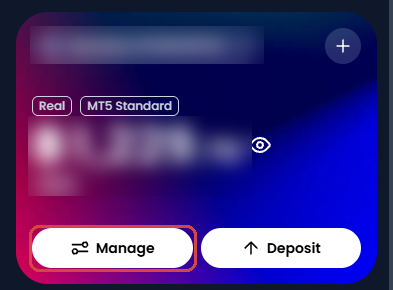
On Home, choose the trading account at the top of the account card, and tap Manage.
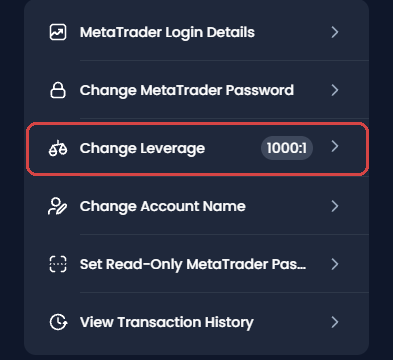
Tap Change Leverage. The current leverage of the trading account is shown on the same line.
Tap the Leverage box, and choose the new leverage from the list.
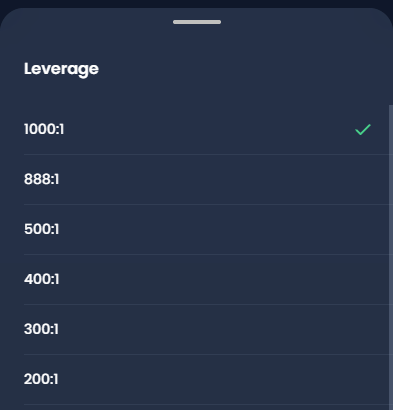
Tap the Change Leverage button at the bottom of the screen. The new leverage applies at once.
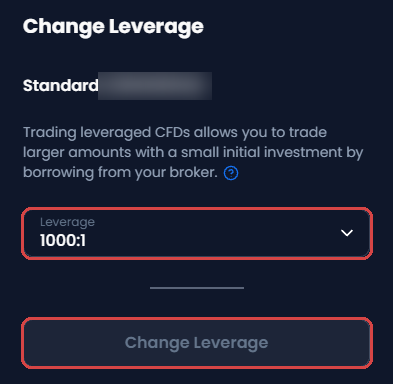
A lower setting does not change the profit or the loss of a trade, because your lot size decides the profit or the loss. The setting changes the largest trade that you can open. So a lower setting is useful when you want a limit that stops you from opening a trade larger than you planned.
XM Leverage FAQ
- Does XM offer more than 1:1000 leverage?
-
XM’s highest leverage is 1:1000, and XM has no account with unlimited leverage. The high leverage comparison shows the maximum at each broker and when that maximum drops.
- What leverage does the XM Shares account have?
-
The XM Shares account has a leverage of 1:1, so you pay the full value of the shares that you buy. The XM account types guide compares the Shares account with Standard and Ultra Low.
- Does leverage change the rebate that you receive?
-
The rebate on your XM trades depends on the lots that you trade, and the rebate does not depend on your leverage. The XM rebate guide shows the rebate on each account and instrument.
Where the facts and the figures come from:
Sources and how the examples are worked out
The rules
The maximum leverage and the equity steps come from XM’s help answer What leverage do you offer? (opens in a new tab), and the steps to change the leverage from Can I change my leverage? (opens in a new tab), both read on 27 October 2026. The leverage during news comes from XM’s Stable Leverage page, and the right to ask for a higher margin from section 59.5 of the XM client agreement, read on the same day. This page follows XM Global, the XM company for most countries.
The weekend limits and the limits of each instrument come from XM’s trading screen, which we read for our XM margin calculator on Saturday 19 September 2026, and from the calculator’s own XM data.
The examples
The examples use the gold price that our XM margin calculator saved from an XM Standard MT5 account on 27 October 2026, 09:04 UTC: $3,996.58 an ounce. 1 lot of gold is 100 ounces. The largest trade is the equity divided by the margin for 1 lot, rounded down to 0.01 lot, before the spread. The move to the stop out assumes no spread and no other open trades.
Which XM Guide Do You Need Next?
To see the margin for your own trade at any leverage, the XM margin calculator works it out by instrument and lot size.
Once your XM trading account is open, link it to Forex FanClub. The member area lists every rebate payment day by day, across every broker you use. Registration is free and takes an email address.

Produced and operated by Forex FanClub
Person responsible: Hiroki Sakaida, founder of Forex FanClub
Hiroki Sakaida decides what our content and services cover and which features they offer. He also checks content and functionality and decides on revisions and publication. Our Content and Service Policy explains how we produce and check our content and services, including our use of AI.
Risk warning: Forex and CFD trading involve leverage, and you could lose all the money you invest. This article and tool provide information, not investment advice. The amounts shown are calculated from the collected data and do not guarantee the amounts that will apply to your own trades, or any future profit.
Affiliate disclosure: This article contains XM referral links. Forex FanClub receives referral commission based on registrations and trading through these links.