

XM pays you $80 for each friend who joins XM through your link and trades 3 lots within 90 days. Your friend’s trades count only if their trading account is not under an IB partner.
Terms checked on 28 October 2026
Your referral link, code and QR code are waiting in your XM Members Area, in the Refer a Friend panel.
Contents
How Much Does XM Pay When You Refer a Friend?
XM pays you $80 for each friend who opens an XM trading account through your link and trades 3 lots within 90 days. In a few countries the amount is lower, and the Refer a Friend panel in your XM Members Area (opens in a new tab) shows the amount for your country.
XM adds the reward to your MyWallet every Sunday. You can then move the reward to a trading account and withdraw the money or trade with it.
The reward goes to you, the person who invites. XM’s current terms and its Refer a Friend page do not list a reward for the friend who joins. So if your friend asks what they receive from your link, the answer is the normal XM trading account and any bonus that XM offers in their country.
XM also advertises an extra reward of up to $5,000 per friend. However, you earn that extra money only when your friend trades much more and reaches a high level in the XM Traders Club.
| Your reward | What your friend must do |
|---|---|
| $80 | Trade 3 lots in 90 days |
| +$2,000 | Trade 90 lots in 90 days and reach Platinum |
| +$3,000 | Trade 360 lots in 90 days and reach Elite |
The Platinum level is a very high bar because it requires USD 50 million of trading in one quarter and USD 50,000 of deposits. With gold at about $4,000 an ounce, that volume equals about 125 lots of gold in three months.
So for most friends you invite, you should plan on the $80 reward, and the VIP money is only for a friend who trades large sizes every day.
XM sometimes runs limited-time campaigns with a larger reward per friend. You can check the Refer a Friend panel in your XM Members Area (opens in a new tab) to see the exact amount that applies to you now.
What Does Your Friend Need to Do?
Your friend must be new to XM, open and verify a trading account through your link, add money and trade 3 lots of their own money within 90 days. XM counts the lots across all of your friend’s trading accounts.
The rules that decide whether a trade counts are easy to miss, so you should tell your friend about the rules before they start trading.
- New to XM
You can only refer someone who does not have an XM trading account yet. A former client whose old trading account XM archived can still join through your link, as long as that old trading account never took part in Refer a Friend. - Two time limits
Your friend has 30 days from receiving your link to register, and then 90 days to trade the 3 lots. - Which trades count
Trades on currency pairs, gold, silver and Bitcoin count, but XM only counts trades that stay open for more than 5 minutes. On Ethereum, your friend needs to trade 30 lots instead. - Own money only
XM only counts the part of a trade that your friend’s own deposit pays for. For example, if half the balance is bonus money, one lot counts as half a lot.
The account type also changes the required number of lots. On an Ultra Low account, XM counts each lot as half a lot, so your friend needs to trade 6 lots there. On a Micro account, the 3 lots requirement means 300 micro lots.
For example, a friend who trades 0.1 lot of gold on a Standard account needs 30 trades of that size to reach 3 lots. You can see your friend’s progress under Referrals History in the Refer a Friend panel, so you can check the progress there instead of asking your friend.
Can You Use XM Refer a Friend and a Rebate Together?
Your own rebate keeps running when you refer friends, but each friend you invite gets either your referral or a rebate, not both.
A rebate is money that an XM partner pays back to the trader on every lot. For example, the XM rebate pays $18 per lot of gold on a Standard account. XM’s Refer a Friend terms only ask you to have one verified real trading account. The terms say nothing about which partner your own trading accounts have.
Your friend has to choose one code at sign-up, because the XM form has a single box for a partner or referral code. XM also does not count the trades of a friend whose trading account is under a partner who pays a rebate. So the code your friend enters decides whether you get the $80 or your friend gets the rebate.
| Code used | Reward to you | Rebate to friend |
|---|---|---|
| Your referral code | $80 once | No rebate |
| A rebate partner code | $0 | $18 per gold lot |
Which way pays more depends on how much your friend trades. Your $80 comes once, but the rebate grows with every lot.
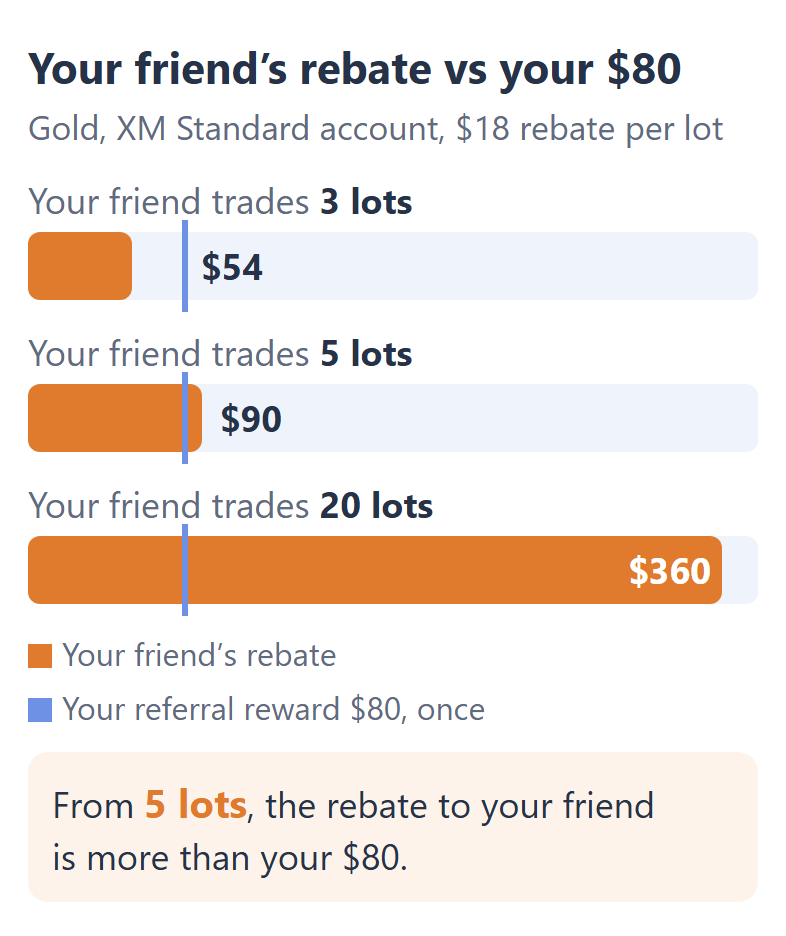
If your friend plans to trade every week, the rebate is worth more to your friend than your $80 reward is worth to you. In that case, you should give your friend our XM partner code instead of your referral link.
If your friend only wants to try a few trades, your referral link is the better choice, because 3 lots of gold pays your friend only $54 in rebate.
Where Do You Find Your XM Referral Code?
Your XM referral link, code and QR code are in your Members Area, inside the Refer a Friend panel. Your friend can open the link, scan the QR code or type your code when they register for a trading account.
Log in to your XM Members Area (opens in a new tab) on the website or in the XM app.
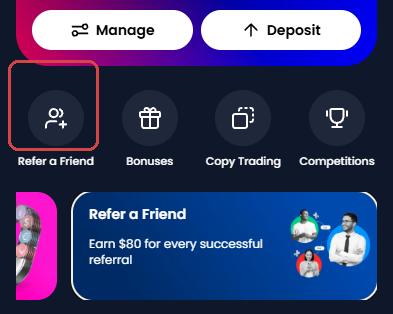
On Home, tap Refer a Friend in the row under your trading account card.
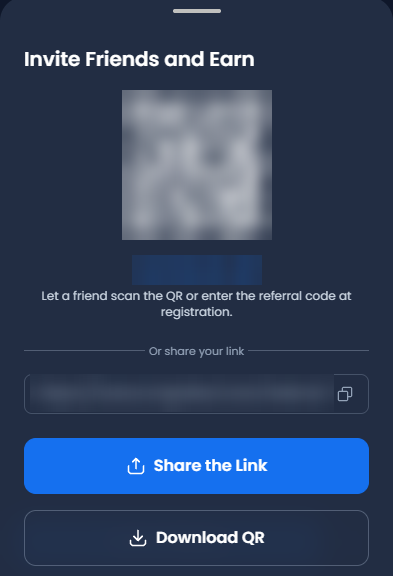
In the Invite a Friend tab, tap Invite Friends at the bottom of the panel.

Copy your referral code, tap Share the Link, or let your friend scan the QR code.
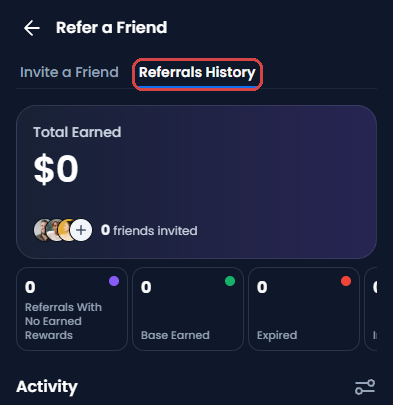
Open the Referrals History tab to see what you have earned and how many friends you have invited.
Your friend types the code under “Have a partner or referral code?” on the sign-up form, below the password. That box is the same place where a partner code goes, so your friend can enter only one of the two codes.
XM Refer a Friend FAQ
- Does your friend get a bonus from XM Refer a Friend?
-
No, XM’s current Refer a Friend terms pay only the person who invites. However, your friend can still use the normal XM bonus for new clients in their country, if XM offers a bonus there.
- Can you refer your husband, wife or a family member?
-
XM’s main Refer a Friend terms do not exclude family members, so the $80 reward can apply to them.
However, the VIP terms for the extra $2,000 and $3,000 exclude family members and people who trade from the same IP address. So the extra VIP rewards are only for friends outside your family.
- Is Refer a Friend the same as becoming an XM partner?
-
No, Refer a Friend pays a fixed $80 per friend, but an XM partner earns a commission on every lot that their clients trade.
If you want to introduce many traders and earn money on their trading, the XM partner programme (opens in a new tab) is the place to apply.
- How do you withdraw the XM referral reward?
-
You can move the reward from MyWallet to one of your trading accounts, and then withdraw the money like any other balance. The smallest move is $20, and the XM withdrawal guide shows the withdrawal methods for your country.
You also pay an inactivity fee from MyWallet after 90 days with no activity, so you should not leave the reward there for months.
Where the facts and the figures come from:
Sources and how the figures are worked out
The rules
We read XM’s Refer a Friend Program terms (opens in a new tab) (version of September 2026), the Refer a Friend VIP Promotion terms (opens in a new tab) and the XM Traders Club terms (opens in a new tab) on 28 October 2026. On the same day, we read the Refer a Friend panel in an XM Members Area and XM’s Refer a Friend page.
The calculations
The gold price of about $4,000 comes from our XM margin data. One lot of gold is 100 ounces, so USD 50 million of trading is about 125 lots. The rebate figures are ForexFanClub’s rebate on an XM Standard account: $18 per lot of gold and $8.10 per lot of EURUSD.
Which XM Guide Do You Need Next?
If your friend is about to open a trading account, send them the XM registration guide, because it shows each step of the sign-up form. The other guides cover the bonus, the rebate and the partner code.
Once your XM trading account is open, link it to Forex FanClub. The member area lists every rebate payment day by day, across every broker you use. Registration is free and takes an email address.

Produced and operated by Forex FanClub
Person responsible: Hiroki Sakaida, founder of Forex FanClub
Hiroki Sakaida decides what our content and services cover and which features they offer. He also checks content and functionality and decides on revisions and publication. Our Content and Service Policy explains how we produce and check our content and services, including our use of AI.
Risk warning: Forex and CFD trading involve leverage, and you could lose all the money you invest. This article and tool provide information, not investment advice. The amounts shown are calculated from the collected data and do not guarantee the amounts that will apply to your own trades, or any future profit.
Affiliate disclosure: This article contains XM referral links. Forex FanClub receives referral commission based on registrations and trading through these links.