

HFM Copy Trading is free to join, and you pay the Strategy Provider up to 50% of your profit. A Copy Premium follower account earns the Premium rebate, $13.50 per lot of gold.
Copy Trading terms checked on 28 October 2026
HFM Copy Trading copies another trader’s trades into a follower account of your own. This guide works out what you pay, when the rebate applies and how much money a copy needs.
HFM’s strategy list shows the fee, the drawdown and the minimum of every strategy, and you can read the list before you sign in.
Contents
- How Much Does HFM Copy Trading Cost?
- Do You Get a Rebate on HFM Copy Trading?
- How Much Money Do You Need for HFM Copy Trading?
- How Do You Choose a Strategy on HFM Copy Trading?
- How Do You Start Copy Trading on HFM?
- How Do You Stop Copying on HFM?
- Questions People Ask About HFM Copy Trading
- Which Page Do You Need Next?
How Much Does HFM Copy Trading Cost?
HFM Copy Trading is free to join, and you pay the Strategy Provider a share of your profit, up to 50%. The provider sets the share once when the strategy opens, and the strategy page shows the share as Performance Fee.
On the 24 strategies at the top of HFM’s list, the middle fee was 25%.
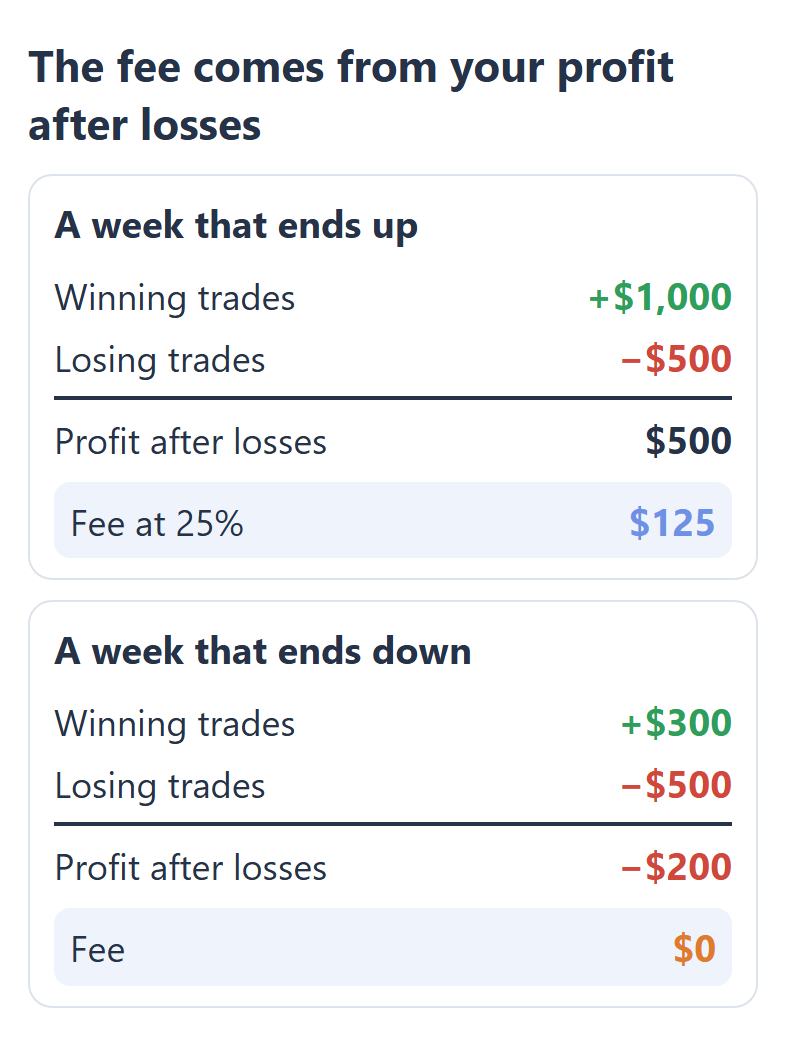
HFM takes the fee only from what you make after your losses. For example, if your copied trades win $1,000 and lose $500 before the next fee payment, your profit is $500. A 25% fee on that profit is $125. If your losses are bigger than your wins, you pay no fee for that period.
Your copied trades also pay the spread, just like trades on any HFM trading account. The provider chooses when you pay the fee: every day, every Saturday, or when you withdraw money or stop copying.
Do You Get a Rebate on HFM Copy Trading?
Yes, a Copy Premium follower account earns the same rebate as an HFM Premium account, which is $13.50 per lot of gold and $8.10 per lot of EURUSD. You receive the rebate for every lot that HFM copies into your account. So the rebate also comes in a week when the strategy loses money.
For a follower, the rebate can be as large as the fee. In this example, you copy a gold strategy for one week. Your copied trades add up to 2 lots, and the week ends with $100 of profit after losses.
1 week on Copy Premium, 2 lots of gold copied
Profit after losses+$100.00
Fee at 25%−$25.00
Rebate, 2 × $13.50+$27.00
You keep$102.00
The gold rebate of $13.50 is a campaign rate, and the rate returns to $10.80 when the campaign ends. Copied trades that close within 2 minutes earn no rebate. So a strategy that opens and closes trades very fast brings you little rebate.
Our rebate table lists the Copy Premium and Copy Cent follower accounts. For a Copy Pro follower account, the table has no amounts yet. So ask us before you open a Copy Pro account for the rebate. The HFM rebate page shows the rebate amounts for each symbol.
How Much Money Do You Need for HFM Copy Trading?
You can start HFM Copy Trading with $25 on a Copy Premium follower account, but each strategy can ask for more money. The strategy page shows the required amount as Minimum First Deposit, and on HFM’s list the US dollar strategies asked for between $100 and $500.
HFM’s lowest deposits
| Account | First | Top-up |
|---|---|---|
| Copy Premium | $25 | $10 |
| Copy Cent | 1,000 USc | 500 USc |
| Copy Pro | $100 | $50 |
Your trades are a smaller copy of the provider’s trades. If you put in $400 and the provider’s account holds $5,000, each of your trades is 8% of the provider’s trade.
With a small amount, your copy can be smaller than 0.01 lot, which is the smallest trade at HFM. HFM then opens your copy at 0.01 lot, and this trade is bigger than your share of the provider’s trade. This happens as long as Minimum trade volume stays ticked in your settings.
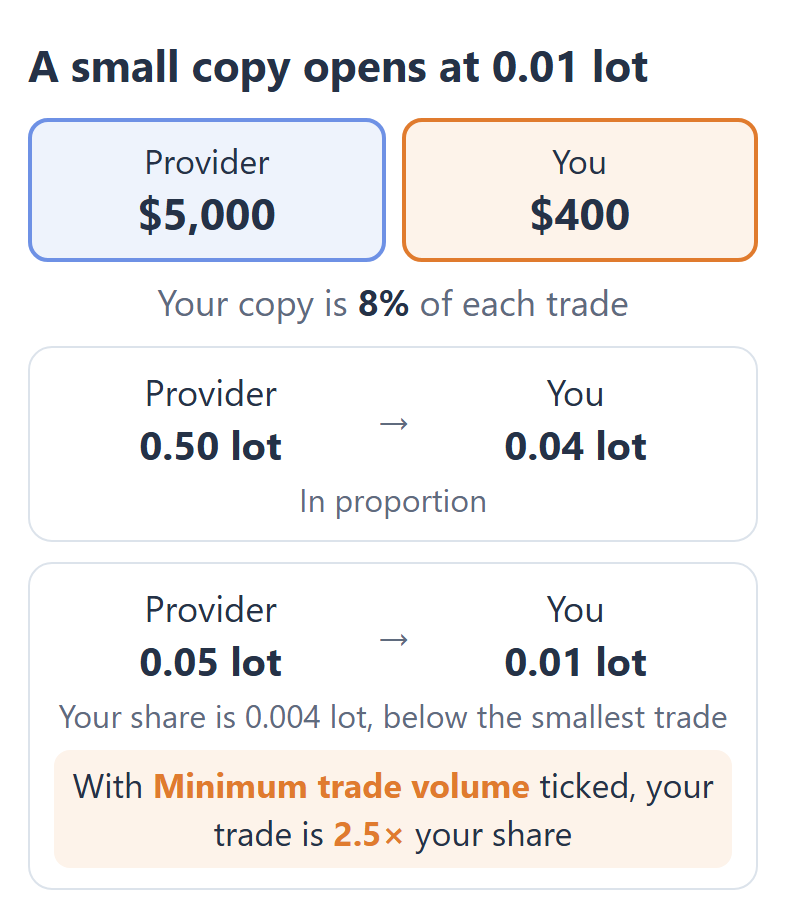
So a small follower account can carry more risk than the provider’s own account. If you want your copied trades to stay in proportion, untick Minimum trade volume. HFM then skips the trades that would be too small for your account.
How Do You Choose a Strategy on HFM Copy Trading?
On HFM, a strategy’s Max. Drawdown tells you more than its Gain, because the strategies with the highest Gain on HFM’s list often lost almost everything at some point.
On 24 strategies at the top of HFM’s strategy list (opens in a new tab), 11 had a maximum drawdown of 90% or more, and 7 of the top 10 strategies had that drawdown.
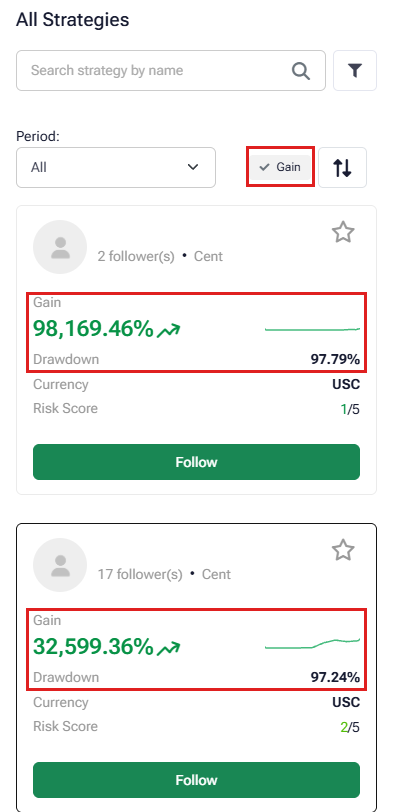
A drawdown of 90% means that the account once fell to a tenth of its peak. If you start copying at that point, your account balance falls the same way. HFM then closes your trades at your Rescue Level.
The leverage on the strategy page matters too, because 11 of the 24 strategies traded below 1:1000. Our follower account showed 1:1000, and HFM sizes your copy by the leverage of both accounts.
So if the strategy trades at 1:500, HFM doubles the size of your copy. With $400 against $5,000, each of your trades is then 16% of the provider’s trade instead of 8%.
The strategy also decides your account type. A Copy Premium strategy is copied only by a Copy Premium follower account, and a Copy Cent strategy needs a Copy Cent follower account.
So if the rebate matters to you, look for Copy Premium strategies. Copy Premium strategies were 3 of the 24 strategies at the top of the list.
Compare a strategy’s Max. Drawdown with the loss that you can accept, before you look at its Gain. If the drawdown is bigger than your accepted loss, your Rescue Level would have closed your trades before the gain came.
Even with the Rescue Level at its highest setting of 50%, a copy started at the strategy’s peak would have been closed on 15 of the 24 strategies at the top of HFM’s list. The strategies with a smaller drawdown show a smaller Gain, but a follower could actually keep that Gain.
How Do You Start Copy Trading on HFM?
To start HFM Copy Trading, you open a new Copy Trading account from the strategy that you want to follow. Your existing HFM trading accounts cannot copy strategies, and you cannot place your own trades in a follower account.
If you are new to HFM, register with the button below first. Then your HFM Client Area is linked with ForexFanClub from the start.
In the menu of the HFM Client Area, open Copy Trading and choose Follow A Strategy.
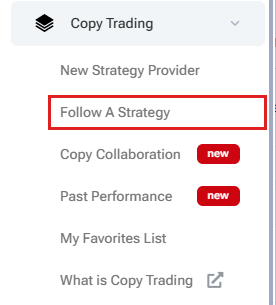
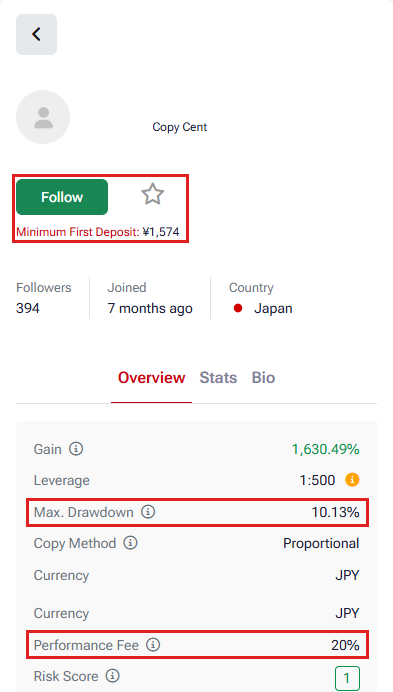
Open a strategy, check its Max. Drawdown, Performance Fee and Minimum First Deposit, and press Follow.
Enter the amount to invest, the Volume Allocation and the Rescue Level. Untick Minimum trade volume if you want HFM to skip the trades that are too small for your account.
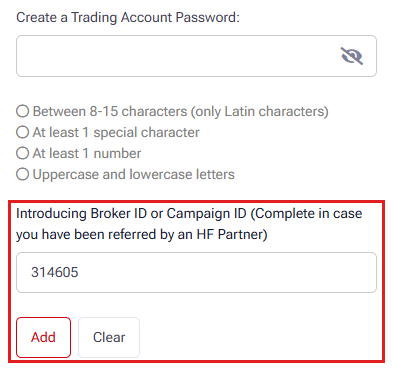
Create a password for the new follower account. For the rebate, paste our ID 314605 into the field “Introducing Broker ID or Campaign ID” and press Add.
Tick the box for the Copy Trading terms and press Start Following.
314605
One follower account copies one strategy at a time. To copy a second strategy, you open a second follower account in the same way.
How Do You Stop Copying on HFM?
On HFM, you stop copying by unfollowing the strategy in the Client Area, and HFM then closes all your copied trades at the current price. You cannot unfollow the strategy while the market of one of your trades is closed. So you must wait and try again when that market opens.
You can also close one copied trade yourself, but you cannot change the stop loss or take profit of that trade.
The Rescue Level closes all trades for you. For example, at 20%, HFM closes all trades when your equity falls to 20% of your starting money. You can set this level up to 50%. However, in a fast market, the trades can close below your chosen level.
You can withdraw money from a follower account starting from $10. If the provider closes the strategy, HFM stops your copying. HFM then moves your money to your HFM wallet.
Questions People Ask About HFM Copy Trading
- Is HFM Copy Trading an option after Exness Copy Trading closed?
-
Yes, HFM Copy Trading is open, while Exness closed its copy trading on 25 June 2026. At HFM, each strategy that you copy needs a new follower account, from $25 or the strategy’s own minimum.
- Can you trade yourself in an HFM Copy Trading account?
-
No, a follower account only copies the strategy. You can close a copied trade, but you cannot open a new trade. For your own trades, use a normal HFM trading account such as Premium.
- Does HFM Copy Trading work with MT4 and MT5?
-
Yes, HFM Copy Trading works with MT4, MT5 and the HFM app. HFM sends the MT4 and MT5 login details of your follower account by email when the account opens.
- Can you become a Strategy Provider on HFM?
-
Yes, you can open a Strategy Provider account in the Client Area starting from $100. You set your fee, which can be up to 50% of your followers’ profit. You cannot change this fee later.
Where the facts come from:
Sources and how we checked them
HFM’s rules
The fee, the minimum deposits, the trade sizes, the Rescue Level, unfollowing and withdrawals are from the Copy Trading Agreement of HF Markets (SV) Ltd (July 2026 edition) and HFM’s public Copy Trading pages, read on 28 October 2026.
HFM’s strategy list
The fee and drawdown figures are from the 24 strategies that HFM’s public strategy list showed first, sorted by Gain, and from the page of each strategy on the same day. The list changes every day.
Our own HFM Client Area and rebate table
We opened the Follow Strategy form in our own HFM Client Area to read its settings, without following a strategy. The rebate amounts are from our HFM rebate table, which lists the partner commission for each account type, and you receive 90% of it.
Which Page Do You Need Next?
If you also trade yourself, the next step is usually the HFM account that costs you least. The pages show the rebate on each account, the account types, the minimum deposit and the withdrawal times.
Once the HFM trading account is open, add it to Forex FanClub. The member area lists every rebate payment day by day, across every broker you use. Registration is free and takes an email address.

Produced and operated by Forex FanClub
Person responsible: Hiroki Sakaida, founder of Forex FanClub
Hiroki Sakaida decides what our content and services cover and which features they offer. He also checks content and functionality and decides on revisions and publication. Our Content and Service Policy explains how we produce and check our content and services, including our use of AI.
Risk warning: Forex and CFD trading involve leverage, and you could lose all the money you invest. This article and tool provide information, not investment advice. The amounts shown are calculated from the collected data and do not guarantee the amounts that will apply to your own trades, or any future profit.
Affiliate disclosure: This article contains HFM referral links. Forex FanClub receives referral commission based on registrations and trading through these links.
- How Much Does HFM Copy Trading Cost?
- Do You Get a Rebate on HFM Copy Trading?
- How Much Money Do You Need for HFM Copy Trading?
- How Do You Choose a Strategy on HFM Copy Trading?
- How Do You Start Copy Trading on HFM?
- How Do You Stop Copying on HFM?
- Questions People Ask About HFM Copy Trading
- Which Page Do You Need Next?