

The ForexFanClub partner code for Exness is fanclub_en. Type it into Partner code (optional) when you register, and your trades earn back up to 36% of the spread.
Checked on 29 October 2026
This guide shows where the code goes on the Exness form, what it changes for you and what to do if you have already registered without it.
Open the Exness form through the button, and keep this page open for the code.
Contents
Should You Use a Partner Code at Exness?
You should enter the Exness partner code fanclub_en, because it takes ten seconds on the sign-up form and decides whether your trades earn money back. With the code, Exness pays you a rebate the day after you close each trade.
On a Standard account, you get a rebate of $8.66 on 1 lot of gold. So if you trade 10 lots of gold a month, you get about $87 back each month.
Skipping the field costs you more later. After registration, you can change your partner only with a request to Exness, and the request usually takes up to three business days.
The trading accounts that you opened before the change stay with the old partner, so trades on those trading accounts never earn the rebate.
The code itself costs you nothing. Your spreads, commissions and leverage stay the ones that Exness publishes, because the rebate comes out of the share that Exness pays its partner.
Where Does the Exness Partner Code Go?
The Exness partner code goes in Partner code (optional), a folded row under the password on the Create an account form. The row is closed when the form opens, so you can easily scroll past it.
Open the Exness sign-up form (opens in a new tab) and choose Create an account. Enter your email address and a password.
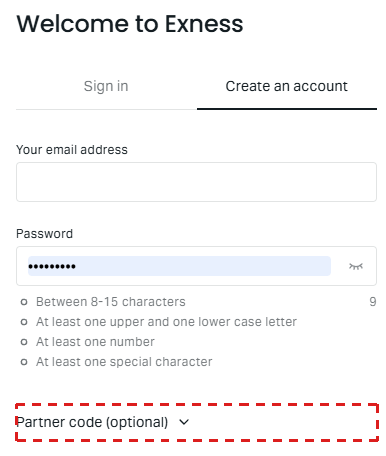
Tap Partner code (optional) under the password. Copy fanclub_en with the Copy button and paste it into the field.
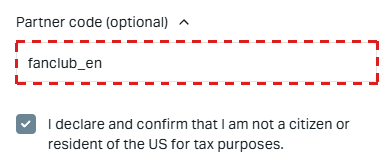
fanclub_en
Tick the declaration and tap Register.
The field stays empty even when you arrive from our link, so type or paste the code yourself. The link and the code do the same job.
However, the code still works when the link loses track of you, for example when your browser blocks cookies or you finish the form in another browser.
If the code is wrong, Exness shows an error and empties the field. So type fanclub_en in small letters with the underscore, or paste it with the Copy button.
The Google button under Register skips the partner code. When you register with Google, Exness shows no Partner code field, so register with your email address and a password to get the rebate.
What Do You Get With the Exness Partner Code?
With fanclub_en, every trading account in your Exness Personal Area earns a rebate on each trade that you close. The rebate arrives in the trading account that you traded on, the next day.
The code works for the whole Personal Area, rather than for just one trading account. So a Standard account that you open today and a Raw Spread account that you open next year both have ForexFanClub as their partner.
The partner code also decides how much money you get back. Exness lets each partner choose what share of its reward goes back to clients, from none of it to all of it.
The code fanclub_en puts you in our rebate group, and this group passes 90% of what Exness pays us back to you every day.
The table below shows the rebate on 1 lot for each account type.
| Account type | Gold | EUR/USD |
|---|---|---|
| Standard account | $8.66 | $3.12 |
| Pro account | $3.79 | $1.45 |
| Raw Spread account | $2.70 | $0.78 |
| Zero account | $2.70 | $0.78 |
The Standard account pays back the most per lot because its spread is the widest. After the rebate, the trading cost of 1 lot of gold is still about $15.39 on Standard and $12.32 on Raw Spread. So you should choose your account type by the cost after the rebate.
The Exness rebate page shows the cost after the rebate for every instrument, and our forex rebate calculator shows what your own lots bring back in a month.
Can You Add the Code After You Register?
You cannot add the Exness partner code after you register because Exness has a partner code field only on the sign-up form. Instead, you change your partner with a request to Exness after registration.
You send the request through the Exness Assistant chat in your Personal Area and a short form. Exness usually processes the request within three business days.
Your existing trading accounts stay with your old partner, so the rebate starts on a new trading account that you open after the change. An internal transfer moves your balance to it.
Our Exness partner change guide shows each screen and the partner link to paste.
What Do You Do After You Register?
After you register at Exness with fanclub_en, you verify your profile, open a trading account, deposit and trade. Verification comes first, because Exness limits deposits until you complete it.
In your Exness Personal Area (opens in a new tab), finish the verification steps that Exness shows you.
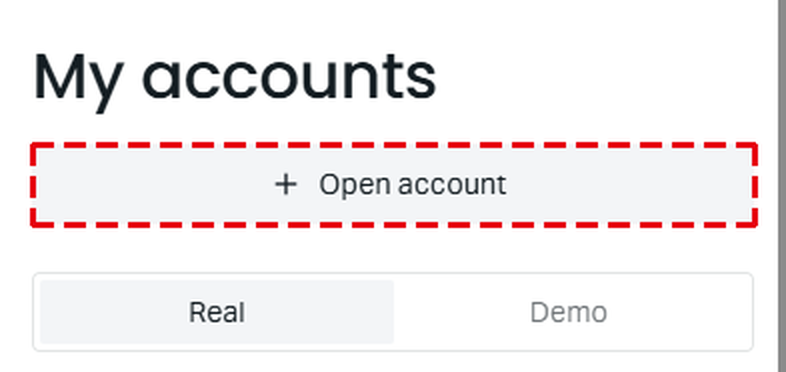
On My accounts, tap Open account at the top.
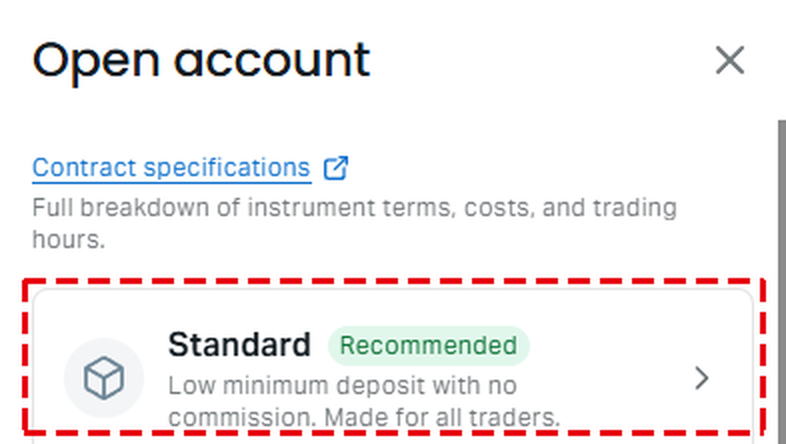
Choose the account type, for example Standard. Keep the Real tab, set a trading password and create the trading account.
Deposit, then trade as usual. The rebate arrives in that trading account the day after each trade that you close.
If you need help to choose the account type, the Exness account types guide compares all five account types. The Exness minimum deposit guide shows how much your first deposit needs to be.
You can also add the new trading account to the ForexFanClub member area. Exness pays the rebate either way.
However, our member area accepts only trading accounts under our partnership. So if the member area accepts your trading account, you know that the code worked.
- Register at the ForexFanClub member area (opens in a new tab) with your email address.
- Open Dashboard, choose Exness and enter the number of your new trading account.
- Approval takes 15 minutes at most. Your rebate history then appears under Auto Rebate History.
Exness Partner Code FAQ
- What is the ForexFanClub partner code for Exness?
-
The ForexFanClub partner code for Exness is fanclub_en. It goes in Partner code (optional) on the Exness sign-up form, and it gives you back 36% of the spread on a Standard account.
- Is the Exness partner code the same as a referral code or a promo code?
-
People use all three names for the same field, which is Partner code (optional). Exness offers no bonus of any kind, so a promo code does not bring you a bonus at Exness.
The Exness referral program is for people who want to become partners and refer traders. As a trader, you only need a partner code.
Where the facts come from:
Sources and how we checked them
The sign-up form
The Partner code (optional) row and its empty field come from the Exness sign-up form opened through our link on a phone. The check of the code, the partner change and the rebate groups come from the Exness Help Centre and the Exness partner help, read on 29 October 2026. The Help Centre asks for a sign-in in some countries, so we do not link to it.
The rebate per lot
The rebate is 90% of what Exness pays ForexFanClub at the Brilliant partner tier. On Standard and Pro, it is a share of the 24-hour average spread, so it moves every day. On Raw Spread and Zero, it is a set amount per lot. The amounts come from our rebate data on 29 October 2026, the same data as the panel on our Exness rebate page.
Which Page Do You Need Next?
Once you have registered with the code, the next step is choosing your trading account and your first deposit. The pages show the rebate, the account types, the minimum deposit and the logins.
Once the new Exness trading account is open, add it to Forex FanClub. The member area lists every rebate payment day by day, across every broker you use. Registration is free and takes an email address.

Produced and operated by Forex FanClub
Person responsible: Hiroki Sakaida, founder of Forex FanClub
Hiroki Sakaida decides what our content and services cover and which features they offer. He also checks content and functionality and decides on revisions and publication. Our Content and Service Policy explains how we produce and check our content and services, including our use of AI.
Risk warning: Forex and CFD trading involve leverage, and you could lose all the money you invest. This article and tool provide information, not investment advice. The amounts shown are calculated from the collected data and do not guarantee the amounts that will apply to your own trades, or any future profit.
Affiliate disclosure: This article contains Exness referral links. Forex FanClub receives referral commission based on registrations and trading through these links.