

XM processes withdrawals the same day, from $5. Banks and cards take 2–5 business days.
Checked on 3 November 2026
Every XM withdrawal starts in your XM Members Area, on the trading account that holds the money.
Contents
How Will Your Money Come Back From XM?
Your money comes back from XM to the method you used for your deposit. Under XM’s withdrawal rules (opens in a new tab), the amount you deposited goes back to the same method first.
If you deposited by bank transfer or crypto, you can withdraw your whole balance and profit in one request. Some countries also have an instant local bank payment on the Deposit screen, and in our test of a local bank method, the whole balance came back to the bank in one request too.
If you deposited by card or e-wallet, you need two requests. For example, you deposited $300 by card, and your balance is now $420. The first request sends $300 back to the card, and the second request sends the $120 profit by bank transfer or crypto.
If you plan to withdraw profit often, deposit by bank transfer, crypto or a local bank method. Then each withdrawal is one request, and the whole amount goes to one place.
A card or e-wallet works for the deposit too. The only difference is a second request each time you take profit out.
How Do You Withdraw From XM?
You withdraw your money in four steps, and each withdrawal starts from Manage on your trading account in the XM Members Area.
Log in to the XM Members Area (opens in a new tab) in the XM app or on the website. On Home, choose the trading account at the top of the account card. Then tap Manage → Withdraw.
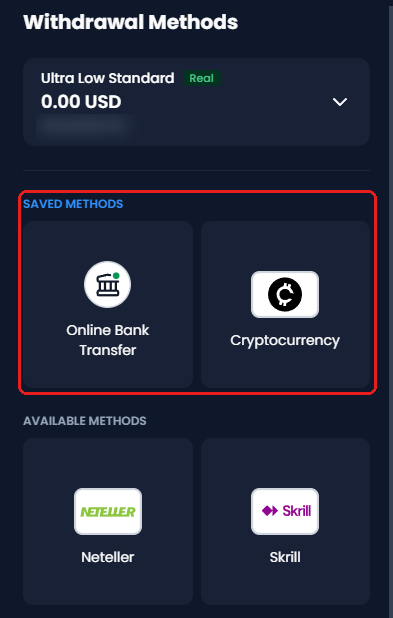
Choose a method. The methods that you have used are under Saved Methods, and the others are under Available Methods.
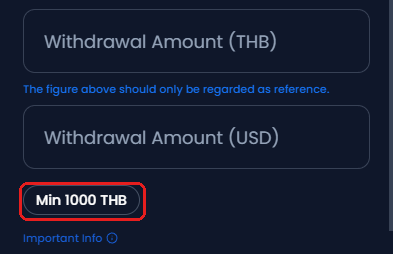
Enter the amount. The minimum for the method shows under the amount. The bank account or wallet must be in your name.
Tick the declaration, and tap Request. The request then shows under Manage → View Transaction History.
Ways to Withdraw Your Money
- Bank transfer
To a bank account in your name, in 2 to 5 business days. Your profit can also go out by bank transfer. - Local transfers
Domestic bank payments that XM offers in some countries, such as Online Bank Transfer to a bank account in your country. - E-wallets
Skrill, Neteller and other e-wallets. The e-wallet must be in your name. - Cryptocurrency
To a crypto wallet address. Your profit can also go out by crypto. - Credit or debit card
Up to the amount you deposited by card, in 2 to 5 business days. Profit goes to a card only where XM’s Bank Card Payout covers the card. Otherwise, use a bank transfer or crypto.
The withdrawal methods depend on your country. The methods can also differ between your trading accounts, for example between a USD trading account and a trading account in your local currency.
Cancel a Pending Request
Open Manage → View Transaction History.
Tap the Pending Withdrawals tab.
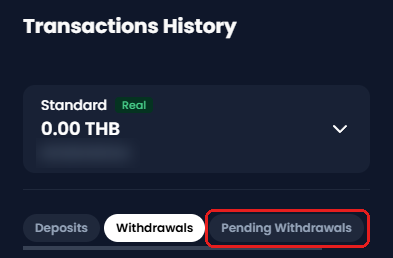
Tap Cancel on the request.
You can cancel only while the request is Pending. Once it shows Processed, wait for the money. Then deposit the money again if you want it back in the trading account. The XM deposit guide shows the steps.
How Long Does an XM Withdrawal Take?
An XM withdrawal to a bank account or card arrives 2 to 5 business days after the request, while e-wallets and crypto usually pay out on the same day.
XM’s own part is quick because a back-office system processes each request automatically, immediately or on the same day. So almost all of the wait for a bank or card withdrawal is on the bank side.
The table below shows when the money reaches you after XM marks the request Processed.
| Payment method | How long it takes |
|---|---|
| Bank transfer | 2 to 5 business days |
| Credit or debit card | 2 to 5 business days |
| E-wallet or crypto | Instantly or the same day |
| Local bank transfer | Within minutes in our test |
Banks and cards count only business days, from Monday to Friday. So a bank withdrawal processed on a Friday usually arrives between the following Tuesday and Friday. XM’s Client Agreement gives XM up to one business day to process a request.
What Do Pending, Processed and Rejected Mean?
Every withdrawal request shows in your XM Members Area (opens in a new tab) under Manage → View Transaction History with one of three statuses.
- Pending
At this stage, XM is still checking your request, usually for less than a day. You can still cancel the request. - Processed
XM has sent the money. Your bank, card company, e-wallet or crypto wallet now pays the money to you. - Rejected
One detail of your request did not match XM’s withdrawal rules. Six common causes explain most cases.
At the weekend, you can still send a withdrawal request. If you have open trades, a weekend request must leave your margin level at 400% or more, instead of 150% on weekdays.
If you receive nothing after 5 business days, write to XM within 15 business days of the Processed date. You send a bank statement in your name for those days, and then XM can trace the payment.
What Is the Minimum XM Withdrawal?
The minimum XM withdrawal is $5 on every trading account type, and XM charges no withdrawal fee. Some methods set a higher minimum, and the Withdraw screen shows that minimum under the amount when you choose the method.
Your own bank or wallet company can still charge a fee. If XM asks, you pay the transfer fee on your side. However, on an international bank transfer of $200 or more, or the same amount in your currency, XM also pays the fee of XM’s own bank.
There is no single maximum withdrawal amount because each payment method and country can have its own maximum per request. So you can ask XM on live chat before a large withdrawal. The XM fees guide shows the other costs outside trading.
If you leave money in a trading account and stop trading, XM charges USD 10 a month after 90 days with no activity. The XM inactivity fee guide shows how to avoid that fee.
Why Was Your XM Withdrawal Rejected?
An XM withdrawal is rejected when one detail of the request did not match XM’s withdrawal rules (opens in a new tab). You can find the cause in the list, fix the cause, and send a new request.
- A name that is not yours
XM sends withdrawals only to the person who made the deposit. Add a bank account, card or wallet in your own name, and send a new request. - Missing documents
Your request waits until your XM profile is verified and XM accepts any proof-of-payment document that XM asked for. Upload the document that XM asked for. - Choosing a different method
The amount you deposited must first go back to the method you deposited with. Send that amount to that method, and request the profit separately. - Low margin level
If you have open trades, a withdrawal request must leave your margin level at 150% or more on weekdays, and 400% or more at the weekend. Ask for a smaller amount, or close part of a position before you send the withdrawal request. - Withdrawing the bonus
Bonus credit is for trading only. Request your deposits and profit, and leave the bonus in the trading account. - A closed card or bank account
An expired or cancelled card still receives the money while its bank account is open. If the bank account is closed, email a bank letter with the account number and a date to support@xm.com.
If the reason is unclear, ask XM on live chat with your trading account number. The XM contact guide lists every way to reach XM. You can also send this email to support@xm.com:
Subject: Rejected withdrawal – trading account [number]

Hello XM Support,

My withdrawal of [amount] by [method], requested on [date], was rejected.
Please tell me the reason and what I need to change before I apply again.

Trading account number: [number]
A screenshot of Transactions History is attached.

Thank you,
[your name]
What Happens to Your XM Bonus When You Withdraw Money?
Each withdrawal removes part of your XM bonus, in the same proportion as the money that you take out of your balance.
XM trading bonus on withdrawal
- The bonus
- For trading only. The bonus stays in the trading account.
- Profit made with the bonus
- You can withdraw this profit at any time.
- On every withdrawal
- The bonus shrinks by the same share as the money you take out.
For example, you have $100 of your own money and a $50 bonus, and you withdraw $25. $25 is 25% of your balance, so 25% of the bonus, $12.50, is removed, and $37.50 of the bonus stays. The XM bonus guide explains how the bonus works.
New to XM? Open your trading account through the button below to receive a rebate on every lot you trade.
XM Withdrawal FAQ
- Can I withdraw to a different bank from the one I deposited with?
-
Yes, but only the profit can go to a different bank. The amount you deposited must first go back to the method you deposited with.
After that, you can send your profit to a different bank account in a new request, as long as the bank account is in your name.
- Can I withdraw my rebate from MyWallet?
-
You move the rebate to a trading account first. MyWallet pays nothing out directly.
So you transfer the rebate to one of your XM trading accounts, and then you withdraw the money as usual. The XM rebate guide shows when the rebate arrives in MyWallet.
- Do Exness withdrawals follow the same rule?
-
Yes, Exness also sends your money back to the method that you deposited with first. A card deposit goes back to the card before any profit, and the profit then goes out by crypto or a bank transfer in your own name.
If you also trade on Exness, our guide to Exness withdrawals shows how long each Exness method takes.
Which XM Guide Do You Need Next?
The XM deposit guide is the usual next step, because the way you deposit decides how your money comes back.
Sources: where each fact on this page comes from
- XM Help Centre (opens in a new tab)
- Withdrawals back to the deposit method and profit by bank transfer or crypto, the automatic processing, money instantly or on the same day and 2 to 5 business days for banks and cards, the margin level of 150% and 400%, no XM fee, the fee cover from 200 USD, the minimum withdrawal of 5 USD, and what happens to the bonus on a withdrawal.
- XM Client Agreement (opens in a new tab)
- Clauses 74.3 to 74.8 and 74A (version of 24 September 2026): limits per request, processing within one business day, the order in which withdrawals go back to each method (Withdrawal Priority Procedure), and the 15 business days to report a payment that did not arrive.
- XM bonus terms (opens in a new tab)
- If you withdraw 20% of your balance, 20% of the bonus is also removed.
- XM Members Area
- The Withdraw screens, the minimum under the amount and the Pending Withdrawals tab, on 26 September 2026. The pictures show a real trading account with its numbers hidden.
Once your XM trading account is open, link it to Forex FanClub. The member area lists every rebate payment day by day, across every broker you use. Registration is free and takes an email address.

Produced and operated by Forex FanClub
Person responsible: Hiroki Sakaida, founder of Forex FanClub
Hiroki Sakaida decides what our content and services cover and which features they offer. He also checks content and functionality and decides on revisions and publication. Our Content and Service Policy explains how we produce and check our content and services, including our use of AI.
Risk warning: Forex and CFD trading involve leverage, and you could lose all the money you invest. This article and tool provide information, not investment advice. The amounts shown are calculated from the collected data and do not guarantee the amounts that will apply to your own trades, or any future profit.
Affiliate disclosure: This article contains XM referral links. Forex FanClub receives referral commission based on registrations and trading through these links.
- How Will Your Money Come Back From XM?
- How Do You Withdraw From XM?
- Ways to Withdraw Your Money
- Cancel a Pending Request
- How Long Does an XM Withdrawal Take?
- What Do Pending, Processed and Rejected Mean?
- What Is the Minimum XM Withdrawal?
- Why Was Your XM Withdrawal Rejected?
- What Happens to Your XM Bonus When You Withdraw Money?
- XM Withdrawal FAQ
- Which XM Guide Do You Need Next?