
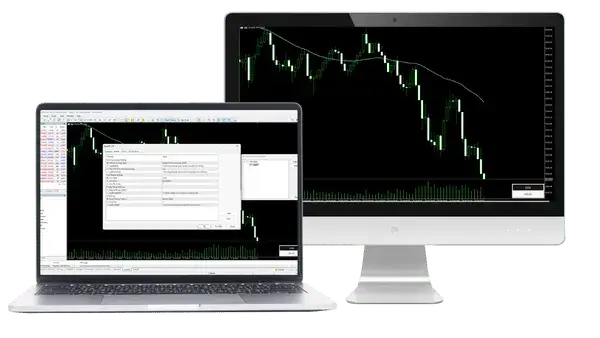
InteractiveMA 1.10 checked on 13 October 2026, and the gold price data on 14 October 2026
MT5 already has a Moving Average indicator, but you change its type and period in a settings window. InteractiveMA draws the same line and lets you change both on the chart with one key, free for MT5 and MT4.
The source code is free to read and change: InteractiveMA.mq5 for MT5 and InteractiveMA.mq4 for MT4.
Contents
How Do You Change a Moving Average Quickly in MT5?
To change the type or the period of a moving average in MT5 without the settings window, add the InteractiveMA indicator and press a key. W switches the type between SMA, EMA, SMMA and LWMA, and A and D make the period one bar shorter or longer.
With the Moving Average that comes with MT5, every change takes five steps. You right-click the chart, choose Indicators List, select the Moving Average, click Properties, and then change the period or the method and click OK.
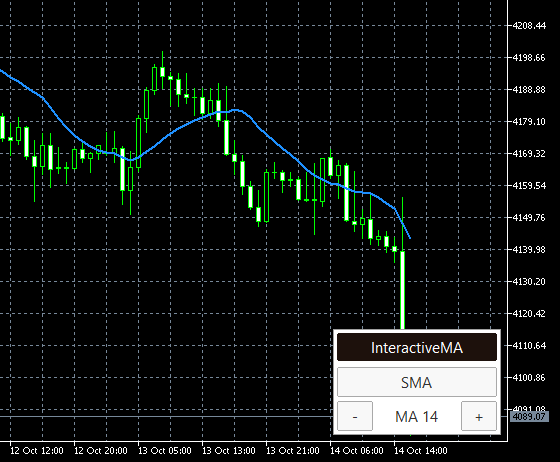
So to compare a 14 and a 20 period, or an SMA and an EMA, you would open that window again for every try. InteractiveMA redraws the line as soon as you press the key, and the panel on the chart shows the type and the period.
The line is the same as the line of MT5’s own Moving Average. In a test MT5, we compared the last 501 values of both on every timeframe from M1 to MN1, and all four types matched. So you get the standard line, with a faster way to change it.
How Does the InteractiveMA Panel Work?
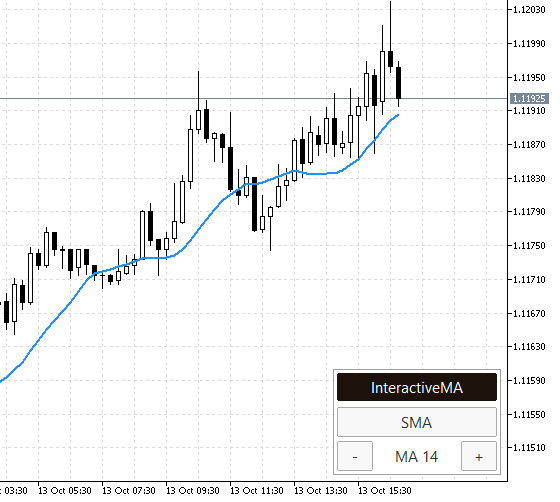
The InteractiveMA panel has three rows: a dark title bar, the type button, and the MA period between a minus and a plus button. The panel sits in the bottom-right corner of the chart when you add the indicator.
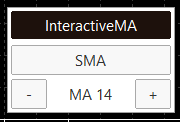
Click the type button, SMA in the picture, to change the line to the next type in the order SMA, EMA, SMMA, LWMA and back to SMA. Click the minus or the plus button to change the period by one, and the bottom row shows the period now, such as MA 14.
The keys do the same. W changes the line to the next type, A makes the period shorter and D makes it longer. Click on the chart first, because MT5 sends the keys only to the chart you clicked last. The period goes from 2 up to Largest period, which is 200 by default.
This matters because the period that fits a chart changes from day to day. On gold M15 charts, the period that fitted the pullbacks best was close to the period of the day before on only about one day in seven.
To move the panel, hold the title bar and drag it. The panel stays inside the chart, and when you make the MT5 window smaller, it moves back into view.
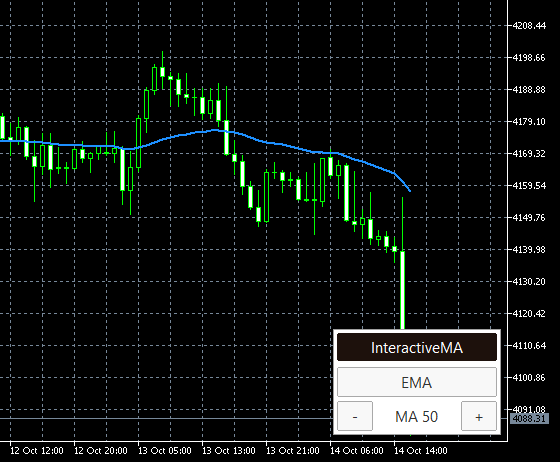
The type, the period and the place of the panel stay on the chart. After a timeframe change or a restart of MT5, the chart still shows the line you chose, such as EMA 50 on gold H1. Each chart keeps its own line, so gold can show EMA 50 while EURUSD shows SMA 20.
In the MT5 Data Window, the line is called InteractiveMA with the type and the period, such as InteractiveMA SMA(14). Use one InteractiveMA per chart, and for a second moving average on the same chart, add MT5’s own Moving Average.
How Do You Install InteractiveMA in MT5?
Download the file for your platform, copy it into the Indicators folder of MT5 and drag it onto a chart. Install it on a computer, because the MT5 app on phones cannot run indicators that you download.
Download the file for your platform. InteractiveMA.ex5 is for MT5, and InteractiveMA.ex4 is for MT4.
In MT5, click File and then Open Data Folder. Open MQL5 and then Indicators, and copy InteractiveMA.ex5 into that folder. In MT4, the folder is MQL4 and then Indicators.
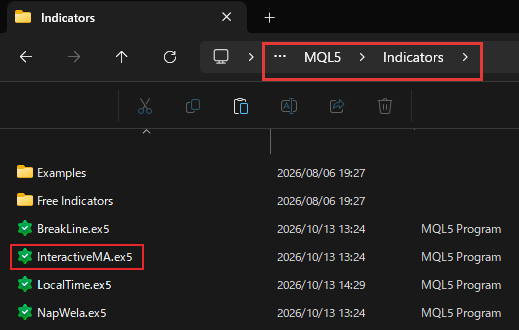
Restart MT5, or right-click Indicators in the Navigator and click Refresh. Then drag InteractiveMA from the Navigator onto your chart and click OK.
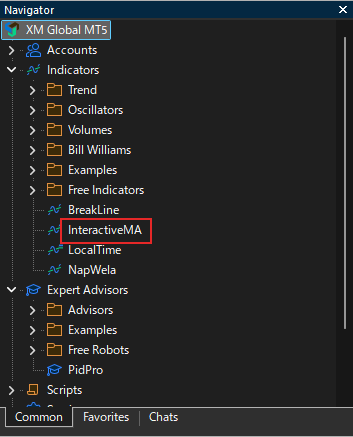
InteractiveMA is an indicator, not an Expert Advisor, so you do not need to turn on Algo Trading. It only draws the line and the panel, and it never places a trade.
Which InteractiveMA Settings Should You Change?
You can use InteractiveMA with its default settings, because the type and the period change on the chart. To open the settings, right-click the chart, choose Indicators List, select InteractiveMA and click Properties.
Period is the setting most people change. The keys move the period one bar at a time, so for a long period such as 200, type it in Period and fine-tune it with A and D. When you change Period or Moving average type in the settings, InteractiveMA starts again from those values.
If you need a period longer than 200, raise Largest period. If the panel looks small on a high-resolution screen, raise Panel font size, which is 11 by default.
The default line colour is a strong blue, DodgerBlue, so the line is easy to see on a black chart and on a white chart. The list of all 8 settings further down this page shows the other defaults.
What If InteractiveMA Does Not Respond?
Most problems with InteractiveMA come from the keyboard focus or from a second copy of the indicator on the same chart. Find the case that matches what you see.
- Keys do nothing
MT5 sends the keys to the chart you clicked last. Click on the chart with InteractiveMA, and then press W, A or D again. - Period stops at 200
The period cannot go past Largest period. Raise Largest period in the settings, for example to 300. - Panel jumps or two lines move
The chart has InteractiveMA twice, and the two copies share one panel. Remove one in the Indicators List, and use MT5’s own Moving Average for the second line. - No panel on the chart
The panel comes back by itself within one second if it is deleted. If it does not, InteractiveMA is not on this chart, so install it or add it from the Navigator again.
Questions People Ask About InteractiveMA
- Is InteractiveMA free?
-
Yes. InteractiveMA is free, with no registration and no time limit. You download the file and use it on as many charts as you like.
- Does InteractiveMA work on MT4?
-
Yes. InteractiveMA.ex4 is the MT4 version, with the same panel, keys and settings. The pictures on this page come from MT5.
- Does InteractiveMA work on the MT5 app on my phone?
-
No. The MT5 app on phones cannot run downloaded indicators. Run InteractiveMA in MT5 on a computer.
- Can I use InteractiveMA on several charts?
-
Yes. Each chart keeps its own type, period and panel position. A key that you press changes only the chart you clicked last.
- How do I update from an older version of InteractiveMA?
-
Download the new file, replace the old file in the Indicators folder and restart MT5. The settings that you saved in a template, such as the line colour, stay the same.
- Can I read or change the code of InteractiveMA?
-
Yes. The source code is free to download, so you can check what InteractiveMA does and change it for your own trading. The terms are at the top of each file. If you share the file, keep the author name Forex FanClub and the link to our site in it, and do not sell it.
- Does InteractiveMA place trades?
-
No. InteractiveMA only draws the moving average and the panel. You decide what to do with the line.
Which Tool Do You Need Next?
Once your moving average is on the chart, the next step is often an alert for the levels you watch, so add BreakLine to draw a line and get an alert when the price breaks it.
All InteractiveMA settings and how we checked them
All 8 settings, with the default value
- Moving average type (W key changes it)
- Simple (SMA), Exponential (EMA), Smoothed (SMMA) or Linear weighted (LWMA), the type to start with. Default: Simple (SMA).
- Period (A and D keys change it)
- Number of bars in the average, the period to start with. Default: 14.
- Largest period
- Longest period that the D key and the plus button can reach. The shortest period is 2. Default: 200.
- Line style
- Solid, Dash, Dot, Dash dot or Dash dot dot. Default: Solid.
- Line color
- Colour of the line. Default: DodgerBlue.
- Line width
- Width of the line. Default: 2.
- Panel corner
- Top left, Top right, Bottom left or Bottom right, the corner where the panel starts. Default: Bottom right.
- Panel font size
- Size of the text on the panel. Default: 11.
The names are the ones in the settings window of the indicator. MT4 shows the same settings with the same defaults.
How we checked
- Files
- InteractiveMA.ex5 (28,440 bytes) and InteractiveMA.ex4 (37,424 bytes), version 1.10, the files of the two download buttons, updated on 14 October 2026.
- Same line as MT5
- On 13 October 2026, in a test MT5, we compared the InteractiveMA line with the MT5 Moving Average (close price) on the last 501 bars. The values matched on EURUSD and gold, on every timeframe from M1 to MN1, for SMA, EMA, SMMA and LWMA. EMA and SMMA start from an SMA value, so only the first few dozen bars at the start of the chart history can differ.
- Pullback count
- Gold and EURUSD M15 prices in a test MT5 at XS, server time: gold from 2026-04-14 to 2026-10-14 (131 trading days) and EURUSD from 2026-04-22 (125 days). For every SMA period from 5 to 100, a pullback is a bar that reaches the line while the line is rising and the close before it is above the line, or the same with a falling line from below. We use the line value that is known when the bar opens. The pullback held when the close of that bar and the next four closes, one hour in all, stayed on the same side of the line. The best period of a day is the one with the most held pullbacks minus the pullbacks that did not hold, with at least two pullbacks on that day. On gold, the best period was within 5 of the day before on 19 of 130 days. Counted on 14 October 2026.
- Keys and panel
- W, A and D work on the chart you clicked last. The type, the period and the panel position are kept on the chart itself, so they stay after a timeframe change or a restart of MT5, and each chart keeps its own.
Checked on 14 October 2026.
Once your rebate account is open, link it to Forex FanClub. The member area lists every rebate payment day by day, across every broker you use. Registration is free and takes an email address.

Produced and operated by Forex FanClub
Person responsible: Hiroki Sakaida, founder of Forex FanClub
Hiroki Sakaida decides what our content and services cover and which features they offer. He also checks content and functionality and decides on revisions and publication. Our Content and Service Policy explains how we produce and check our content and services, including our use of AI.
Risk warning: Forex and CFD trading involve leverage, and you could lose all the money you invest. This article and tool provide information, not investment advice. The amounts shown are calculated from the collected data and do not guarantee the amounts that will apply to your own trades, or any future profit.
Affiliate disclosure: The broker pages linked from this page contain referral links. Forex FanClub receives referral commission based on registrations and trading through those links.