NAVIGATION
  • HOME
  • Broker Rebates
    • XM Rebates
    • HFM Rebates
    • XS Rebates
    • Exness Rebates
  • Trading Tools
    • Calculators
      • Lot Size Calculator
      • Margin Calculator
      • Pip Calculator
      • Rebate Calculator
    • Market Tools
      • Currency Strength
      • Market Hours
      • Best Time to Trade
      • Best Pairs to Trade
      • NinjaBull AI Forecast
    • MT4/MT5 Tools
      • LocalTime Indicator
      • NapWela Timer
      • BreakLine Indicator
      • Interactive MA
      • PidPro
      • MT4/MT5 Setup
    • Forex Basics
      • 0.01 Lot in Dollars
      • Pip Value in Dollars
      • XAUUSD Pips
      • XAUUSD Market Hours
      • Margin Call
      • Demo Accounts
  • NinjaBull
    • How NinjaBull Works
    • EA News Filter (API)
  • Broker Guides
    • Lowest Spread Brokers
    • Zero Spread Brokers
    • Best Broker for Gold
    • Swap-Free Brokers
    • High Leverage Brokers
    • Cent Account Brokers
    • Deposit Bonus Brokers
    • XM vs Exness
    • Most Popular Brokers
    • Broker Changes
    • XM
      • Registration
      • Verification
      • Login
      • Account Types
      • Standard Account
      • Ultra Low Account
      • Cent Account
      • Minimum Deposit
      • Withdrawal
      • Fees and Charges
      • Inactivity Fee
      • Spreads
      • Swap Rates
      • Leverage
      • Margin Calculator
      • Bonus
      • Demo Competition
      • Traders Club
      • Refer a Friend
      • Copy Trading
      • Additional Account
      • Demo Account
      • Internal Transfer
      • Delete Account
      • Partner Code
      • Support
    • HFM
      • Login
      • App
      • Account Types
      • Minimum Deposit
      • Withdrawal Time
      • Spreads and Commissions
      • Swap Rates
      • Leverage
      • Margin Calculator
      • Bonus
      • Demo Contest
      • Copy Trading
    • XS.com
      • Account Types
      • Spreads and Fees
      • Swap Rates
      • Leverage and Margin
    • Exness
      • Review
      • Personal Area Login
      • Web Terminal
      • App
      • Account Types
      • Minimum Deposit
      • Withdrawal Time
      • Fees and Charges
      • Spreads
      • Swap Rates
      • Leverage
      • Margin Calculator
      • Demo Account
      • Partner Code
      • Change IB Partner
      • Contact Support
  • Dashboard
Forex FanClub
  • HOME
  • Broker Rebates
    • XM Rebates
    • HFM Rebates
    • XS Rebates
    • Exness Rebates
  • Trading Tools
    • Calculators
      • Lot Size Calculator
      • Margin Calculator
      • Pip Calculator
      • Rebate Calculator
    • Market Tools
      • Currency Strength
      • Market Hours
      • Best Time to Trade
      • Best Pairs to Trade
      • NinjaBull AI Forecast
    • MT4/MT5 Tools
      • LocalTime Indicator
      • NapWela Timer
      • BreakLine Indicator
      • Interactive MA
      • PidPro
      • MT4/MT5 Setup
    • Forex Basics
      • 0.01 Lot in Dollars
      • Pip Value in Dollars
      • XAUUSD Pips
      • XAUUSD Market Hours
      • Margin Call
      • Demo Accounts
  • NinjaBull
    • How NinjaBull Works
    • EA News Filter (API)
  • Broker Guides
    • Lowest Spread Brokers
    • Zero Spread Brokers
    • Best Broker for Gold
    • Swap-Free Brokers
    • High Leverage Brokers
    • Cent Account Brokers
    • Deposit Bonus Brokers
    • XM vs Exness
    • Most Popular Brokers
    • Broker Changes
    • XM
      • Registration
      • Verification
      • Login
      • Account Types
      • Standard Account
      • Ultra Low Account
      • Cent Account
      • Minimum Deposit
      • Withdrawal
      • Fees and Charges
      • Inactivity Fee
      • Spreads
      • Swap Rates
      • Leverage
      • Margin Calculator
      • Bonus
      • Demo Competition
      • Traders Club
      • Refer a Friend
      • Copy Trading
      • Additional Account
      • Demo Account
      • Internal Transfer
      • Delete Account
      • Partner Code
      • Support
    • HFM
      • Login
      • App
      • Account Types
      • Minimum Deposit
      • Withdrawal Time
      • Spreads and Commissions
      • Swap Rates
      • Leverage
      • Margin Calculator
      • Bonus
      • Demo Contest
      • Copy Trading
    • XS.com
      • Account Types
      • Spreads and Fees
      • Swap Rates
      • Leverage and Margin
    • Exness
      • Review
      • Personal Area Login
      • Web Terminal
      • App
      • Account Types
      • Minimum Deposit
      • Withdrawal Time
      • Fees and Charges
      • Spreads
      • Swap Rates
      • Leverage
      • Margin Calculator
      • Demo Account
      • Partner Code
      • Change IB Partner
      • Contact Support
  • Dashboard
Login
Forex FanClub
  • HOME
  • Broker Rebates
    • XM Rebates
    • HFM Rebates
    • XS Rebates
    • Exness Rebates
  • Trading Tools
    • Calculators
      • Lot Size Calculator
      • Margin Calculator
      • Pip Calculator
      • Rebate Calculator
    • Market Tools
      • Currency Strength
      • Market Hours
      • Best Time to Trade
      • Best Pairs to Trade
      • NinjaBull AI Forecast
    • MT4/MT5 Tools
      • LocalTime Indicator
      • NapWela Timer
      • BreakLine Indicator
      • Interactive MA
      • PidPro
      • MT4/MT5 Setup
    • Forex Basics
      • 0.01 Lot in Dollars
      • Pip Value in Dollars
      • XAUUSD Pips
      • XAUUSD Market Hours
      • Margin Call
      • Demo Accounts
  • NinjaBull
    • How NinjaBull Works
    • EA News Filter (API)
  • Broker Guides
    • Lowest Spread Brokers
    • Zero Spread Brokers
    • Best Broker for Gold
    • Swap-Free Brokers
    • High Leverage Brokers
    • Cent Account Brokers
    • Deposit Bonus Brokers
    • XM vs Exness
    • Most Popular Brokers
    • Broker Changes
    • XM
      • Registration
      • Verification
      • Login
      • Account Types
      • Standard Account
      • Ultra Low Account
      • Cent Account
      • Minimum Deposit
      • Withdrawal
      • Fees and Charges
      • Inactivity Fee
      • Spreads
      • Swap Rates
      • Leverage
      • Margin Calculator
      • Bonus
      • Demo Competition
      • Traders Club
      • Refer a Friend
      • Copy Trading
      • Additional Account
      • Demo Account
      • Internal Transfer
      • Delete Account
      • Partner Code
      • Support
    • HFM
      • Login
      • App
      • Account Types
      • Minimum Deposit
      • Withdrawal Time
      • Spreads and Commissions
      • Swap Rates
      • Leverage
      • Margin Calculator
      • Bonus
      • Demo Contest
      • Copy Trading
    • XS.com
      • Account Types
      • Spreads and Fees
      • Swap Rates
      • Leverage and Margin
    • Exness
      • Review
      • Personal Area Login
      • Web Terminal
      • App
      • Account Types
      • Minimum Deposit
      • Withdrawal Time
      • Fees and Charges
      • Spreads
      • Swap Rates
      • Leverage
      • Margin Calculator
      • Demo Account
      • Partner Code
      • Change IB Partner
      • Contact Support
  • Dashboard
  1. Home
  2. XM Broker Review: Is XM Legit, and Who Is It Good For?
  3. XM Support: Email Address, Live Chat and Phone (24/7), and WhatsApp

XM Support: Email Address, Live Chat and Phone (24/7), and WhatsApp

XM Trading Logo

Reach XM by live chat, phone or email. Live chat and phone are answered 24/7.

Checked on 4 October 2026

XM support contacts

Live chat · 24/7XM support page (opens in a new tab)

Phone · 24/7+501 2236696

Phone · 24/7+501 2279421

Emailsupport@xm.com

Complaintscomplaints@xmglobal.com

WhatsAppXM support page (opens in a new tab)

LINE@xmsupport (opens in a new tab)

Telegram@XMSupport_Bot (opens in a new tab)

Contents

Contents

  1. Which Way Should You Contact XM?
  2. What Is XM’s Support Email Address?
  3. How Do You Use XM Live Chat?
  4. Does XM Have WhatsApp, LINE or Telegram?
  5. What Is XM’s Phone Number?
  6. FAQ on Contacting XM
  7. Which XM Guide Do You Need Next?

Which Way Should You Contact XM?

Choose how to contact XM by what you need.

  • A fast answer
    Use live chat. Live chat runs 24/7, and the agent can see the screenshot that you send.
  • A record in writing
    Email support@xm.com from your registered address. Email suits a deposit or a withdrawal that did not arrive, because XM asks for those claims in writing.
  • A complaint
    Email complaints@xmglobal.com with your trading account number, what happened and when.
  • A call
    Call +501 2236696 at any time. The number is in Belize, so your phone company charges an international call.
Our view

Start with live chat, and switch to email when you need a written record. For a missing deposit, email XM within 10 business days. For a missing withdrawal, email XM within 15 business days.

Use only the contacts on the XM support page. A phone number or a chat account on another site may not be XM. So do not send your login details there.

What Is XM’s Support Email Address?

For help, email support@xm.com. XM also has two addresses for complaints and for your personal data.

  • General help
    support@xm.com
  • Complaints
    complaints@xmglobal.com
  • Your personal data
    dpo@xmglobal.com, XM’s data protection officer

Write from the email address that you registered with XM. The team can then find your Members Area.

Email to XM Support
Subject: [your question in a few words] – trading account [number]

Hello XM Support,

[What happened, with the date and time.]

Trading account number: [number]
A screenshot of the screen is attached.

Thank you,
[your name]

If you are logged in, the Compose Email button on the XM support page (opens in a new tab) opens an email form in your Members Area.

For a question about the Forex FanClub rebate, write to us instead. The addresses above reach the XM team.

How Do You Use XM Live Chat?

Open the XM support page (opens in a new tab), and tap the live chat button.

Fill in your first name, last name and email. Choose your language, and tap Start Chat.
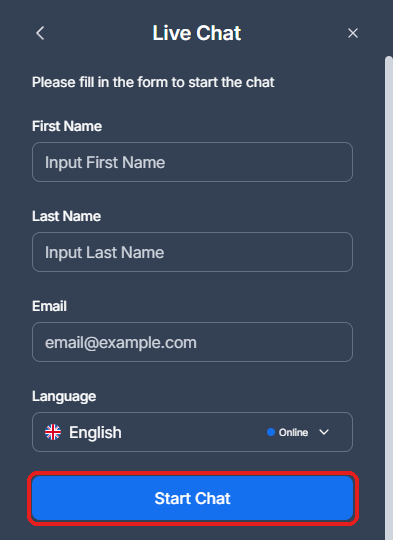
XM live chat form asking for first name, last name, email and language, with the Start Chat button framed in red

Type your question with your trading account number. The attachment icon sends a screenshot.

Live chat suits questions about the Members Area, deposits and withdrawals. To speak to a person, ask in the chat for a call back.

Does XM Have WhatsApp, LINE or Telegram?

Yes. You can reach XM support on WhatsApp, LINE and Telegram. All three open from the XM support page (opens in a new tab), and from the help panel in your Members Area (opens in a new tab), next to live chat.

  • WhatsApp
    Tap WhatsApp on the support page or in the Members Area help panel. The WhatsApp number can differ by country, so start the chat from the XM page and not from a saved number.
  • LINE
    @xmsupport (opens in a new tab)
  • Telegram
    @XMSupport_Bot (opens in a new tab)

A WhatsApp number on another site or in a social media post may not be XM. So send your login or trading account details only through the channels on the support page.

What Is XM’s Phone Number?

XM phone support

Phone 1+501 2236696

Phone 2+501 2279421

Hours24/7

Both numbers are in Belize, where XM Global is based. So your phone company charges an international call. To avoid the cost, ask for a call back in live chat, and give the agent your number.

New to XM? Open your trading account through the button below to receive a rebate on every lot you trade.

Open an XM Account (opens in a new tab)

FAQ on Contacting XM

What is XM’s support email address?

support@xm.com. Complaints go to complaints@xmglobal.com, and questions about your personal data go to dpo@xmglobal.com.

Is support@xm.com XM’s email address?

Yes. The XM support page gives support@xm.com for help by email. For complaints and for questions about your personal data, XM still uses addresses that end in @xmglobal.com.

Does XM support use a Gmail address?

No. The XM addresses end in @xm.com or @xmglobal.com.

Do not send your details to a Gmail address that says it is XM.

Does XM have a WhatsApp number?

Yes. The XM support page lists WhatsApp next to LINE (@xmsupport) and Telegram (@XMSupport_Bot).

The WhatsApp number can differ by country. So open WhatsApp from the XM support page or from the help panel in your Members Area.

Is XM support available 24/7?

Live chat and phone are. XM gives no hours for LINE, Telegram or email. So use live chat at night or at the weekend.

How do I make a complaint to XM?

Email complaints@xmglobal.com with your trading account number, what happened and when it happened.

Can I contact XM before I open a trading account?

Yes. Live chat needs only your name, email and language. Phone, LINE, Telegram and email also work for anyone.

The Compose Email form needs a Members Area login.

Which XM Guide Do You Need Next?

These guides answer the most common questions about money in and out. The XM Help Centre (opens in a new tab) covers platform settings.

XM withdrawal guideHow long a withdrawal takes and where the money goes› XM deposit guidePayment methods and when the money arrives› XM login guideWhich password to use, and a forgotten password› Close your XM accountOne trading account in 3 steps, or the whole XM account› XM rebatesGet part of your trading cost back, paid daily› XM reviewWho XM suits, how XM is regulated, and the cost against other brokers›
Sources: where each fact on this page comes from +−
XM support page (opens in a new tab)
Live chat and phone (+501 2236696, +501 2279421) every day and night, the email form, and LINE and Telegram. On 5 November 2026, the page also listed WhatsApp. On 16 October 2026, the page gave the email support@xm.com.
XM Privacy Policy (opens in a new tab)
The addresses complaints@xmglobal.com and dpo@xmglobal.com. Read on 4 October 2026.
XM Client Agreement (opens in a new tab)
Clause 74A: if a deposit does not arrive, report it in writing within 10 business days. If a withdrawal does not arrive, report it within 15 business days.
XM live chat
The form that opens before the chat, on 26 September 2026.
Keep your rebate history in one place

Once your XM trading account is open, link it to Forex FanClub. The member area lists every rebate payment day by day, across every broker you use. Registration is free and takes an email address.

Join Forex FanClub (opens in a new tab)
Forex FanClub

Produced and operated by Forex FanClub
Person responsible: Hiroki Sakaida, founder of Forex FanClub

Hiroki Sakaida decides what our content and services cover and which features they offer. He also checks content and functionality and decides on revisions and publication. Our Content and Service Policy explains how we produce and check our content and services, including our use of AI.

About the company | Report a correction or issue

Risk warning: Forex and CFD trading involve leverage, and you could lose all the money you invest. This article and tool provide information, not investment advice. The amounts shown are calculated from the collected data and do not guarantee the amounts that will apply to your own trades, or any future profit.
Affiliate disclosure: This article contains XM referral links. Forex FanClub receives referral commission based on registrations and trading through these links.

Contents
×
  • Which Way Should You Contact XM?
  • What Is XM’s Support Email Address?
  • How Do You Use XM Live Chat?
  • Does XM Have WhatsApp, LINE or Telegram?
  • What Is XM’s Phone Number?
  • FAQ on Contacting XM
  • Which XM Guide Do You Need Next?
Contents