NAVIGATION
  • HOME
  • Broker Rebates
    • XM Rebates
    • HFM Rebates
    • XS Rebates
    • Exness Rebates
  • Trading Tools
    • Calculators
      • Lot Size Calculator
      • Margin Calculator
      • Pip Calculator
      • Rebate Calculator
      • Compounding Calculator
      • Profit Calculator
    • Market Tools
      • Currency Strength
      • Market Hours
      • Best Time to Trade
      • Best Pairs to Trade
      • NinjaBull AI Forecast
    • MT4/MT5 Tools
      • LocalTime Indicator
      • NapWela Timer
      • BreakLine Indicator
      • Interactive MA
      • PidPro
      • MT4/MT5 Setup
    • Forex Basics
      • 0.01 Lot in Dollars
      • Pip Value in Dollars
      • XAUUSD Pips
      • XAUUSD Market Hours
      • Margin Call
      • Demo Accounts
  • NinjaBull
    • How NinjaBull Works
    • EA News Filter (API)
  • Broker Guides
    • Lowest Spread Brokers
    • Zero Spread Brokers
    • Best Broker for Gold
    • Forex Trading Apps
    • Swap-Free Brokers
    • High Leverage Brokers
    • Cent Account Brokers
    • Deposit Bonus Brokers
    • XM vs Exness
    • Most Popular Brokers
    • Broker Changes
    • XM
      • Registration
      • Verification
      • Login
      • App
      • Account Types
      • Standard Account
      • Ultra Low Account
      • Cent Account
      • Minimum Deposit
      • Withdrawal
      • Fees and Charges
      • Inactivity Fee
      • Spreads
      • Swap Rates
      • Leverage
      • Margin Calculator
      • Bonus
      • Demo Competition
      • Traders Club
      • Refer a Friend
      • Copy Trading
      • Additional Account
      • Demo Account
      • Internal Transfer
      • Delete Account
      • Partner Code
      • Support
    • HFM
      • Login
      • App
      • Account Types
      • Minimum Deposit
      • Withdrawal Time
      • Spreads and Commissions
      • Swap Rates
      • Leverage
      • Margin Calculator
      • Bonus
      • Demo Contest
      • Copy Trading
    • XS.com
      • Account Types
      • Spreads and Fees
      • Swap Rates
      • Leverage and Margin
    • Exness
      • Review
      • Personal Area Login
      • Web Terminal
      • App
      • Account Types
      • Minimum Deposit
      • Withdrawal Time
      • Fees and Charges
      • Spreads
      • Swap Rates
      • Leverage
      • Margin Calculator
      • Demo Account
      • Partner Code
      • Change IB Partner
      • Contact Support
  • Dashboard
Forex FanClub
  • HOME
  • Broker Rebates
    • XM Rebates
    • HFM Rebates
    • XS Rebates
    • Exness Rebates
  • Trading Tools
    • Calculators
      • Lot Size Calculator
      • Margin Calculator
      • Pip Calculator
      • Rebate Calculator
      • Compounding Calculator
      • Profit Calculator
    • Market Tools
      • Currency Strength
      • Market Hours
      • Best Time to Trade
      • Best Pairs to Trade
      • NinjaBull AI Forecast
    • MT4/MT5 Tools
      • LocalTime Indicator
      • NapWela Timer
      • BreakLine Indicator
      • Interactive MA
      • PidPro
      • MT4/MT5 Setup
    • Forex Basics
      • 0.01 Lot in Dollars
      • Pip Value in Dollars
      • XAUUSD Pips
      • XAUUSD Market Hours
      • Margin Call
      • Demo Accounts
  • NinjaBull
    • How NinjaBull Works
    • EA News Filter (API)
  • Broker Guides
    • Lowest Spread Brokers
    • Zero Spread Brokers
    • Best Broker for Gold
    • Forex Trading Apps
    • Swap-Free Brokers
    • High Leverage Brokers
    • Cent Account Brokers
    • Deposit Bonus Brokers
    • XM vs Exness
    • Most Popular Brokers
    • Broker Changes
    • XM
      • Registration
      • Verification
      • Login
      • App
      • Account Types
      • Standard Account
      • Ultra Low Account
      • Cent Account
      • Minimum Deposit
      • Withdrawal
      • Fees and Charges
      • Inactivity Fee
      • Spreads
      • Swap Rates
      • Leverage
      • Margin Calculator
      • Bonus
      • Demo Competition
      • Traders Club
      • Refer a Friend
      • Copy Trading
      • Additional Account
      • Demo Account
      • Internal Transfer
      • Delete Account
      • Partner Code
      • Support
    • HFM
      • Login
      • App
      • Account Types
      • Minimum Deposit
      • Withdrawal Time
      • Spreads and Commissions
      • Swap Rates
      • Leverage
      • Margin Calculator
      • Bonus
      • Demo Contest
      • Copy Trading
    • XS.com
      • Account Types
      • Spreads and Fees
      • Swap Rates
      • Leverage and Margin
    • Exness
      • Review
      • Personal Area Login
      • Web Terminal
      • App
      • Account Types
      • Minimum Deposit
      • Withdrawal Time
      • Fees and Charges
      • Spreads
      • Swap Rates
      • Leverage
      • Margin Calculator
      • Demo Account
      • Partner Code
      • Change IB Partner
      • Contact Support
  • Dashboard
Login
Forex FanClub
  • HOME
  • Broker Rebates
    • XM Rebates
    • HFM Rebates
    • XS Rebates
    • Exness Rebates
  • Trading Tools
    • Calculators
      • Lot Size Calculator
      • Margin Calculator
      • Pip Calculator
      • Rebate Calculator
      • Compounding Calculator
      • Profit Calculator
    • Market Tools
      • Currency Strength
      • Market Hours
      • Best Time to Trade
      • Best Pairs to Trade
      • NinjaBull AI Forecast
    • MT4/MT5 Tools
      • LocalTime Indicator
      • NapWela Timer
      • BreakLine Indicator
      • Interactive MA
      • PidPro
      • MT4/MT5 Setup
    • Forex Basics
      • 0.01 Lot in Dollars
      • Pip Value in Dollars
      • XAUUSD Pips
      • XAUUSD Market Hours
      • Margin Call
      • Demo Accounts
  • NinjaBull
    • How NinjaBull Works
    • EA News Filter (API)
  • Broker Guides
    • Lowest Spread Brokers
    • Zero Spread Brokers
    • Best Broker for Gold
    • Forex Trading Apps
    • Swap-Free Brokers
    • High Leverage Brokers
    • Cent Account Brokers
    • Deposit Bonus Brokers
    • XM vs Exness
    • Most Popular Brokers
    • Broker Changes
    • XM
      • Registration
      • Verification
      • Login
      • App
      • Account Types
      • Standard Account
      • Ultra Low Account
      • Cent Account
      • Minimum Deposit
      • Withdrawal
      • Fees and Charges
      • Inactivity Fee
      • Spreads
      • Swap Rates
      • Leverage
      • Margin Calculator
      • Bonus
      • Demo Competition
      • Traders Club
      • Refer a Friend
      • Copy Trading
      • Additional Account
      • Demo Account
      • Internal Transfer
      • Delete Account
      • Partner Code
      • Support
    • HFM
      • Login
      • App
      • Account Types
      • Minimum Deposit
      • Withdrawal Time
      • Spreads and Commissions
      • Swap Rates
      • Leverage
      • Margin Calculator
      • Bonus
      • Demo Contest
      • Copy Trading
    • XS.com
      • Account Types
      • Spreads and Fees
      • Swap Rates
      • Leverage and Margin
    • Exness
      • Review
      • Personal Area Login
      • Web Terminal
      • App
      • Account Types
      • Minimum Deposit
      • Withdrawal Time
      • Fees and Charges
      • Spreads
      • Swap Rates
      • Leverage
      • Margin Calculator
      • Demo Account
      • Partner Code
      • Change IB Partner
      • Contact Support
  • Dashboard
  1. Home
  2. Free Forex Trading Tools: Calculators and MT4/MT5 Indicators
  3. Forex Compounding Calculator With Your Monthly Rebate

Forex Compounding Calculator With Your Monthly Rebate

See how your trading balance grows month by month, with and without your monthly rebate.

Rebate rates checked on 10 November 2026

Forex FanClub
Forex Compounding Calculator
GROWTH
Rebates updated: 14 Nov 2026, 15:34 UTC
Rebate added each month
Broker
Account

Your rebate: $36.00 a month, from $18.00 per lot of GOLD × 2 lots

Your balance after 12 months, with the rebate
$2,368.87

Without the rebate: $1,795.86

The rebate adds $573.02 to your balance. You receive $36.00 a month, so $432.00 in 12 months, and each payment then grows by 5% a month with the rest of your balance.

The return per month is the figure you enter, not a forecast. Real results change from month to month.

Balance by month
MonthNo rebateWith rebate
At start$1,000.00$1,000.00
1$1,050.00$1,086.00
2$1,102.50$1,176.30
3$1,157.63$1,271.12
4$1,215.51$1,370.67
5$1,276.28$1,475.20
6$1,340.10$1,584.96
7$1,407.10$1,700.21
8$1,477.46$1,821.22
9$1,551.33$1,948.28
10$1,628.89$2,081.70
11$1,710.34$2,221.78
12$1,795.86$2,368.87
How to use the calculator
  • Starting balanceThe money in your trading account now.
  • Return per monthYour average monthly result, such as 5%.
  • RebateChoose a broker, account and instrument, and enter your lots per month.
  • TableYour balance each month, with and without your rebate.

The rebate in the calculator comes back to you when your trading account has ForexFanClub as its partner. Our rebate page compares how much each broker pays back.

Compare Forex Rebates

Contents

  1. How Much Does the Rebate Add to Compounding?
  2. How Does Forex Compounding Work?
  3. What Happens to Compounding in a Losing Month?
  4. How Does the Calculator Add the Rebate?
  5. Questions About the Forex Compounding Calculator
  6. Which Page Do You Need Next?

How Much Does the Rebate Add to Compounding?

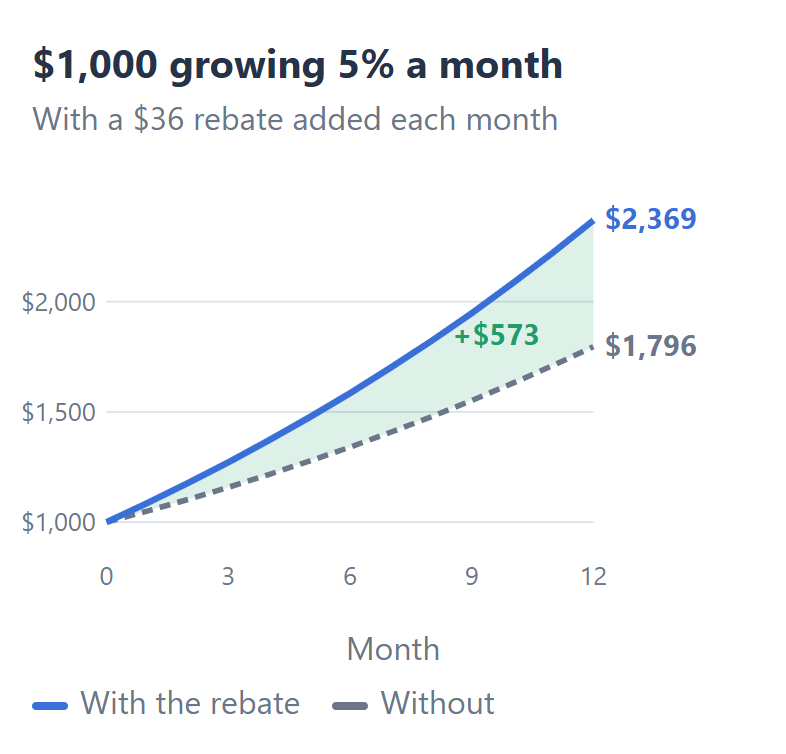
On a $1,000 account that grows 5% a month, a rebate of $36 a month adds $573 to your balance after 12 months, so you end the year with $2,369 instead of $1,796. That $36 is the rebate on 2 lots of gold a month on an XM Standard account, at $18.00 per lot.
Line chart: $1,000 growing 5% a month reaches $2,369 after 12 months with a $36 monthly rebate and $1,796 without it, a difference of $573

You receive $432 of rebate in the 12 months, but the rebate adds more than that amount, because each payment joins your balance and grows by 5% a month too. So the rebate works like a small deposit that you make every month without using your own money.

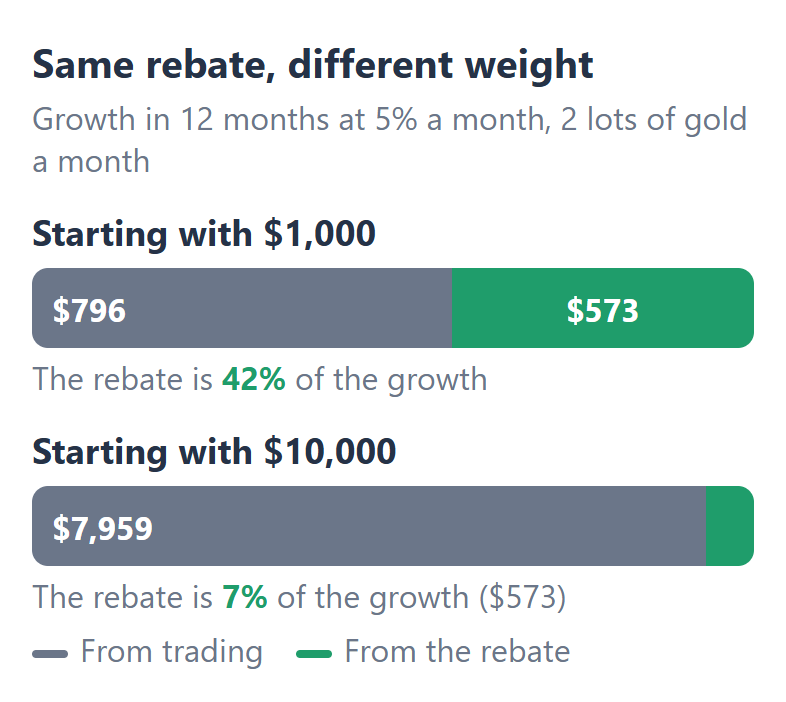
The rebate is a set amount of dollars for each lot, and your trading return is a percentage of your balance. So the same rebate matters much more on a small account.
Bar chart: on $1,000 the $573 added by the rebate is 42% of the growth in 12 months, on $10,000 the same $573 is 7%

On a balance of $1,000, the rebate gives more than 40% of the growth of the year. On a balance of $10,000, the same 2 lots add the same $573, which is under 7% of the growth. With bigger lots, the rebate grows too, so enter your own lots per month in the calculator.

How Does Forex Compounding Work?

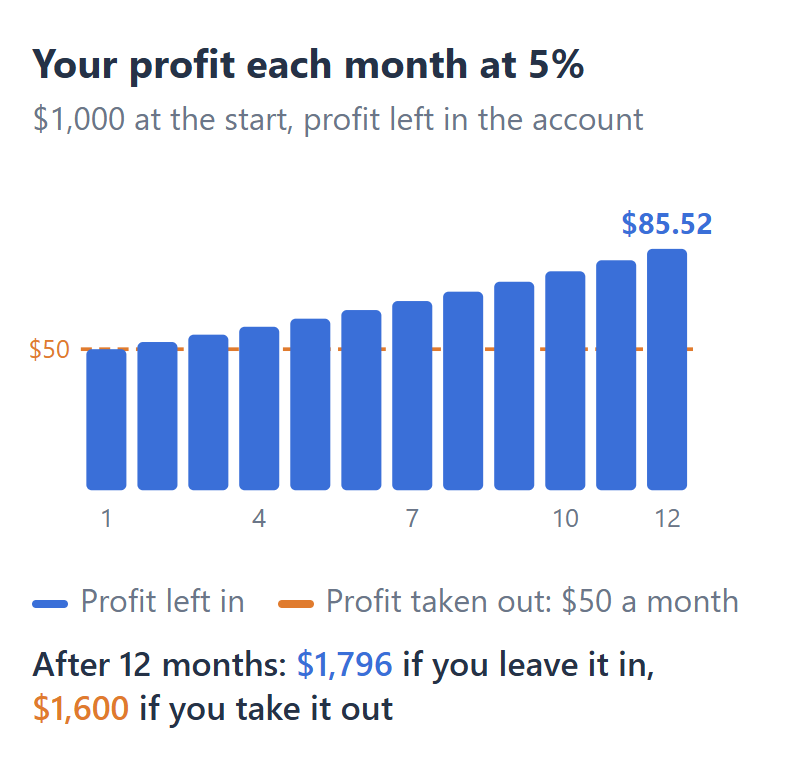
Forex compounding means that you leave your profit in your trading account, so your return for the next month is on a bigger balance. At 5% a month, a balance of $1,000 makes $50 in the first month, and in the twelfth month the same 5% makes $85.52.
Bar chart: at 5% a month the monthly profit rises from $50 to $85.52 when you leave it in, against $50 every month when you take it out

If you take the $50 out every month instead, you end the year with $1,600, not $1,796. The difference comes only from the profit of earlier months earning its own return.

To make 5% on a balance of $1,050, you need positions about 5% larger than on a balance of $1,000, so compounding traders raise their lot size as the balance rises. Our lot size calculator gives the lot for your new balance and the risk that you choose.

What Happens to Compounding in a Losing Month?

A loss compounds in the same way as a profit, so a gain and a loss of the same percentage leave you with less money than you started with. If a balance of $1,000 gains 10% and then loses 10%, you have $990, because the 10% loss is on the bigger balance of $1,100.
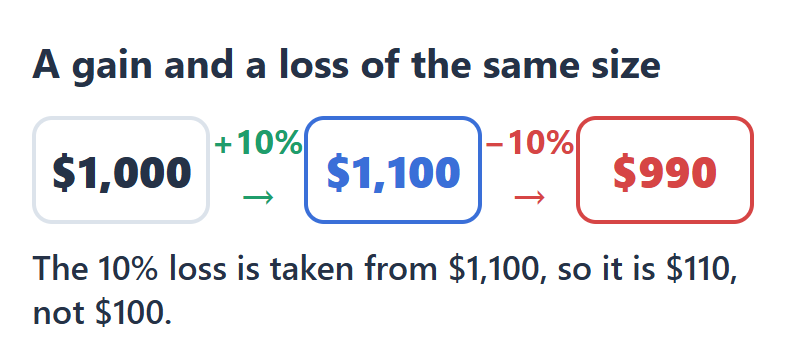
Diagram: $1,000 plus 10% is $1,100, and minus 10% is $990

At minus 5% a month for 12 months, a balance of $1,000 falls to $540. With the same $36 rebate a month, the balance falls to $871, because you receive the rebate on the lots that you trade, whether the trades win or lose.

The rebate makes a losing month smaller, but the rebate does not make a losing strategy profitable. In this example, the balance is still lower than the $1,000 at the start. Enter a negative return in the calculator to see your own losing months.

How Does the Calculator Add the Rebate?

The calculator multiplies the rebate per lot by your lots per month, and adds that amount to your balance at the end of each month. The rebate per lot is the same figure that our forex rebate calculator shows for your broker, trading account and instrument.

Where the rebate lands decides whether the rebate compounds on its own.
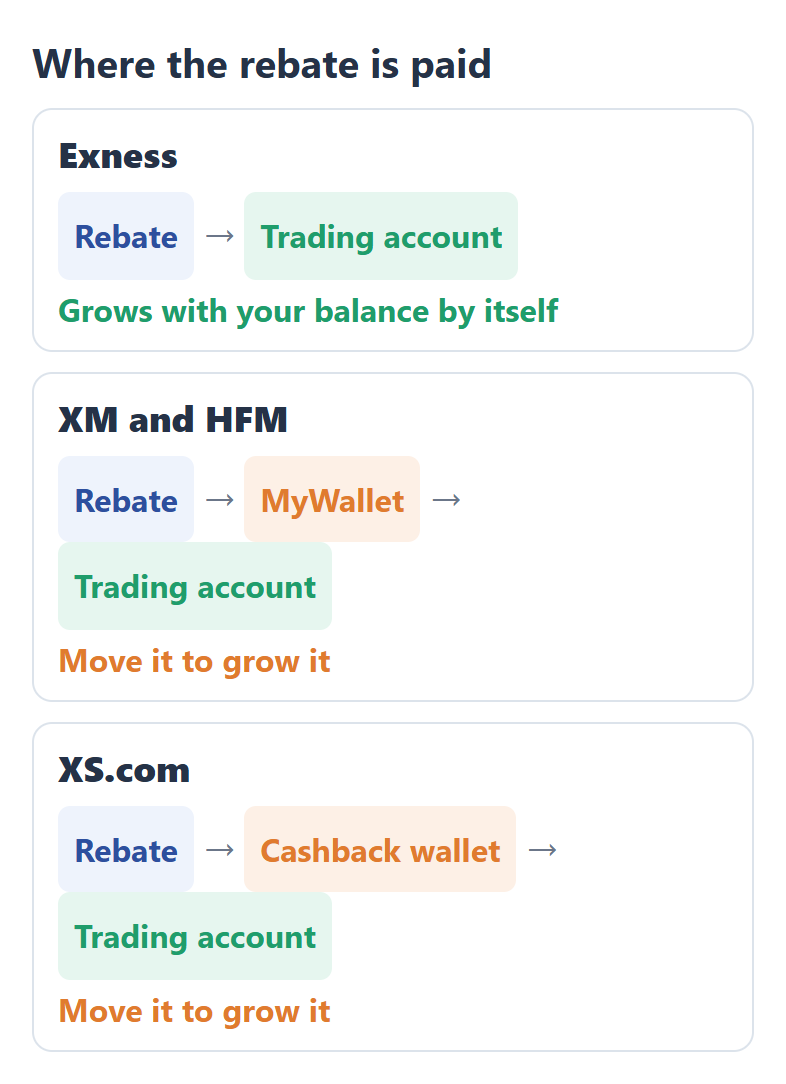
Diagram: Exness pays the rebate into the trading account, XM and HFM into MyWallet and XS.com into a cashback wallet, from where you move it to the trading account

Exness pays the rebate into the trading account that you traded on, so the rebate grows with your balance from the next day.

XM and HFM pay the rebate into your wallet, called MyWallet, and XS.com pays the rebate into a cashback wallet. At XM, HFM and XS.com, move the rebate from the wallet to your trading account if you want the result that the calculator shows.

The lots stay the same every month in the calculator. If you raise your lot size as your balance grows, your rebate grows too, so your real result can be higher than the calculator’s answer.

A rebate always gives back only a part of the cost that you pay. On an Exness Standard account, for example, the rebate is 36% of the spread, so you still pay 64% of the spread. So trade the lots that your strategy needs, and let the rebate come from those lots.

To receive the rebate, your trading account needs ForexFanClub as its partner. Our forex rebates page compares XM, HFM, XS.com and Exness, and links to the rebate page of each broker with the steps to link your trading account.

Questions About the Forex Compounding Calculator

Can I use the calculator for daily compounding?

Yes. Turn your daily return into a monthly return first, and enter that monthly return. A month has about 21 trading days, so 0.25% a day becomes about 5.4% a month when each day’s profit stays in the account.

The calculator works in months because the rebate is easier to count by month, and your lots per month already include every trading day.

What return per month should I enter?

Enter the average monthly result of your own trading account, and then try a lower figure too. Your MT4 or MT5 trading history shows the result of each month.

The calculator’s answer is a calculation, not a forecast. Real months go up and down, and a few losing months change the result more than a high average suggests.

Is the rebate in the calculator the money that I receive?

Yes. The rebate per lot is the amount that reaches you after ForexFanClub’s share, in US dollars.

On accounts where the rebate is a share of the spread, the calculator uses the 24-hour average spread, so your real rebate moves a little with the market.

A few trades earn no rebate, such as XM trades that you close within 3 minutes. The forex rebate calculator explains which trades each broker leaves out.

Which Page Do You Need Next?

If you want to know the rebate on your own trades first, the forex rebate calculator shows the rebate for your broker, trading account and instrument. The lot size calculator gives the lot for your balance as it grows.

Forex rebate calculatorThe rebate on your own lots, at XM, HFM, XS.com and Exness› Lot size calculatorThe lot for your balance and the risk that you choose› Forex rebates comparedHow much of your trading cost each broker pays back› All free forex toolsCalculators, broker cost comparisons and MT4/MT5 indicators›
How the compounding calculator works +−
Each month
The balance of the month before, multiplied by 1 plus your return per month, and then the rebate of the month is added. Without the rebate, the calculator uses the same rule with no rebate.
Rebate a month
The rebate per lot on the trading account and instrument that you choose, multiplied by your lots per month. The lots stay the same every month.
Rebate per lot
The figure of our forex rebate calculator: your share of the referral commission that each broker pays ForexFanClub, 90% at XM, HFM and Exness and 80% at XS.com. Where the rebate is a share of the spread, it uses the 24-hour average spread from the MT5 servers of our trading accounts, refreshed every 5 minutes. XS.com uses the MT5 figures.
Instruments
The most traded instruments at each broker, such as gold, the major currency pairs and the main stock indices.
Return per month
The figure that you enter, from minus 99% to 100%. It is not a forecast.
Currency and time
US dollars. Rebates updated, at the top of the calculator, shows the time of the rebate data in UTC.

Rebate rates checked on 10 November 2026. The calculator always uses the latest data.

Keep your rebate history in one place

Once your rebate account is open, link it to Forex FanClub. The member area lists every rebate payment day by day, across every broker you use. Registration is free and takes an email address.

Join Forex FanClub (opens in a new tab)
Forex FanClub

Produced and operated by Forex FanClub
Person responsible: Hiroki Sakaida, founder of Forex FanClub

Hiroki Sakaida decides what our content and services cover and which features they offer. He also checks content and functionality and decides on revisions and publication. Our Content and Service Policy explains how we produce and check our content and services, including our use of AI.

About the company | Report a correction or issue

Risk warning: Forex and CFD trading involve leverage, and you could lose all the money you invest. This article and tool provide information, not investment advice. The amounts shown are calculated from the collected data and do not guarantee the amounts that will apply to your own trades, or any future profit.
Affiliate disclosure: The broker pages linked from this page contain referral links. Forex FanClub receives referral commission based on registrations and trading through those links.

Contents
×
  • How Much Does the Rebate Add to Compounding?
  • How Does Forex Compounding Work?
  • What Happens to Compounding in a Losing Month?
  • How Does the Calculator Add the Rebate?
  • Questions About the Forex Compounding Calculator
  • Which Page Do You Need Next?