
From Nigeria, a naira bank transfer puts money into HFM instantly from ₦4,000. A withdrawal to your Nigerian bank arrives within 24 hours, and HFM charges no fee either way.
Nigerian payment methods checked on 10 November 2026
This guide shows how traders in Nigeria put naira into HFM and get it back, how long each method takes and how much each account needs, from HFM’s Nigerian payment lists.
When you register at HFM with Nigeria as your country, your Client Area shows the naira payment methods.
Contents
- What Is the Best Way to Deposit and Withdraw at HFM from Nigeria?
- How Do You Deposit Naira into HFM?
- How Much Do You Need to Open an HFM Account in Nigeria?
- How Long Does It Take to Withdraw Money from HFM in Nigeria?
- Does the HFM Bonus in Nigeria Change How You Should Deposit?
- Can Traders in Nigeria Get a Rebate on HFM Trades?
- FAQ About HFM in Nigeria
- Which Page Do You Need Next?
What Is the Best Way to Deposit and Withdraw at HFM from Nigeria?
For a trader in Nigeria, the naira bank transfer is the best way to deposit and withdraw at HFM, because your deposit arrives instantly and your withdrawal reaches your bank within 24 hours. HFM charges no fee in either direction, and the smallest naira deposit is ₦4,000.
The choice of deposit method matters more than it looks, because HFM pays your withdrawals back by the method that you deposited with. HFM calls that rule its return-to-source policy. So the deposit method also decides how fast your money comes back.
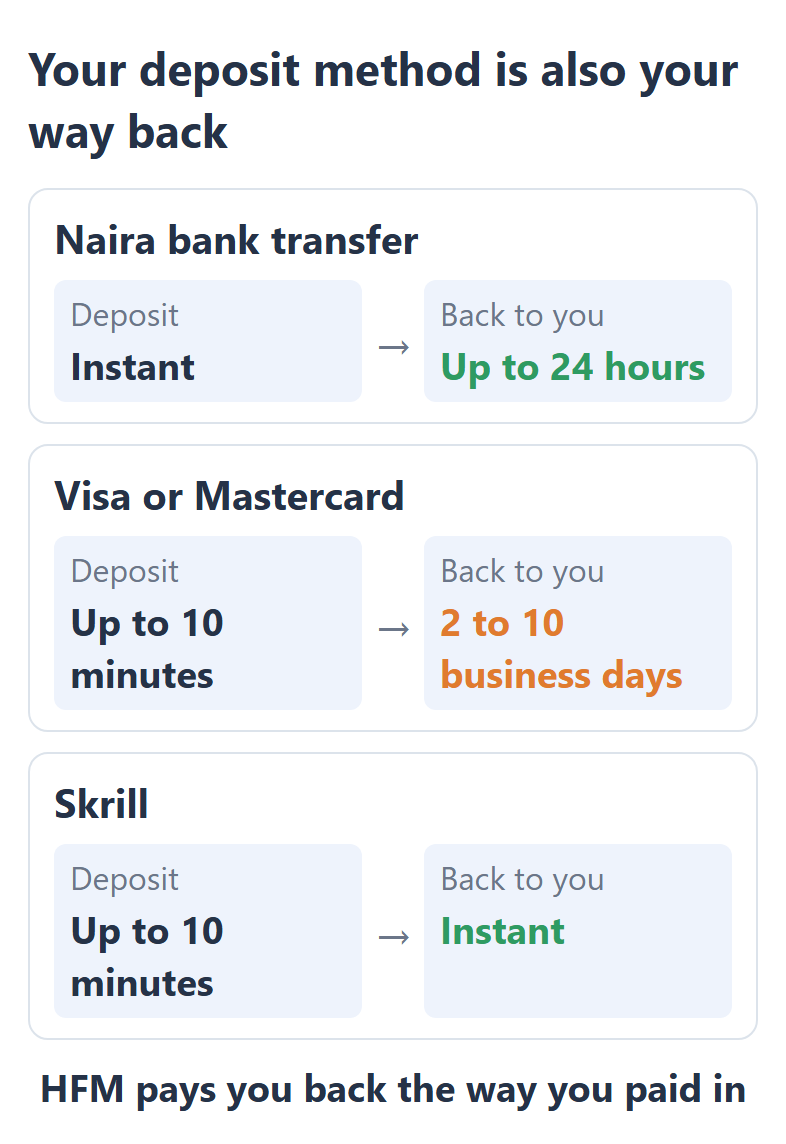
So a card deposit is the one to think about twice, because the money goes back to the same card and waits for the card company. Skrill is the only withdrawal method that is instant, so Skrill suits traders who withdraw often and already have a Skrill account.
How Do You Deposit Naira into HFM?
You deposit naira into HFM with the naira bank transfer in the Deposit screen of your HFM Client Area, from ₦4,000 per deposit, up to ₦4,000,000. The other methods on the Nigerian list are in US dollars, so the naira bank transfer is the only method that takes naira as it is.
Deposit methods for Nigeria
| Method | Minimum | Time |
|---|---|---|
| Naira bank transfer | ₦4,000 | Instant |
| Bank transfer | $5 | 10 minutes to 12 hours |
| Visa or Mastercard | $5 | Up to 10 minutes |
| Skrill | $10 | Up to 10 minutes |
| Crypto | $30 | Instant |
| International transfer | $100 | 2 to 7 business days |
When you type an amount in naira, the form shows the exchange rate and the amount in US dollars before you send anything. The payment must come from a bank account or card in your own name, because HFM does not accept payments from other people.
- Sign in to your HFM Client Area and press Deposit.
- In Deposit to, choose myWallet or the trading account that should receive the money.
- Open Bank Transfers and choose the bank transfer that shows its limits in naira.
- Type the amount in naira, check the rate in US dollars under it, and press Deposit.
- Pay from your own bank account on the page that opens.
Your Deposit screen shows the methods for the country of your HFM profile, and not for the place where you are now. So a profile that you registered in Nigeria shows the Nigerian methods even when you travel. HFM’s Nigerian deposit page (opens in a new tab) shows the same list before you sign in.
How Much Do You Need to Open an HFM Account in Nigeria?
In Nigeria, the HFM Premium account has no minimum deposit, the Zero account needs ₦37,500 and the Pro account needs ₦75,000. The Premium, Zero and Pro accounts can also hold your balance in naira instead of US dollars.
Smallest first deposit in Nigeria
| Account | US dollars | Naira |
|---|---|---|
| Premium | $0 | ₦0 |
| Zero | $25 | ₦37,500 |
| Pro | $50 | ₦75,000 |
| Cent | $0 | US cents only |
The Pro account is cheaper to open in Nigeria. On HFM’s international pages, the Pro account starts at $100, so a trader in Nigeria can try the Pro account with half the money. The HFM minimum deposit guide compares what each account costs to trade, and the HFM account types guide shows which account is cheapest on gold.
If you choose naira as the currency of your trading account, your balance and your profits show in naira, so you see your results in the money that you spend.
How Long Does It Take to Withdraw Money from HFM in Nigeria?
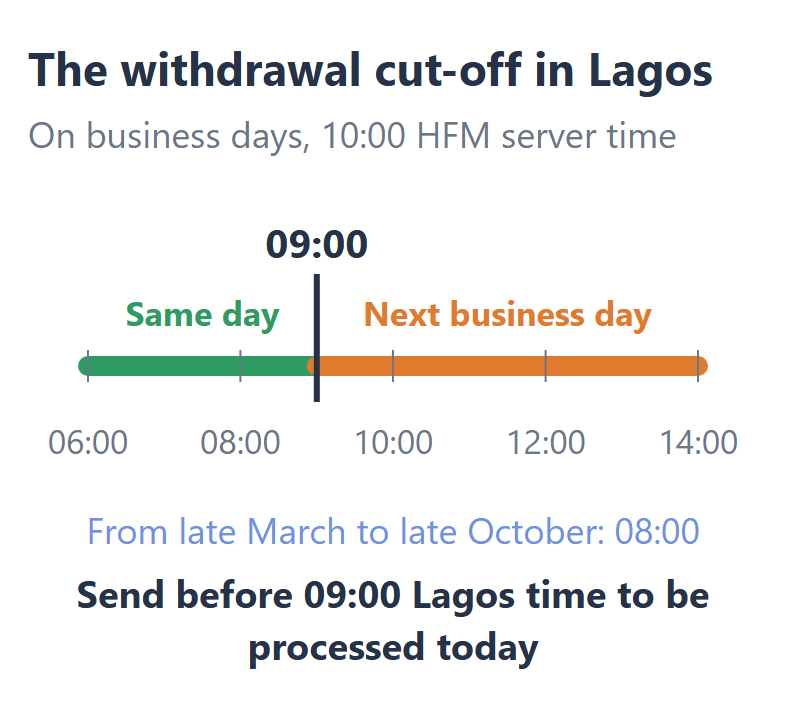
An HFM withdrawal to a Nigerian bank arrives within 24 hours, from $5 by the bank transfer or $10 by the naira bank transfer. A request that you send before 09:00 Lagos time on a business day is processed on the same day.
HFM processes withdrawals by its server clock, before 10:00 server time. The server clock moves to summer time at the end of March, and Nigeria keeps the same time all year. So from the last Sunday of March to the last Sunday of October, the cut-off in Lagos is 08:00 instead.
Withdrawal methods for Nigeria
| Method | Minimum | Time |
|---|---|---|
| Naira bank transfer | $10 | Up to 24 hours |
| Bank transfer | $5 | Up to 24 hours |
| Visa or Mastercard | $5 | 2 to 10 business days |
| Skrill | $5 | Instant |
| Crypto | $10 | Up to 24 hours |
HFM’s withdrawal list for Nigeria (opens in a new tab) has no international bank transfer, so you withdraw to a Nigerian bank, Skrill, crypto or the card that you paid with. HFM takes no fee, but your own bank can still charge for a payment that your bank receives.
You withdraw from myWallet, the wallet in your HFM Client Area. So if your money is in a trading account, move the money to myWallet with Transfer Funds first and then send the request from the Withdraw screen. The HFM withdrawal guide shows each step and what to check when the money is late.
Does the HFM Bonus in Nigeria Change How You Should Deposit?
Yes for the Shield 500 bonus, which needs a first deposit of at least ₦15,500 by a method other than crypto. Shield 500 is one of the two bonuses that HFM shows in Nigeria, together with the 100% SuperCharged bonus.
Shield 500 returns your losses of the first 25 days, up to $500, as money that you can trade with. But you must not withdraw anything during those 25 days. So if you may need the money back soon, a deposit without the bonus is the simpler choice. The HFM bonus guide explains both bonuses and what the bonuses cost you.
Can Traders in Nigeria Get a Rebate on HFM Trades?
Yes. From Nigeria, the ForexFanClub rebate pays $13.50 back on every lot of gold that you trade on an HFM Premium account, and the rebate arrives in your myWallet the next day. On EURUSD the rebate is $8.10 per lot, and you withdraw the rebate to your Nigerian bank in the same way as your own money.
The rebate returns part of the spread on every trade, whether the trade wins or loses. The HFM rebate guide shows the amount for each account and instrument.
To receive the rebate, register with HFM through the button below. If you already have an HFM Client Area, you can keep the Client Area and add a new trading account through ForexFanClub instead.
FAQ About HFM in Nigeria
- Can you open an HFM account in naira?
-
Yes, you can open an HFM account in naira. In Nigeria, the HFM Premium, Zero and Pro accounts can use naira as the account currency. You choose the currency when you open the trading account. The Cent account counts in US cents only.
- Does HFM charge fees on naira deposits and withdrawals?
-
No, HFM charges no fee on any deposit or withdrawal method in Nigeria. Your bank, card company or Skrill can still charge their own fees, and crypto payments also pay the network fee.
- Why does your HFM Deposit screen not show the naira bank transfer?
-
Your HFM Client Area shows the payment methods for the country of your profile. If you registered your profile in another country, the naira methods do not appear, even when you sign in from Nigeria. In that case, ask HFM support on live chat which methods your profile can use.
Where the facts come from:
Sources and how we checked them
HFM’s Nigerian pages
The deposit and withdrawal methods, the minimum deposits and the account currencies are from the Nigerian version of HFM’s website (Deposit Options, Withdraw Options and the account pages), which we opened through a connection in Lagos on 10 November 2026. HFM shows the payment methods as logos, so the method names in our tables describe them in words.
HFM’s rules and our own Client Area
The withdrawal cut-off, the return-to-source policy and the Shield 500 conditions are from HFM’s Help FAQs, its Client Area and the Shield 500 terms. We also opened the Deposit screen of our own HFM Client Area through the Lagos connection, and it still showed the methods of our profile’s country, without sending any payment.
Our HFM rebate table
The rebate amounts are from our HFM rebate table, which lists the partner commission for each account type, and you receive 90% of it.
Which Page Do You Need Next?
After your first deposit, the next step is usually the HFM account that costs you least. The pages show the rebate on each account, the account types, the minimum deposit, the withdrawal times and the HFM app.
Once the HFM trading account is open, add it to Forex FanClub. The member area lists every rebate payment day by day, across every broker you use. Registration is free and takes an email address.

Produced and operated by Forex FanClub
Person responsible: Hiroki Sakaida, founder of Forex FanClub
Hiroki Sakaida decides what our content and services cover and which features they offer. He also checks content and functionality and decides on revisions and publication. Our Content and Service Policy explains how we produce and check our content and services, including our use of AI.
Risk warning: Forex and CFD trading involve leverage, and you could lose all the money you invest. This article and tool provide information, not investment advice. The amounts shown are calculated from the collected data and do not guarantee the amounts that will apply to your own trades, or any future profit.
Affiliate disclosure: This article contains HFM referral links. Forex FanClub receives referral commission based on registrations and trading through these links.
- What Is the Best Way to Deposit and Withdraw at HFM from Nigeria?
- How Do You Deposit Naira into HFM?
- How Much Do You Need to Open an HFM Account in Nigeria?
- How Long Does It Take to Withdraw Money from HFM in Nigeria?
- Does the HFM Bonus in Nigeria Change How You Should Deposit?
- Can Traders in Nigeria Get a Rebate on HFM Trades?
- FAQ About HFM in Nigeria
- Which Page Do You Need Next?