
Manual trading, EAs and semi-automated trading: why every type still needs your judgement, and where to start.
Checked on 19 November 2026
In the first lesson, you saw that forex rewards the traders who practise. Now it is time to decide what kind of trader you want to be.
There are three types. In manual trading, you decide and place every trade yourself. In automated trading, an EA (a trading robot that runs in MT5) places trades by fixed rules. In semi-automated trading, you decide when to enter, and a tool takes over part of the work, such as closing the trade.
Here is the answer first. Whichever of the three types you aim for, you start by practising manual trading. An EA can only follow its fixed rules, so it cannot notice when the market changes.
In the end, you are the one who decides when to run it, when to stop it and how much money to give it. You build that judgement only through manual practice.
This page is the second lesson of our free forex course.
Contents
- Can an EA Trade for You While You Do Nothing?
- Should You Keep Running an EA or a Signal That You Bought?
- Can You Trust an EA’s Past Results?
- Can an EA Make You a Lot of Money?
- So Which Type Should a Beginner Start With?
- How Should You Use Automated Trading Now That AI Can Write Code?
- How Do You Practise Manual Trading Without Losing Money?
- Questions About Manual and Automated Trading
Can an EA Trade for You While You Do Nothing?
No, you cannot leave everything to an EA. An EA trades by fixed rules, so when the market changes, the EA cannot change its rules and falls out of step with the market.
For example, rules that did well while prices kept moving in one direction start to lose again and again when prices begin to swing up and down. The EA does not know that the market has changed. It keeps placing the same orders by the same rules.
When you trade manually, you can read the mood of the market from the chart, such as how nervous other traders are and what prices have tended to do recently. So you can stop trading when the market looks dangerous and trade only when the market suits the method.
If you run an EA without knowing how it works, you have nothing to base that decision on.
Should You Keep Running an EA or a Signal That You Bought?
Do not leave an EA or a signal service that you bought from someone else running 24 hours a day. When you do that, you hand every decision about your money to rules that you cannot see.
Think about it for a moment. If an EA really kept making money, the person who built it would earn far more by using it than by selling it. So an EA like that rarely reaches the market.
Some people who sell EAs earn from the sales themselves, and some earn more as buyers trade more. In that case, the EA may be built to sell well or to trade often, not to grow your money. So using an EA that someone else built is a risk in itself.
Can You Trust an EA’s Past Results?
No, past results alone are not a reason to trust an EA. The rules of an EA can be fitted closely to past prices, and that alone can make the past results look as good as the seller wants. This fitting is called curve fitting.
For example, the person who builds the EA can add rules such as “do not buy at this hour on this day” or “take profit at this distance”, each one chosen to remove a losing trade on the past chart.
The result line then rises smoothly. However, those rules match only the prices of that past period.
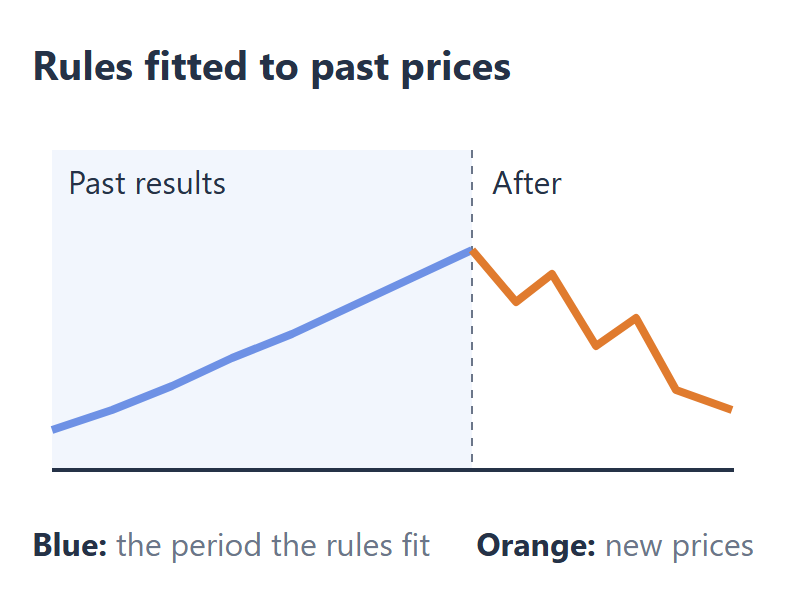
As the figure shows, the same rules often break down after the period that they were fitted to. So the smoother the past results look, the more you should suspect curve fitting.
Can an EA Make You a Lot of Money?
Making a lot of money with an EA, month after month, is very hard. The EA has to apply the same rules to prices that keep changing, and keep winning.
The traders in the market change, and the way prices move changes from one period to the next. If one set of rules kept winning in every period, that would be close to a miracle.
The size of your account is the other reason. As your account grows, each loss also grows.
Most traders find it hard to give a large account to an automated system that they do not understand, and it is even harder when someone else built that system.
So Which Type Should a Beginner Start With?
Start with manual trading, even if you want to use an EA one day. Whichever type you choose, a person decides when to stop trading, when to trade and how much money to use. You build that judgement through manual practice.
After that practice, your path depends on your goal:
- You want to use an EA First, build your own rules through manual trading. Then ask AI to turn those rules into code, and build your own EA.
- You have little time Move on to semi-automated trading. You decide each entry, and a tool closes the trade at your take profit or your stop loss.
- You want to read charts Stay with manual trading, and keep building your skill at reading other traders from the chart.
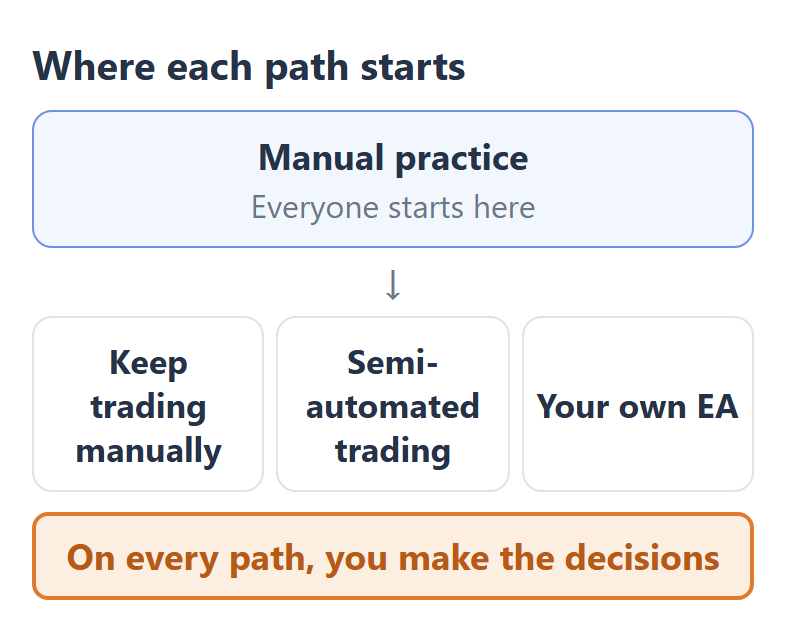
Every path starts at the same point. And on every path, you are still the one who makes the decisions.
How Should You Use Automated Trading Now That AI Can Write Code?
Today, AI can write the code for you, so you can turn your own rules into your own EA without knowing how to program. So instead of buying someone else’s EA, build an EA from the rules that you developed in manual trading.
When you build the EA yourself, you know the rules that it follows. So you can decide for yourself to stop it when the market no longer suits it and to run it only when the market does.
| Someone else’s EA | Your own EA | |
|---|---|---|
| Entering a trade | The seller’s rules | Your rules |
| Closing a trade | The seller’s rules | Your rules |
| Lot size | You | You |
| Running or stopping | You (you cannot see the rules) | You (the rules are yours) |
Semi-automated trading works in the same way. You decide every entry, and you hand only a job with clear rules to a tool, such as closing the trade at the price that you set. A later lesson of this course shows how to build a stop loss EA with AI.
How Do You Practise Manual Trading Without Losing Money?
You practise manual trading in a trading simulator. A trading simulator is software that replays past prices so that you can trade them by hand, and you can go through months of trades in a few weeks.
A trading simulator is a different tool from the Strategy Tester that comes with MT5. The Strategy Tester runs an EA on past prices, so you use it to test an EA, not to practise manual trading.
Before you start practising, this course prepares a few more things. The next lesson shows the traps on the easy paths to quick money, such as fake broker websites. After that, you decide the hours when you can trade and the symbols that you will practise on.
Questions About Manual and Automated Trading
- Is discretionary trading the same as manual trading?
-
Yes, discretionary trading and manual trading mean almost the same thing. In both, you enter and exit each trade by your own judgement instead of leaving it to fixed rules.
- Can you run a forex trading bot on your phone?
-
No, an EA does not run in the MT5 app on your phone. To run an EA, you keep MT5 running on a computer, or you run MT5 on a VPS, a server that you rent.
- Is manual trading profitable?
-
Manual trading can be profitable for traders whose total stays positive over many practice trades. Your first target is a positive total in a trading simulator.
Once your rebate account is open, link it to Forex FanClub. The member area lists every rebate payment day by day, across every broker you use. Registration is free and takes an email address.

Produced and operated by Forex FanClub
Person responsible: Hiroki Sakaida, founder of Forex FanClub
Hiroki Sakaida decides what our content and services cover and which features they offer. He also checks content and functionality and decides on revisions and publication. Our Content and Service Policy explains how we produce and check our content and services, including our use of AI.
Risk warning: Forex and CFD trading involve leverage, and you could lose all the money you invest. This article and tool provide information, not investment advice. The amounts shown are calculated from the collected data and do not guarantee the amounts that will apply to your own trades, or any future profit.
Affiliate disclosure: The broker pages linked from this page contain referral links. Forex FanClub receives referral commission based on registrations and trading through those links.
- Can an EA Trade for You While You Do Nothing?
- Should You Keep Running an EA or a Signal That You Bought?
- Can You Trust an EA’s Past Results?
- Can an EA Make You a Lot of Money?
- So Which Type Should a Beginner Start With?
- How Should You Use Automated Trading Now That AI Can Write Code?
- How Do You Practise Manual Trading Without Losing Money?
- Questions About Manual and Automated Trading