

An HFM demo account is free, and Demo Premium on MT5 is the one to open first. It lasts 60 days, with up to $100,000 of virtual money to start with.
Checked on 17 November 2026
We opened HFM demo trading accounts in the HFM App and compared a Demo Premium trading account with HFM’s live Premium prices. This guide shows which demo to open, how long it lasts and what changes when you go live.
A demo trading account opens inside myHF, so you need an HFM login first. If you are new to HFM, you can register on the HFM website.
Contents
- Which HFM Demo Account Should You Open?
- Is an HFM Demo Account the Same as a Live Account?
- How Do You Open an HFM Demo Account?
- How Long Does an HFM Demo Account Last?
- How Do You Change the Demo Balance or Leverage?
- How Do You Log In to an HFM Demo Account on MT5?
- When Should You Move to a Live HFM Account?
- HFM Demo Account FAQ
- Which Page Do You Need Next?
Which HFM Demo Account Should You Open?
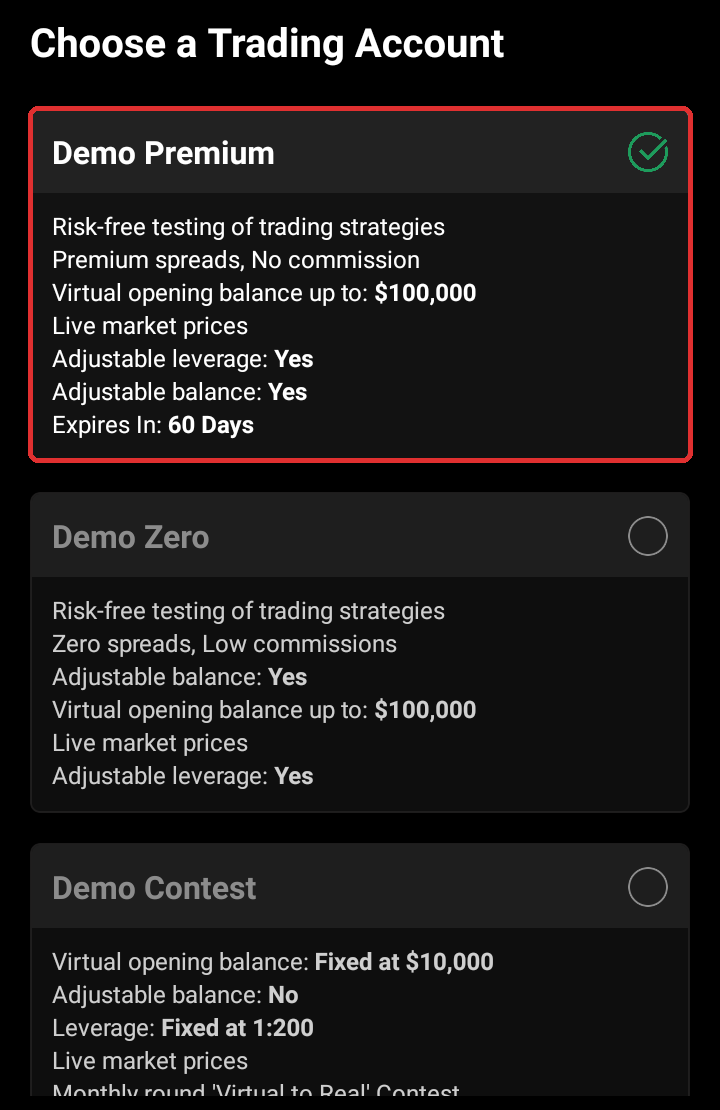
For most traders, the HFM demo account to open is Demo Premium on MT5, because Demo Premium is the only HFM demo account that runs on MT5. You can choose from three kinds of demo trading account, and each one does a different job.
| Platform | How long it lasts | |
|---|---|---|
| Demo Premium | MT5 or MT4 | 60 days |
| Demo Zero | MT4 only | No end date shown |
| Demo Contest | MT4 | One monthly round |
Demo Zero runs only on MT4, so you only need Demo Zero if you plan to trade the Zero account on MT4.
Demo Contest is the entry to HFM’s monthly contest, with a fixed balance of $10,000 and a fixed leverage of 1:200, so you use it to compete and Demo Premium for normal practice. The HFM demo contest guide explains the prizes and the rules.
Demo Premium has one limit to plan for. A Demo Premium trading account ends after 60 days even if you trade on it every day, so note the day you open it. When the 60 days are over, you open a new one in the same way.
Is an HFM Demo Account the Same as a Live Account?
An HFM demo account works like a live account, but three things exist only on a live trading account. So your live results can differ from your demo results, even with the same trades.
- Rebate
You get part of the spread back as an HFM rebate on every lot when you open a live trading account with ForexFanClub as the partner. On one lot of gold on Premium, the spread costs about $35.53 and $13.50 comes back, so the live trade costs about $22.03. - Bonus
You can get HFM’s deposit bonuses only on a live trading account. The HFM bonus guide explains which ones you can get. - Slippage
On a live order, the price you get can be a little different from the price on the screen. That gap changes with every order, so a demo account cannot show it, and we cannot compare it without many real trades.
On prices, the demo was close to the live trading account. On forex, gold, oil and Bitcoin, an HFM Demo Premium trading account had the same spreads as HFM’s live Premium account in our comparison. We read the demo and the live prices at the same moment 48 times over 24 hours on 17 November 2026, and the table shows the average cost of the spread on one lot.
| Demo Premium | Live Premium | |
|---|---|---|
| EURUSD | $20.21 | $20.40 |
| GBPUSD | $25.96 | $26.38 |
| USDJPY | $16.80 | $17.18 |
| Gold (XAUUSD) | $36.42 | $35.98 |
| US oil (USOIL) | $13.86 | $14.25 |
| Bitcoin (BTCUSD) | $39.48 | $39.57 |
| Silver (XAGUSD) | $61.48 | $48.64 |
| US 100 (USA100) | $2.42 | $2.02 |
| US 30 (USA30) | $3.98 | $5.10 |
| Germany 40 (GER40) | $2.22 | $2.26 |
So a demo trade on these instruments shows the spread that you will pay on a live Premium trading account.
Silver and the US stock indices are a little different, because the demo takes their prices from another price feed. On the demo, the silver spread was about a quarter wider and the US 100 spread about a fifth wider. The US 30 spread was narrower on the demo.
Gold needs twice as much margin on the demo. One lot of gold needed $770.56 on the demo, while a live Premium trading account at 1:1000 needs about $385. So a gold trade that is too big for your demo balance can still fit a live trading account. The HFM margin guide shows the margin on a live trading account.
Swaps and lot sizes matched on almost every instrument. The live trading account also lists a few ETFs and shares that the demo does not have.
How Do You Open an HFM Demo Account?
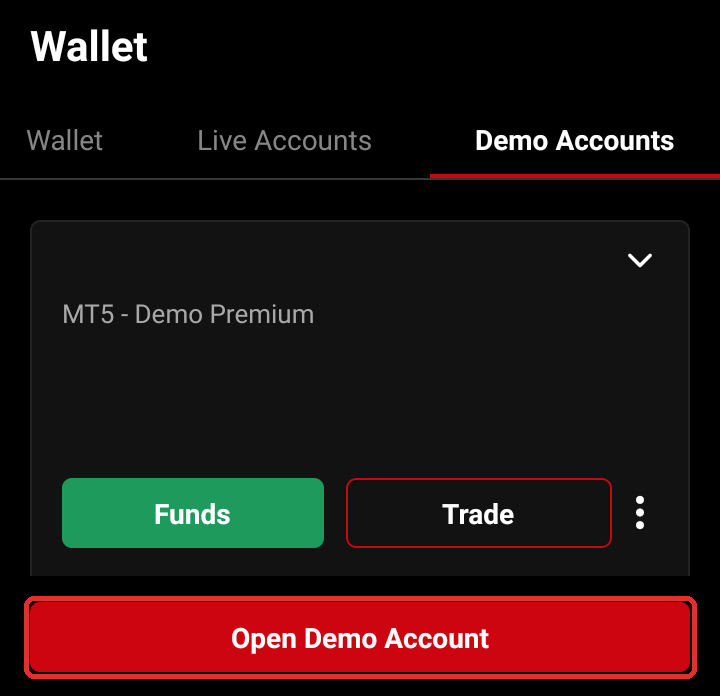
You open an HFM demo trading account in the myHF area or in the HFM App, from My Wallet, Demo Accounts and Open Demo Account. You need a myHF login first, so if you are new to HFM, register on the HFM website (opens in a new tab). The demo trading account is ready as soon as you finish the form.
Log in to myHF or the HFM App. Tap Menu, then My Wallet. Open Demo Accounts and tap Open Demo Account.
Choose Demo Premium and tap Continue.
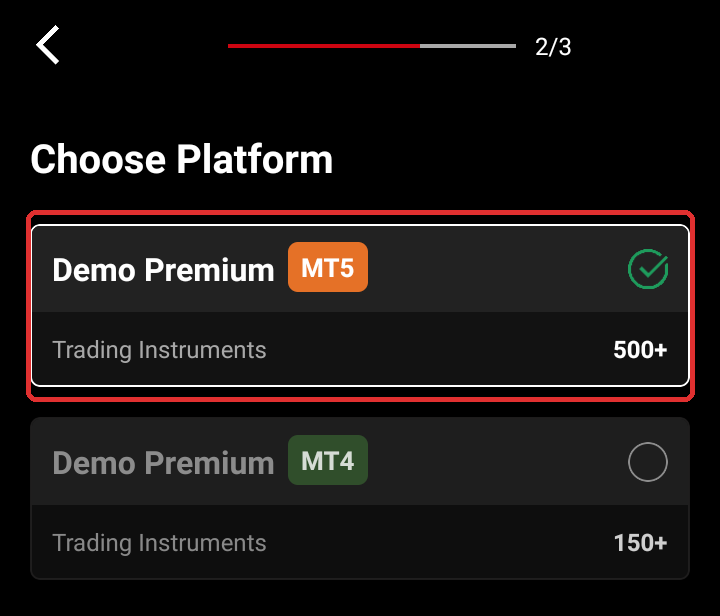
Choose MT5 and tap Continue.
Choose the currency, the leverage and the balance, and type a password for the demo trading account. Tick the box for the terms and tap Open Demo Account.
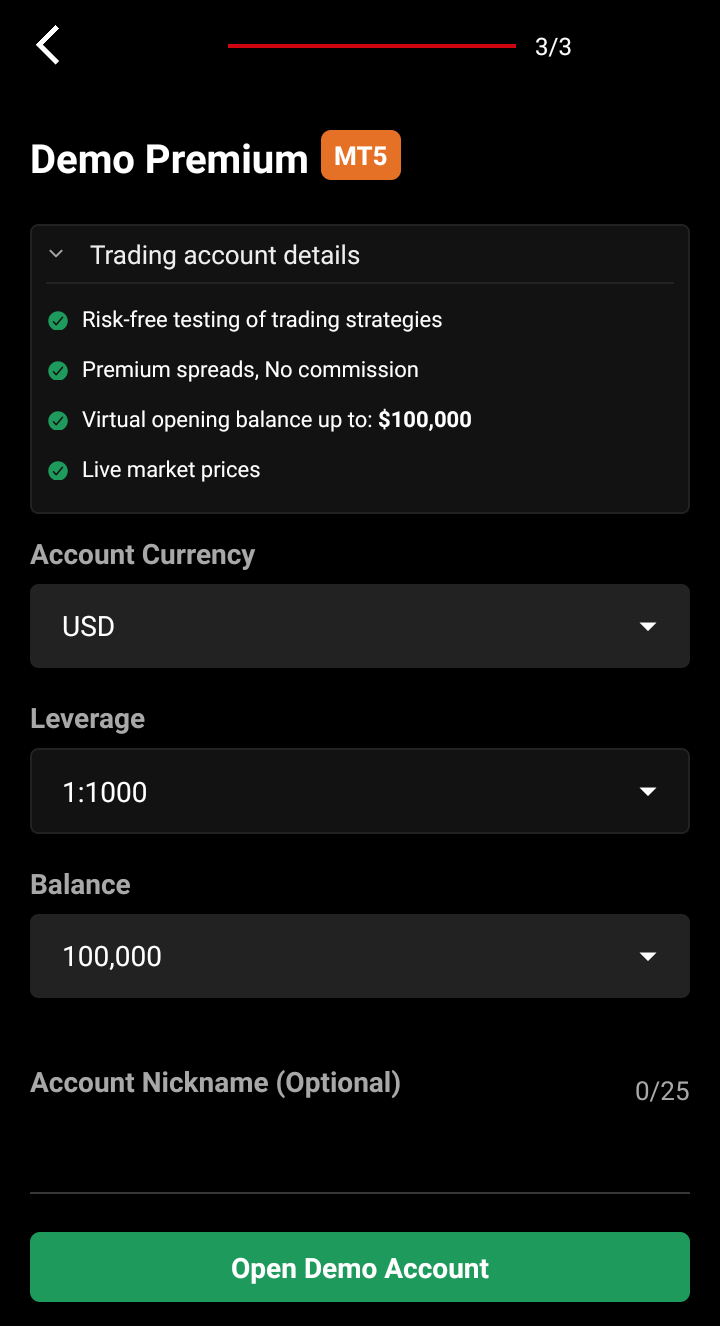
The password for a demo trading account needs 8 to 15 characters, with upper and lower case letters, a number and a symbol such as ! or #. You receive the trading account ID and the server by email, and you can also find these details on the row of the demo trading account in My Wallet.
You skip one screen when you open Demo Zero. After you choose Demo Zero, the form goes straight to the currency, leverage and balance, because Demo Zero runs only on MT4.
How Long Does an HFM Demo Account Last?
An HFM Demo Premium trading account lasts 60 days, and HFM deletes any demo trading account that has had no activity for 29 days. Both limits are in HFM’s client agreement, so one trade every four weeks keeps a demo trading account open.
The 60 days of Demo Premium start on the day you open the trading account, and trading every day adds no extra days. The row of the demo trading account in My Wallet shows no end date, so keep a note of the day you opened it.
The form for Demo Zero shows no end date, so a Demo Zero trading account stays open as long as you keep using it. The forex demo account comparison shows how long the demo accounts at other brokers last.
How Do You Change the Demo Balance or Leverage?
You change the balance of an HFM demo trading account with its Funds button, and the leverage from the menu next to Funds. Under Funds, Add Funds raises the balance and Remove Funds lowers it.
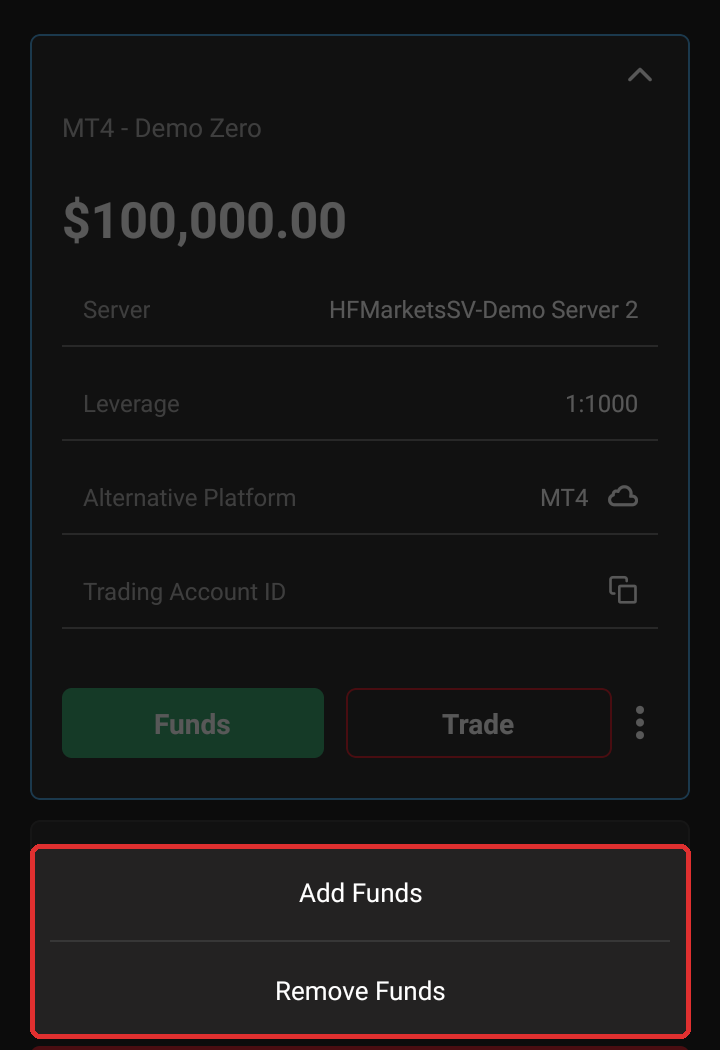
HFM lets you raise the demo balance three times a day and lower it twice a day. Each raise needs to be at least $10, and the balance can go up to $10,000,000. You can change the leverage of a demo trading account as many times as you want, while a live trading account allows 30 changes.
Set the demo balance to the amount that you plan to deposit. With $100,000 of virtual money, a $50 loss is too small to notice, but on a $500 deposit the same trade loses a tenth of your money. The lot size calculator shows the trade size that fits the balance you plan to use.
How Do You Log In to an HFM Demo Account on MT5?
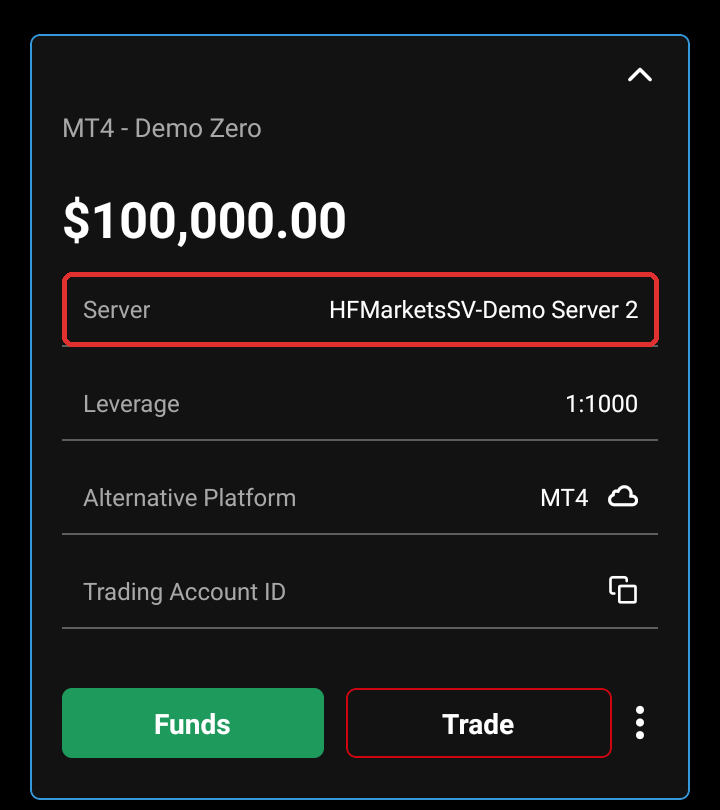
You log in to MT5 with the trading account ID of the demo trading account, the password you chose for it and its server. The server of an HFM demo trading account is not the same as the server of a live trading account.
- Demo Premium on MT5
Our Demo Premium trading accounts were on HFMarketsGlobal-Demo 4. In the MT5 list, the name has no space, as HFMarketsGlobal-Demo4. - Demo Zero on MT4
Our Demo Zero trading account was on HFMarketsSV-Demo Server 2. So log in with the MT4 app or HFM WebTrader for MT4.
Your own server can carry a different number, so read it on the row of the demo trading account in My Wallet. If MT5 says Invalid account, the HFM login guide shows the usual causes.
When Should You Move to a Live HFM Account?
Move to a live trading account once your demo trades make a profit at the balance that you plan to deposit. A demo trading account stays a demo, so you open a new live trading account in myHF.
Open the live trading account through ForexFanClub, so that the rebate comes back on every lot from your first trade.
If you already have a myHF login, your new live trading account can still get the rebate. The HFM rebate guide shows how to add ForexFanClub as the partner before you open the live trading account.
HFM Demo Account FAQ
- Is the HFM demo account free?
-
Yes, an HFM demo trading account is free and needs no deposit. The money in the trading account is virtual, so you trade without the risk of losing real money.
- Can you withdraw the profit from an HFM demo account?
-
No, the profit on a demo trading account is not real money, so you cannot withdraw it. The monthly Demo Contest is the only demo with real prizes, and you receive these prizes as credits on a live trading account.
- Is there an HFM cent demo account?
-
No, HFM offers no cent demo trading account. To practise with small amounts, set the Demo Premium balance to the amount you plan to deposit and trade 0.01 lot.
- How many HFM demo accounts can you have?
-
HFM does not publish a maximum number of demo trading accounts, and we held three at the same time. Each demo trading account keeps its own balance, leverage and server.
Where the facts come from:
Sources and how we checked them
The demo screens
We read the Open Demo Account screens in the HFM App on Android on 17 November 2026 and opened a new Demo Zero trading account. The three kinds of demo account, the 60 days of Demo Premium, the MT4-only form of Demo Zero, the password rules and the Funds menu are from those screens. The steps for Demo Premium on MT5 are from our HFM app guide, checked on 6 November 2026.
Our comparison of demo and live prices
We logged in to MT5 with a Demo Premium trading account (server HFMarketsGlobal-Demo4, leverage 1:1000). The live Premium prices are the ones that our own data collector reads from HFM every 30 minutes on HFMarketsGlobal-Live16. For each of the 48 live readings between 22:34 UTC on 16 November and 22:34 UTC on 17 November 2026, we took the demo price at the same second from the demo tick history in MT5. The cost on one lot is the average spread in points times the value of one point on one lot. We also compared the settings of the 313 instruments that are on both trading accounts, and we checked the margin on one lot of gold with the margin calculation in MT5 on 17 November 2026.
HFM’s documents
The 60 days of Demo Premium, the deletion after 29 days without activity, the limits on balance changes and the unlimited leverage changes on a demo account are in the HFM client agreement for HF Markets (SV) Ltd, dated August 2026. The statement that the demo reflects live trading as closely as possible is on HFM’s public demo account page.
The spread cost and the rebate on gold
The cost and the rebate are the 24-hour averages in our rebate ranking, updated on 15 October 2026 at 17:05 UTC, the same figures as in the HFM account types guide.
Which Page Do You Need Next?
After the demo, the next step is usually your account type, your trade size and your first deposit. These pages cover each one.
Once the HFM trading account is open, add it to Forex FanClub. The member area lists every rebate payment day by day, across every broker you use. Registration is free and takes an email address.

Produced and operated by Forex FanClub
Person responsible: Hiroki Sakaida, founder of Forex FanClub
Hiroki Sakaida decides what our content and services cover and which features they offer. He also checks content and functionality and decides on revisions and publication. Our Content and Service Policy explains how we produce and check our content and services, including our use of AI.
Risk warning: Forex and CFD trading involve leverage, and you could lose all the money you invest. This article and tool provide information, not investment advice. The amounts shown are calculated from the collected data and do not guarantee the amounts that will apply to your own trades, or any future profit.
Affiliate disclosure: This article contains HFM referral links. Forex FanClub receives referral commission based on registrations and trading through these links.
- Which HFM Demo Account Should You Open?
- Is an HFM Demo Account the Same as a Live Account?
- How Do You Open an HFM Demo Account?
- How Long Does an HFM Demo Account Last?
- How Do You Change the Demo Balance or Leverage?
- How Do You Log In to an HFM Demo Account on MT5?
- When Should You Move to a Live HFM Account?
- HFM Demo Account FAQ
- Which Page Do You Need Next?