
Your maximum drawdown from practice sets the largest lot size you can use in live trading.
Checked on 25 November 2026
When your lot size is too small, your money grows slowly even when your chart reading works. When it is too big, a normal losing streak can empty your account before your reading has time to pay off.
You can work out how big your lot size can be from one number in your practice results. That number is your maximum drawdown. It shows how far your account fell at its deepest while you traded with your own method.
This lesson shows where to find that number in your backtesting software, how to read it, and how it sets the largest lot size for your live trading.
This page is the thirteenth lesson of our free forex course.
Contents
- Which Number in Your Backtest Results Matters Most?
- What Is Maximum Drawdown?
- Where Do You Find Maximum Drawdown in Your Backtesting Software?
- Will Your Drawdown Be Deeper in Live Trading?
- How Does Maximum Drawdown Set the Number of Lots You Trade?
- Do Win Rate and Profit Factor Still Matter?
- Questions About Maximum Drawdown
Which Number in Your Backtest Results Matters Most?
Your maximum drawdown matters most. It tells you the largest lot size you can use without losing your account. It also tells you how deep a losing period can get while it is still normal for your way of trading.
Your total profit tells you whether your chart reading works. But even a way of trading that makes money overall has long losing streaks.
As we saw in the lesson on the risk reward ratio, a trader with a 40% win rate and wins twice as big as losses almost always loses 5 trades in a row in 100 trades. So the lot size you can use depends on the deepest drop, not on the total at the end.
When you practise, you only see that drop as a number on the results screen. In live trading, the same drop is your account balance every day, and real money goes down.
The deepest drop is also where most people stop trading. If you know its size from your practice trades, you can tell yourself during a bad week that this drop is still inside what you have already been through, and you keep trading the same way.
What Is Maximum Drawdown?
Maximum drawdown is the biggest fall of your account from its highest point to the lowest point after it. Out of all the drops in your results, it is the largest one.
In the example below, a trader practises EURUSD at 0.1 lot, so one pip is worth $1. The account grows from $1,000 to $1,300, falls back to $1,000, and then grows to $1,500.
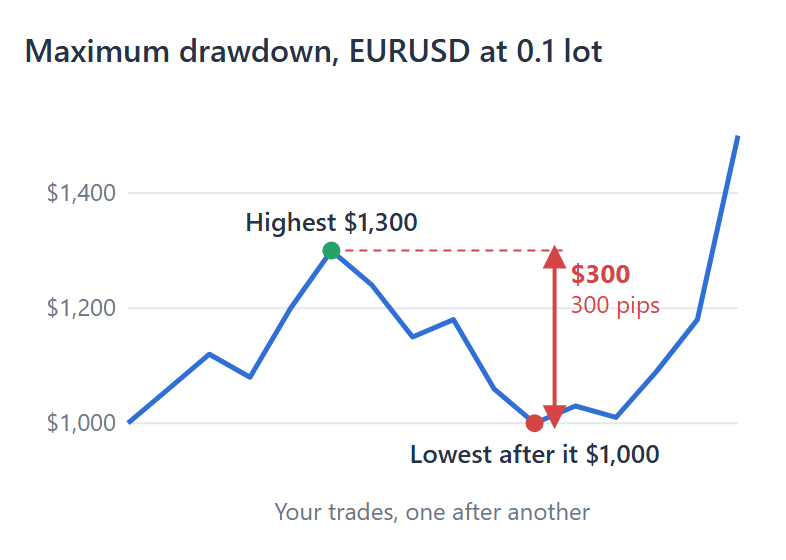
The maximum drawdown here is $300, from $1,300 down to $1,000. The total at the end is a profit of $500, so the total alone never shows you that the account once fell by $300.
Write your maximum drawdown down in pips. The number of pips depends only on your trading, so you can use it later with any lot size.
Your practice software often shows a money amount or a percentage instead. Both of these change with the starting balance and the lot size you chose for practice. If you get a money amount, divide it by the value of one pip at your practice lot size. In this example, $300 divided by $1 is 300 pips.
Where Do You Find Maximum Drawdown in Your Backtesting Software?
Most backtesting software shows your maximum drawdown on the results screen. The name and the place are different in each one.
| Software | Where to look |
|---|---|
| Forex Tester Online | Max Drawdown on the Profit Chart |
| Forex Tester (desktop) | Maximum drawdown in the Statistics window |
| FX Replay | The drawdown analytics, not Max Drawdown (R) |
| TradingView Bar Replay | The report at the end of a replay. It is not saved, so export it or write it down |
One name is easy to mix up. In FX Replay, Max Drawdown (R) is not the drawdown of your account. It shows how far a winning trade went against you before it closed in profit. So do not use that number for your lot size.
If you cannot find the number in your software, you can work it out from your own trades. Your lot size stays the same in your practice trades, so the result of each trade in pips is enough. Add the results one by one to get your total after each trade.
| Result | Total | |
|---|---|---|
| Trade 1 | +60 pips | 60 pips (highest) |
| Trade 2 | -30 pips | 30 pips |
| Trade 3 | -25 pips | 5 pips (lowest) |
| Trade 4 | +50 pips | 55 pips |
| Trade 5 | -20 pips | 35 pips |
| Trade 6 | +20 pips | 55 pips |
The highest total was 60 pips, after trade 1. The lowest total after that was 5 pips, after trade 3. The fall from 60 to 5 is 55 pips, so your maximum drawdown is 55 pips.
Will Your Drawdown Be Deeper in Live Trading?
When you have only about 200 practice trades, your maximum drawdown is usually still smaller than the drops that can come later. The more trades you practise or record, the closer that number gets to the drops you see in live trading. This is because, with only a few trades, the deepest drop of your way of trading often has not come yet.
We tested this with a way of trading that uses a 25-pip stop loss and a 50-pip take profit and wins 4 trades in 10. After 200 practice trades, the maximum drawdown of this way of trading is about 300 pips. Then 100 traders continue in live trading with the same method and the same lot size for one year, at 60 trades a month. We ran 20,000 random tests and counted how many of the 100 traders had a live drop of more than 2 times or 3 times the maximum drawdown they started from.
The table shows how many of 100 traders went past each depth in one year of live trading.
| Based on | More than double | More than triple |
|---|---|---|
| 200 practice trades | 22 in 100 | 5 in 100 |
| 720 practice trades (one year) | 4 in 100 | Under 1 in 100 |
| 3 years of live trading records | Under 1 in 100 | 0 in 100 |
If you start from 200 practice trades, 22 traders in 100 have a drop more than double that drawdown in their first year of live trading. If you start from 3 years of live trading records, almost nobody has a drop that deep. So once you trade live, measure your maximum drawdown again from your live records.
This test assumes that you trade the same way every time and that every loss is a full stop loss. In real trading, you sometimes close a trade at your entry price or skip a day when conditions are poor, so your drops tend to be smaller than in this test.
However, live trading also has accidents that this test does not include. You miss an important news release. You hold a trade over the weekend on an impulse to catch the gap. Your broker’s server stops just before a news release, and you cannot close your position.
In our experience, apart from accidents, our live drops have rarely gone beyond the maximum drawdown measured over a long record. Accidents have taken us to about 2 times that depth. Whether an accident ends as a loss or a profit is luck.
So when you have only a few practice trades, we plan for a drop of at least 3 times the maximum drawdown from practice. If your practice drawdown is 300 pips, plan for 900 pips.
How Does Maximum Drawdown Set the Number of Lots You Trade?
Your lot size must be small enough that 3 times your practice drawdown still fits inside your trading money. We do this in three steps.
- Keep the money for investing apart from the money for trading.
- Split your trading money into three equal parts.
- Choose a lot size small enough that the maximum drawdown from your practice would lose no more than one of the three parts.
For example, your trading money is $3,000 and your practice drawdown on EURUSD is 300 pips. One part is $1,000, and $1,000 for 300 pips is about $3.30 a pip, so your largest lot size is 0.3 lot.
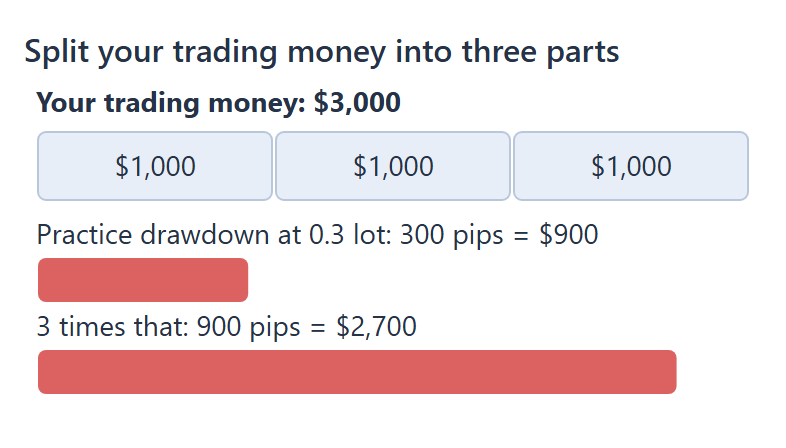
At 0.3 lot, a 300-pip drop costs $900, and a 900-pip drop costs $2,700, which is still inside your $3,000. At 1 lot, the same 300-pip drop would take all $3,000.
Your trading money should be money that you can lose without changing your life. With offshore brokers with high leverage, you can trade without putting a large amount in your account.
Now you have the upper limit for the number of lots you trade. How to use your lots within that limit is called money management, and it is the subject of a later lesson. Before you raise your lots, the next lesson, on trading discipline, shows how to start live trading at the smallest lot size and compare your live numbers with your practice.
Do Win Rate and Profit Factor Still Matter?
Yes, but they answer a different question. Your win rate and your profit factor show whether your reading works. Your maximum drawdown shows how much your account must be able to lose.
Your profit factor is the total profit of your winning trades divided by the total loss of your losing trades. A profit factor above 1 means that your total is a profit.
For example, in 10 trades, you win $40 four times and lose $20 six times. Your wins add up to $160 and your losses add up to $120, so your profit factor is about 1.3. In other words, your wins are 1.3 times your losses.
The lesson on the risk reward ratio shows how to read your win rate with your average win and loss, and what to fix when your total is below zero.
Questions About Maximum Drawdown
- Is a 20% Drawdown Too Much?
-
A percentage alone cannot tell you. With the same trading, twice the lot size gives about twice the percentage. Turn your practice drawdown into pips, and check that 3 times that drop still fits inside your trading money.
- What Is the Difference Between Balance and Equity Drawdown?
-
A balance drawdown counts only closed trades. An equity drawdown also counts the loss on trades that are still open, so it is the same size or a little bigger.
When you practise with one position at a time and the same lot size, the two are usually close.
- How Long Does It Take to Recover From a Drawdown?
-
It takes more trades than most people expect. Say you win 50 pips in 4 trades out of 10 and lose 25 pips in the other 6. Then 10 trades add only 50 pips, so getting back 300 pips takes about 60 trades.
If you stop during those 60 trades, the drop stays as a loss.
- What Is a Good Profit Factor?
-
Any profit factor above 1 means a profit, but judge it on 100 trades or more. After only 20 trades, the profit factor is still below 1 in about one case out of four, even for a way of trading that makes money overall.
Once your rebate account is open, link it to Forex FanClub. The member area lists every rebate payment day by day, across every broker you use. Registration is free and takes an email address.

Produced and operated by Forex FanClub
Person responsible: Hiroki Sakaida, founder of Forex FanClub
Hiroki Sakaida decides what our content and services cover and which features they offer. He also checks content and functionality and decides on revisions and publication. Our Content and Service Policy explains how we produce and check our content and services, including our use of AI.
Risk warning: Forex and CFD trading involve leverage, and you could lose all the money you invest. This article and tool provide information, not investment advice. The amounts shown are calculated from the collected data and do not guarantee the amounts that will apply to your own trades, or any future profit.
Affiliate disclosure: The broker pages linked from this page contain referral links. Forex FanClub receives referral commission based on registrations and trading through those links.
- Which Number in Your Backtest Results Matters Most?
- What Is Maximum Drawdown?
- Where Do You Find Maximum Drawdown in Your Backtesting Software?
- Will Your Drawdown Be Deeper in Live Trading?
- How Does Maximum Drawdown Set the Number of Lots You Trade?
- Do Win Rate and Profit Factor Still Matter?
- Questions About Maximum Drawdown